Auto Captions: How They Work, What to Check, What They Cost
Captions should save you time. Then you spot your own name spelled wrong in a video that's already live.
Auto captions are fast. They're also a guess. This guide shows how the guess is made, which errors to check, and what accessibility rules expect. It also covers what captions do for search and what they really cost once you count the review. The goal is to make captioning one small step in your week, not one more tool.
How do automatic captions work?
An auto caption tool listens to your audio and predicts the words it hears. Then it marks when each word or phrase happens and splits the text into short blocks. It's fast. But every step is a prediction, and every step has a spot where it can slip. That's why review is part of the process.
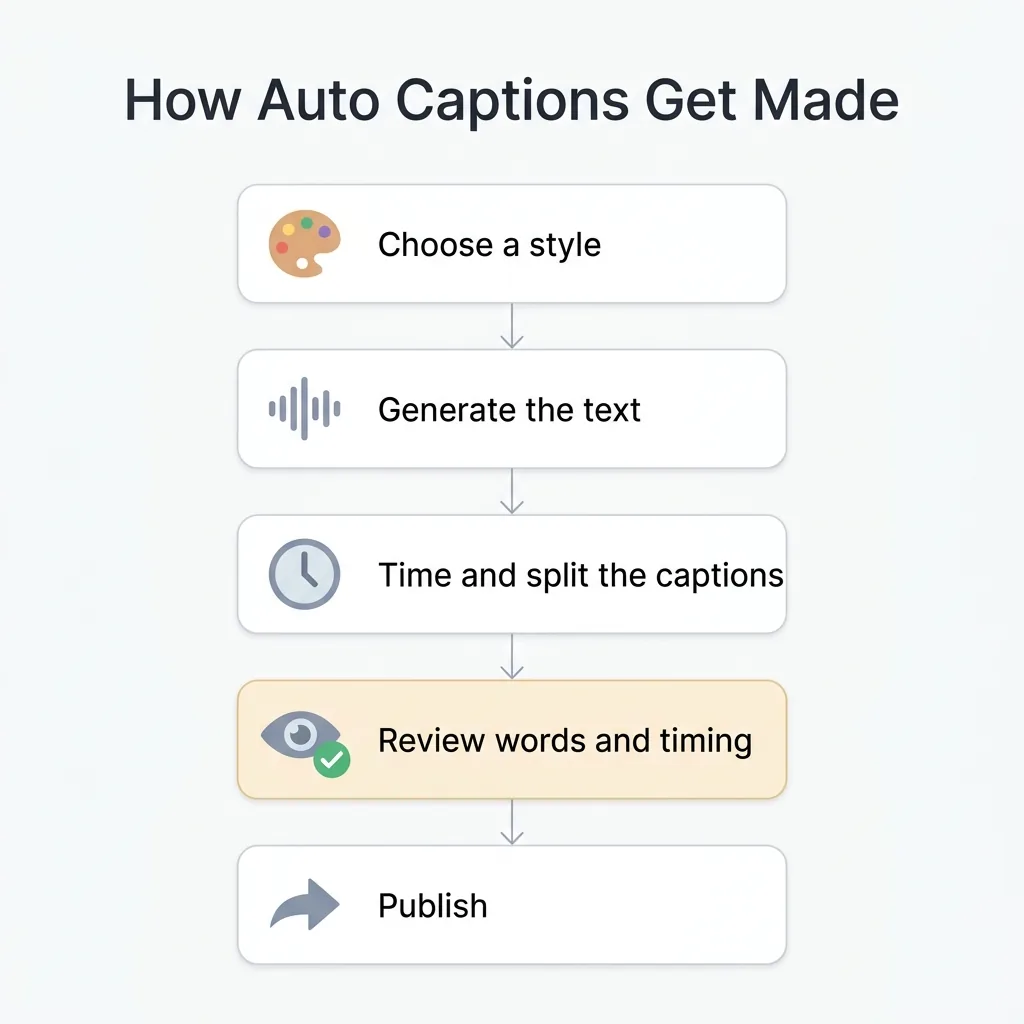
In GotReach, this happens inside your video workflow. You choose a caption style and generate captions from your spoken words. Then you review the words and timing before publishing. Here is each step, and where it can go wrong.
- Choose a style. The style sets how captions look on screen. What can go wrong: a busy style is hard to read fast on a phone.
- Generate the text. A speech model turns sound into words. One widely used open speech model was described by its maker in 2022. It cuts audio into 30-second chunks and turns each chunk into a picture of the sound. Then it predicts the text that most likely fits. That same 2022 description says it learned from 680,000 hours of web audio. That's a lot of practice. It's still a guess. What can go wrong: names, rare words and unclear audio get wrong guesses.
- Time and split the captions. The engine marks when each word or phrase starts and ends. Speech services can hand back that timing in caption formats like SRT and VTT. Then the text is split into short blocks. Good practice keeps a describing word with the word it describes. So “fresh basil” stays on one line. What can go wrong: captions show up early or late, or lines break in odd places.
- Review the words and timing. Watch the video once with the sound on. Auto caption text is often wrong. Sometimes it changes the meaning. Sometimes it's just embarrassing. What can go wrong: skipping this step.
- Publish. Pick burned-in captions or a caption file. More on that below. What can go wrong: publishing the draft as if it were final.
Want more on what affects accuracy? Read our guide, AI Captions Explained: How They Work and How to Choose the Right Tool.
What mistakes do automatic captions make most often?
The most common mistakes are wrong names, wrong technical words, and missing words. Punctuation, speaker changes, sound cues and timing slip too. None of this is your fault. It's how prediction works. The fix is a short, focused review that checks each error type below. Start with names, because they're the easiest to get wrong.
Auto captions often miss words, names or key phrases. It gets worse with background noise, unclear speech or technical terms. Broadcast caption rules set a clear bar here. Captions should not swap other words in for proper names and places. That's a good bar for your videos too.
| Mistake | Why it happens | How to fix it in review |
|---|---|---|
| Names and brand terms | The model has rarely heard them | Check every name against your spelling list |
| Technical words | Jargon sounds like common words | Find each key term in the draft and confirm it |
| Sound-alike words | “Their” and “there” sound the same | Read for meaning, not just sound |
| Numbers | “Fifteen” and “fifty” sound close | Check each number against your script |
| Punctuation and sentence breaks | Speech has no commas, so the model guesses | Add periods and question marks where you paused |
| Missed speaker changes | Voices run together in one block | Add a name or a dash when the speaker changes |
| Missing sound cues | Tools write words, not sounds | Add cues like [music] or [laughter] when they matter |
| Invented text in pauses | The model may fill silence with words | Watch silent stretches and delete anything not said |
| Timing drift | Timestamps slip on fast speech or long pauses | Watch with sound on and move blocks back in sync |
A few of these need a closer look.
Invented text. Researchers studied one popular speech model. They found made-up sentences in roughly 1% of transcriptions made in mid-2023. Many showed up when no one was speaking. The model's own maker warns its output may include words that were never said. That doesn't mean every tool does this at that rate. It means pauses are worth a glance.
Punctuation. Even auto captions on a major video platform can lack punctuation. A missing question mark can flip what you meant.
Different voices. Accuracy isn't the same for every voice. A 2020 study tested five speech services. The tools got more words wrong for Black speakers. Their average share of wrong words was 0.35, compared with 0.19 for white speakers. If a tool struggles with your voice, that's the tool's limit. Give your review a little extra time.
Our own guide lists the factors that hurt accuracy most. They are background noise, accents, multiple speakers, fast speech and low audio bitrate. A few recording habits prevent many errors before you generate:
- Record in a quiet room. Turn off fans and music.
- Keep the mic close to your mouth.
- Let one person speak at a time.
- Slow down a little on names and numbers.
- Use your device's best audio setting.
- Write down names, brand terms and jargon before you record. If your tool keeps a word list, add them there. Either way, check those words first.
Ready to fix what you found? See Caption Editing: Correct, Restyle & Export Captions.
Are automatic captions good enough to meet WCAG and ADA caption requirements?
Not on their own. Unedited auto captions usually fall short of what accessibility guidance asks for. The good news is that the gap is a review, not a new service. Fix the words, add what the AI leaves out, and check the timing. That brings a draft much closer to what deaf and hard-of-hearing viewers need.
The W3C Web Accessibility Initiative says auto captions don't meet user needs or accessibility requirements unless they're confirmed fully accurate. It adds that they usually need significant editing. University accessibility offices say the same thing.
There's no official pass mark. The National Deaf Center on Postsecondary Outcomes says no standard threshold sets when auto captions are accurate enough. It also says auto captions often average only 60–70% accuracy. That's why “mostly right” isn't the target.
The legal picture, briefly. The firm deadlines today apply to governments. The U.S. Department of Justice on ADA.gov published a rule change on April 20, 2026. State and local governments with 50,000 or more people now have until April 26, 2027. Smaller public entities and special district governments have until April 26, 2028. For businesses, the Justice Department's web guidance notes that people with hearing disabilities may not understand a video without captions. We can't tell you what the law requires of your business. A lawyer can.
What good captions look like. FCC caption quality rules say captions should be accurate, synchronous, complete and appropriately placed. Accurate means they match what's said, with correct spelling, grammar and punctuation. Captioning guidelines for educational media set error-free captions as the goal. And WCAG counts captions that leave out dialogue or important sound effects as a failure.
Here's the checklist. Each item shows who does the work.
- Correct words and spelling: AI drafts it. You confirm it.
- Punctuation: AI drafts it. You fix it.
- Proper names: You check every one.
- Speaker identification: You add it.
- Meaningful sound cues: You add them.
- Sync: AI drafts the timing. You check it.
- Completeness: You check nothing is missing.
- Placement: You check captions don't cover faces or on-screen text.
In GotReach, the caption workflow ends with reviewing the words and timing before publishing. That's where this checklist fits. For formats and legal obligations in more depth, read Captioning Videos: Methods, Formats & Best Practices.
Do automatic captions help short videos get found in search?
Maybe a little, and only in one form. A caption file or transcript is text that search systems can read. Captions burned into the video are part of the picture. No platform has confirmed that on-screen captions raise your recommendations. The clearer win is keeping muted viewers watching long enough to hear your point.
Text in caption files and transcripts can be indexed better by search engines. That's the search route.
The viewer route is simpler. Many people watch with the sound off. In a 2019 ad-industry survey, 69% said they watched video with the sound off in public. It was an online survey of 5,616 U.S. adults aged 18 to 54. It's older data, but the habit is easy to spot in any waiting room.
What about recommendations? In 2020, TikTok said its recommendation system factors in video information like captions, sounds and hashtags. It didn't say whether “captions” meant post text or on-screen words. So we won't promise that on-screen captions move your reach.
| Burned-in captions | Caption file or transcript | |
|---|---|---|
| Muted autoplay | Always shows | Shows only if captions are turned on |
| Readable text for search | No, it's part of the picture | Yes, it's text |
| Viewer control | None. Viewers can't turn them off | Viewers can turn them on or off |
| Accessibility | Helps if the words are accurate | Helps if the words are accurate |
A few practical tips:
- Burn captions in for short videos in feeds, where people scroll with the sound off.
- Add a caption file where a platform accepts one.
- Say your key terms out loud. Then put them in your post text too.
Choosing between open and closed captions? See How to Add Subtitles to Video: A Practical Recording-to-Publishing Guide.
How much do automatic caption tools cost?
Generating captions is often the smallest cost. Free tiers can cost nothing. AI services charge by the minute. Human services charge more per minute. The cost most people miss is your review time, and you pay it with almost every model. Match the model to how many videos you post and how much time you can spare.
| Pricing model | What you pay | What's included | Typical catches | Review time you still need |
|---|---|---|---|---|
| Free tiers | Nothing | Basic editing, sometimes captions | Auto captions can be a paid feature. Export may be locked | Full review |
| Per-minute AI | One transcription company lists AI captions starting at $0.25 per minute | Machine captions | The same errors as any auto caption | Full review |
| Per-minute human | One captioning company lists human captions at $1.99 per minute | Captions made by people | Faster turnaround can cost more. Hard audio can cost extra | A quick spot check |
| Bundled in an editor or workspace | A monthly subscription | Captions plus editing and more | Plan limits vary | Full review |
Some notes on the table. Vendors change prices, so check the current page before you buy. One popular editing app's help center says its auto captions can include paid-only features. It also says exporting work that uses them needs a paid plan. A university accessibility office recommends the same human caption vendor at the same $1.99 per minute. Another university notes that caption pricing depends on how fast you need them. It also reports that one vendor sometimes adds $1.00 per minute for difficult audio.
Now the hidden cost. Once you're comfortable, reviewing and editing auto captions takes about 3 times the video's length. A 60-second video means about 3 minutes of review. Captioning from scratch takes about 4 to 10 minutes per minute of recording. So review is real time, but far less than typing every word.
GotReach offers Free, Starter and Premium plans. Premium adds team management and managed seats. Captions sit in one workspace with recording, editing, scheduling, analytics and conversations. To try the workflow before you spend, GotReach has a 14-day free trial of its create, edit and post workflow. For caption editors compared on pricing and limits, see AI Caption Video Editors Compared (2026).
Frequently Asked Questions
Can an AI chatbot generate subtitles for a video?
The clearest route we know of is on the developer side. One major chatbot maker offers a transcription service for developers. It can return subtitle files in SRT and VTT formats. Using it takes some code. You'd still need to review the text and add the captions to your video. In GotReach, captions happen inside the video workflow. You choose a style, generate, and review words and timing before publishing.
How long do automatic captions take to generate?
Generation is usually quick. Transcription companies advertise results in minutes. One says five minutes or less. Review takes longer. Plan on about 3 times the video's length once you're used to it. If you only caption now and then, expect it to take a bit longer. That's normal. It gets faster with practice.
What is an SRT file?
An SRT file is a plain text file of captions and their timings. The Library of Congress describes it as a text-based subtitle format that plays alongside video or audio. Each caption gets a number, a start and end time, and its text. A blank line separates each one:
1
[start time] --> [end time]
Here's one tip for your plants.

2
[start time] --> [end time]
Water less in winter.
The file holds no video or audio. The video player reads its timing and shows the text on top of the video. That's why viewers can turn SRT captions on or off. Do you need one for short videos? It depends on where you post. Feeds often favor burned-in captions. A file helps where a platform accepts uploads. Our guides explain burned-in captions and subtitle files like SRT, VTT and TTML.
Captions work best as one step, not one more tool. Chase built GotReach after years of trying to stay consistent with content in the wellness and health industry. In GotReach, you record once, generate captions, review them, and schedule. One recording session can become many short videos with content repurposing. Captions stay in the same workspace, with you in charge of the final check.
Start a partnership inquiry
Sources
- W3C Web Accessibility Initiative — Captions/Subtitles | Web Accessibility Initiative (WAI) | W3C · retrieved October 20, 2026
- National Deaf Center on Postsecondary Outcomes — Captioning Compliance and Standards - National Deaf Center · retrieved October 21, 2026
- U.S. Department of Justice, ADA.gov — Fact Sheet: New Rule on the Accessibility of Web Content and Mobile Apps Provided by State and Local Governments | ADA.gov · retrieved October 22, 2026
- eCFR, 47 CFR Part 79 (FCC) — eCFR :: 47 CFR Part 79 -- Accessibility of Video Programming · retrieved October 21, 2026
- Library of Congress, Sustainability of Digital Formats — SubRip Subtitle format (SRT) · retrieved October 21, 2026
- Duke University Web Accessibility — Video | Web Accessibility · retrieved October 22, 2026
- W3C (WCAG 2.2 Understanding Docs) — Understanding Success Criterion 1.2.2: Captions (Prerecorded) | WAI | W3C · retrieved October 22, 2026
- U.S. Department of Justice, ADA.gov — Guidance on Web Accessibility and the ADA | ADA.gov · retrieved October 21, 2026
- Described and Captioned Media Program (DCMP) · retrieved October 21, 2026
- W3C Web Accessibility Initiative — Video Captions | Web Accessibility Initiative (WAI) | W3C · retrieved October 22, 2026
- Streaming Media — 80% of Video Caption Users Aren't Hearing Impaired, Finds Verizon · retrieved October 20, 2026
- TechCrunch — TikTok explains how the recommendation system behind its 'For You' feed works | TechCrunch · retrieved October 22, 2026
- OpenAI — Introducing Whisper | OpenAI · retrieved October 21, 2026
- Rev — AI Captions For Videos In Minutes | Rev · retrieved October 22, 2026
- Utah State University Accessibility — USU Caption Pricing | Accessibility | USU · retrieved October 22, 2026
- University of Washington Accessibility — Ensuring accessibility of video and audio in UW courses – Accessibility at the UW · retrieved October 22, 2026
- CapCut Help Center — Why Am I Prompted to Join CapCut Pro as a Standard User? · retrieved October 22, 2026
- OpenAI API reference — Create transcription | OpenAI API Reference · retrieved October 22, 2026
- Michigan State University Web Accessibility — Third-Party Captions · retrieved October 22, 2026
- Rev — See All Speech-To-Text Services | Rev · retrieved October 22, 2026
- OpenAI (Whisper model card on GitHub) — whisper/model-card.md at main · openai/whisper · GitHub · retrieved October 22, 2026
- arXiv (Koenecke et al., Careless Whisper) — Careless Whisper: Speech-to-Text Hallucination Harms · retrieved October 22, 2026
- OpenAI API documentation — File transcription | OpenAI API · retrieved October 22, 2026
- PNAS (via PubMed Central, NIH) — Racial disparities in automated speech recognition - PMC · retrieved October 22, 2026
- Stanford University IT Accessibility — Captioning in YouTube | University IT · retrieved October 22, 2026
- Rev — Closed Captioning Services For Video | Rev · retrieved October 22, 2026