
AI Instagram Captions: Sound Like You, Batch Them, Check Them
Captions take time. You finish a Reel, and then the empty box under it waits. Then the words on screen need fixing, one by one.
AI can take most of that work. The worry is fair, though. It might mishear a name. It might sound like everyone else. It might quietly cost you reach.
Here is the short version. Let AI write the first draft. You make the final call.
One thing first. On Instagram, "caption" means two things. There is the post text under the Reel. There are also the on-screen captions of your spoken words. This guide covers both.
How do you get an AI Instagram caption generator to sound like your brand?
Give it a voice brief and real examples. A tone word like "friendly" is not enough. Paste in a few of your best past captions. List the words you use and the words you avoid. Set rules for length and emoji. Then match the look of your on-screen captions to that voice.
Examples do the heavy lifting. The companies that build these AI models say examples are one of the most reliable ways to steer tone, format and structure. This is called few-shot prompting. You show the model a handful of examples, and it follows the pattern. No special training is needed.
Next, split voice from tone. Your voice stays the same every day. Your tone shifts with the post. A launch can sound bright. A reply to a hard question can slow down. Tone researchers describe four core dimensions of tone, such as formal versus casual. In their testing, casual, conversational and enthusiastic tones did best. So lean conversational. Write like you talk.
Your voice brief (fill it in once, reuse it every time):
- Fixed voice: a few traits that never change.
- Words to use: your phrases, product names, sign-offs.
- Words to avoid: jargon, hype, anything you'd never say.
- Sentence length: short, medium or mixed.
- Emoji rules: none, a few, or where they go.
- Tone by post type: tip, story, offer, behind the scenes.
- Examples: a few real past captions, pasted in full.
The look matters too. In GotReach, you choose a caption style before you generate captions from your spoken words. Pick a style that fits your voice and keep it. See the real style examples in Captions ↗. Then your Reels look the way your post text sounds.
Want more prompt tips for post-text generators? Read our guide to AI caption generators for social media and video.
How do you write Instagram captions for a batch of Reels at once?
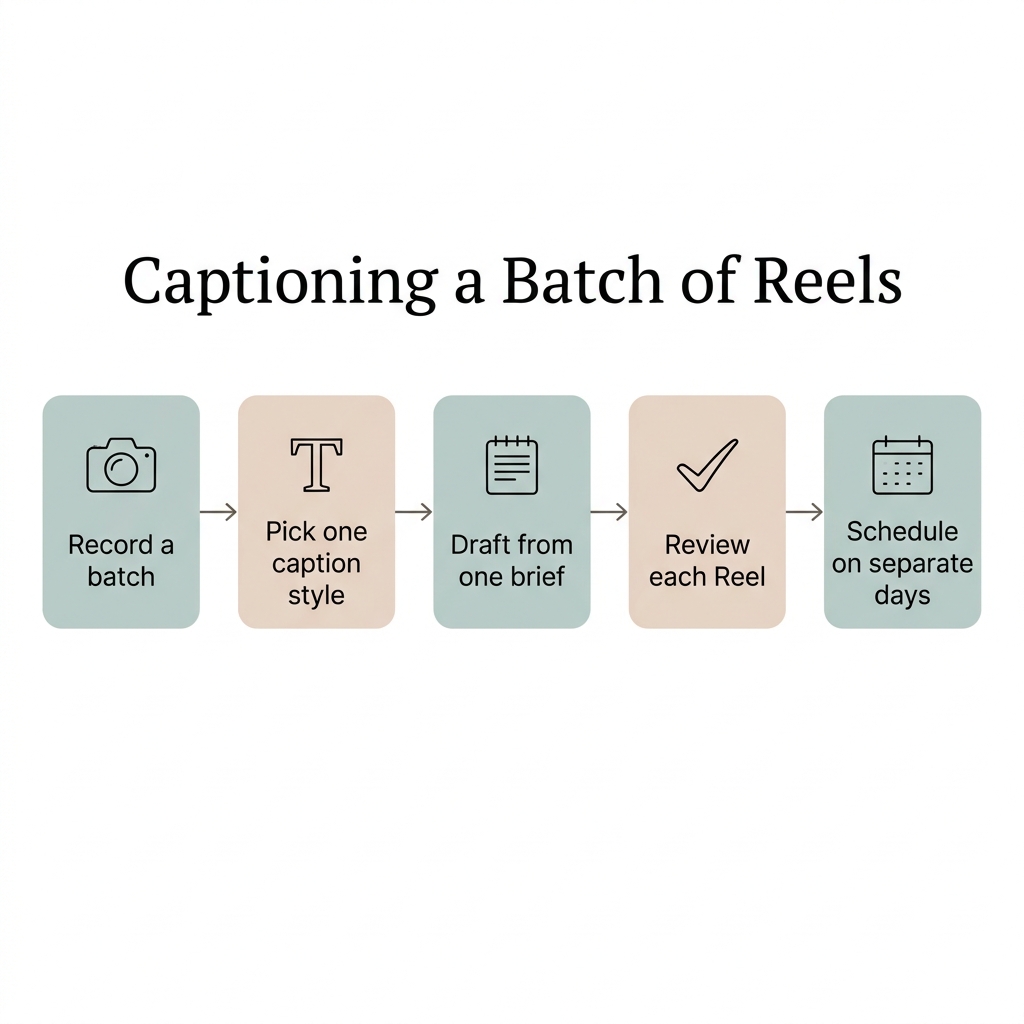
Record a batch in one session. Apply one caption style to every video. Draft all the post text from one shared brief, with varied examples. Review each Reel on its own. Then schedule them across separate days. The brief keeps your voice steady. The variety keeps the captions from sounding the same.
Chase founded GotReach after years of trying to stay consistent with content in the wellness and health industry. He knows the grind of feeling like you must post every day. You don't. One recording session. Weeks of social videos.
- Plan and record a batch. In GotReach, one recording session becomes weeks of videos. You mix and match hooks and solutions instead of re-recording every version. Our plant care example shows five clips making six possible videos. See how it works on our content repurposing page.
- Pick one caption style for the whole batch. GotReach edits each video and adds captions. You review the finished videos. Reusable caption and visual templates across videos are now a normal practice. Some editing apps even offer detailed templates with layered overlays.
- Draft post text from one shared brief. Use your voice brief. Feed it varied examples: a tip, a question, a short story. AI model guidance says to show a diverse range of examples, not near-copies. This matters for Reels. Instagram lists similarity to other reels among the signals its Reels system may weigh. A batch that all looks and reads alike is a risk.
- Review each Reel on its own. Use the two-part checklist below. Every video, every time.
- Schedule across separate days. GotReach keeps recording, editing, captioning, scheduling, analytics and conversation management in one workspace. If a post has not been published yet, you can edit its description, scheduled time and platform from the post project tracking area.
A few honest limits. Facebook and Instagram need to be business or professional accounts before GotReach can publish to them. Third-party scheduling also has limits compared with native platform features. Supported formats, account eligibility, and direct publishing options depend on Instagram permissions and the connection available in GotReach. Do not assume every native Instagram effect, audio feature, or post format is available in a third-party scheduler.
Instagram's own app can also queue posts for professional accounts. An older guide put the limit at 75 days ahead and 25 posts a day. Check the app for current limits.
Start a trial to record or upload your own video and generate captions inside GotReach.
How do you check an AI-generated Instagram caption before posting it?
Run two short checks. First, the post text: facts, names, claims, hook, call to action and any sponsor disclosure. Second, the on-screen captions. Watch the Reel once with sound and once without. Check names, specialized words, line breaks and how fast the words move. Fix what you trip over.
No caption tool is perfect, ours included. Even Instagram's own captions sticker expects you to fix it. The deaf and hard of hearing charity RNID explains how Instagram's captions sticker works: you tap words to change them, then choose Done. Speech recognition accuracy also varies widely by language. Names and product words trip it up most. Check those first.
Part one: the post text
- Facts and numbers. Are they true and current?
- Names. People, places and products spelled right.
- Claims. The Federal Trade Commission's guide for social media influencers says you can't make up claims that need proof the advertiser doesn't have. Cut anything AI invented.
- Hook. Does the first line say something real?
- Call to action. One clear ask, or none.
- Length. Trim filler.
- Disclosure. If it's sponsored, say so clearly. Don't mix it into a group of hashtags or links.
Part two: the on-screen captions
- Words. Do they match what you said?
- Names and specialized words. Check each one.
- Line breaks. The Described and Captioned Media Program's Captioning Key says to break lines where speech normally pauses.
- Lines on screen. The same standard prefers no more than two lines per caption.
- Reading speed. A widely used streaming style guide caps adult reading speed at 20 characters per second. If a caption flashes by, slow it or shorten it.
- Sponsor disclosure. For a video endorsement, the FTC says the disclosure belongs in the video, not just the description.
- Sound off. Watch once muted. Does it still make sense?
In GotReach, you choose a style, generate captions from spoken words, review the words and timing, then publish. We tell every user the same thing: watch your finished video and check names, specialized words, timing and readability before publishing.
For the full generate-review-publish workflow and what affects accuracy, read how AI captions work and when to trust them. For more on mobile readability, see our Reels caption formatting guide.
Should you let an AI caption generator choose your Instagram hashtags?
Let AI suggest. You decide. Instagram now caps posts at five hashtags. It has said a few specific tags perform better than a long list of generic ones. Hashtags can help with search, but they don't necessarily increase reach. So cut the AI's list down to the few that truly fit this post.
Split your tags in two. Keep a small set of fixed brand tags. Fill the rest per post. Stay within five.
Keep or cut, one tag at a time:
- Does it describe this exact post? If not, cut.
- Would a real person search it? If not, cut.
- Is it specific, not generic? Keep specific.
- Is it one of your brand tags? Keep.
- Is it a sponsor disclosure? Move it out of the tag block. Put it where people will see it.
Don't expect hashtags to lift reach. Use them so the right people can find you.
Will AI-generated Instagram captions hurt your reach?
Nothing in Meta's own documentation says AI-written caption text gets buried. The real risks are different: bland posts that say nothing, reposting other people's work, and unlabeled realistic AI video or audio. We can't promise reach. Clear captions you have checked are the better bet.
The risk isn't that AI wrote it. The risk is that it says nothing.
| The fear | What Meta's documentation indicates |
|---|---|
| "Instagram detects AI captions and buries them." | The Meta Transparency Center's notes on Instagram Feed recommendations list how informative a post is. An AI model scores content quality. Empty text is the risk, not who wrote it. |
| "You must label AI-written captions." | Meta's announcement on labeling AI content requires its disclosure tool for photorealistic video or realistic-sounding audio that was digitally created or altered. Its policy is silent on caption text. |
| "AI labels go on your words." | "AI info" labels apply to video, audio and image content. |
| "Using AI gets accounts held back." | Instagram now holds back accounts that regularly repost content they didn't create. That rule is about sharing other people's work. |
| "Similar posts are fine." | Similarity to other reels is among the signals the Reels system may consider. Vary your batch. |
On-screen captions matter for another reason. A survey from 2019 found 69% of people watched video with the sound off in public. That number is old. The habit is why accurate captions still matter: they carry your message when the sound is off.
We don't promise viral reach or follower numbers. We promise you can show up consistently.
Frequently Asked Questions
Can an Instagram caption generator write captions in other languages?
Some can. Meta AI can translate Reels into Hindi, English, Spanish, Portuguese, Bengali, Tamil, Telugu, Kannada and Marathi. Instagram's Edits app also offers bilingual captions that translate into a second language.
Know the difference. Transcription writes down what you said, in the language you said it. Translation turns it into another language. Some speech models do both. Their accuracy varies widely by language. So have a fluent speaker review before you post. If the post is sponsored, the FTC says the disclosure should be in the same language as the endorsement.
How does the Instagram caption generator work?
There are two technologies. On-screen captions use speech recognition. The tool transcribes your audio into words and times them to the video. Instagram's captions sticker even shows a "Transcribing audio" notice. Then you tap words to fix them.
Post-text captions use a language model. It writes text from your prompt. That's why your voice brief matters.
In GotReach, you choose a caption style, generate captions from your spoken words, review the words and timing, then publish. The review step is part of the work. Don't skip it.
Is there a free Instagram caption generator?
Yes. Instagram's Captions sticker is built in. Tap the sticker icon, then choose Captions.
Free tools elsewhere vary. One video caption tool vendor's free tool caps videos at 10 minutes. Another caption tool vendor says generating, editing, styling and burning in captions are free, with no watermark. Check the limits before you commit a batch.
GotReach has a Free plan with 30 videos per month, no watermarks and one connected social account. There is also a 14-day free trial of creating, editing with captions and posting videos.
Let AI draft. Keep your judgment in charge. If you want to build a captioning and posting workflow that fits how you work, we'd like to hear from you.
Start a partnership inquiry
Sources
- RNID — How to use video captions on Instagram - RNID · retrieved October 22, 2026
- Federal Trade Commission — Disclosures 101 for Social Media Influencers | Federal Trade Commission · retrieved October 22, 2026
- Described and Captioned Media Program (DCMP) Captioning Key — Captioning Key - Text · retrieved October 22, 2026
- Meta Transparency Center — Instagram Feed Recommendations · retrieved October 22, 2026
- Meta — Labeling AI-Generated Images on Facebook, Instagram and Threads · retrieved October 22, 2026
- Netflix Partner Help Center — English (USA) Timed Text Style Guide – Netflix | Partner Help Center · retrieved October 22, 2026
- OpenAI (Whisper GitHub repository) — GitHub - openai/whisper: Robust Speech Recognition via Large-Scale Weak Supervision · GitHub · retrieved October 21, 2026
- Anthropic (Claude Platform Docs) — Prompting best practices - Claude Platform Docs · retrieved October 22, 2026
- OpenAI Developer Docs — Prompt engineering | OpenAI API · retrieved October 22, 2026
- Mailchimp Content Style Guide — Voice and Tone | Mailchimp Content Style Guide · retrieved October 20, 2026
- Nielsen Norman Group — The Impact of Tone of Voice on Users' Brand Perception (Nielsen Norman Group UX research) - NN/G · retrieved October 20, 2026
- Meta Transparency Center — Instagram Reels Chaining · retrieved October 22, 2026
- Search Engine Journal — How To Schedule Posts & Reels In The Instagram App · retrieved October 21, 2026
- Storyboard18 — Instagram updates Edits app with bilingual captions and new creator tools - Storyboard18 · retrieved October 22, 2026
- Digital Trends — Instagram now limits you to five hashtags per post - Digital Trends · retrieved October 22, 2026
- Meta — Our Approach to Labeling AI-Generated Content and Manipulated Media · retrieved October 21, 2026
- TechCrunch — Instagram cracks down on content aggregators | TechCrunch · retrieved October 22, 2026
- Streaming Media (reporting Verizon Media / Publicis Media survey) — 80% of Video Caption Users Aren't Hearing Impaired, Finds Verizon · retrieved October 20, 2026
- Meta — Instagram Empowers Creators to Go Global with Local Voice Translations and Fonts · retrieved October 22, 2026
- OpenAI (Whisper GitHub repository) — whisper/README.md at main · openai/whisper · GitHub · retrieved October 22, 2026
- Choppity — Free Instagram Reels Caption Generator - Add Now | Choppity · retrieved October 21, 2026
- Kommodo — Auto Caption Generator - Add Animated Captions to Video | Kommodo · retrieved October 22, 2026