
AI Generated Captions: How They Work, How Accurate They Are, and What to Do Before You Publish
Most creators reach for an AI caption tool expecting clean, ready-to-publish output. What they get instead is a transcript that is 90% right but wrong in exactly the places that matter: brand names spelled incorrectly, a homophone that changes the meaning of a sentence, timing that drifts after a single edit cut.
The tool did not fail. The workflow did. And choosing the right tool starts with understanding what kind of AI caption you actually need, because the term covers two completely different problems.
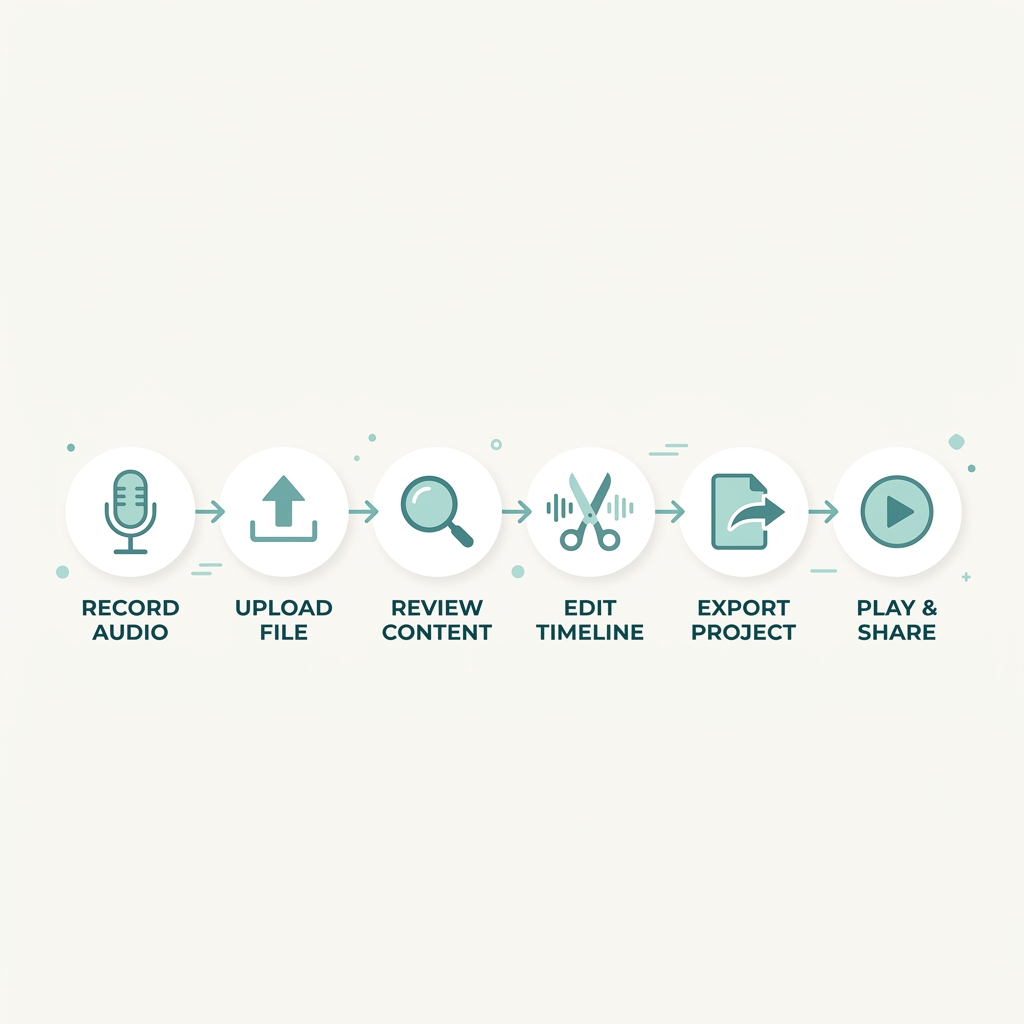
This guide covers how AI caption generation works in practice, what accuracy really means in concrete terms, how to match your export format to your platform, and a six-step workflow you can run with any tool before you publish.
Key Takeaways
- AI generated captions fall into two distinct categories: video subtitle captions produced by speech-to-text transcription, and social media post copy generated by a language model. Confusing the two leads to using the wrong tool entirely.
- At 95% word accuracy, expect roughly 5 errors per 100 words. Background noise, multiple speakers, and fast speech push accuracy lower. A review pass before publishing is standard practice, not optional cleanup.
- Burned-in captions are permanently embedded in the video and preferred for social platforms. SRT and VTT files are separate, viewer-controllable subtitle files required for YouTube, compliance workflows, and platforms that support closed captions.
- Platform requirements differ: TikTok and Instagram Reels favor burned-in captions; YouTube and LinkedIn support SRT file uploads and closed captions indexed by search.
- A six-step generate-review-publish workflow keeps AI captions accurate and publish-ready regardless of which tool you use.
The Two Types of AI Generated Captions (And Why the Difference Matters)
When someone searches for AI generated captions, they are usually looking for one of two very different things.
The first is AI-generated video captions: a speech-to-text transcription that analyzes your video's audio track, segments spoken words into timed intervals, and outputs text synchronized to the timeline. The result is a subtitle file (SRT, VTT, or TTML format) or text burned directly into the video frame. This is a transcription problem solved by speech-to-text models.
The second is AI-generated social media captions: written post copy generated by a large language model (LLM) to accompany a video or image on a social platform. This has nothing to do with audio transcription or timing. It is a copywriting problem solved by generative AI writing tools.
These are different workflows, different tools, and different outputs. A creator uploading a 60-second Reel needs burned-in subtitle captions so viewers can follow along without sound. A brand manager scheduling a LinkedIn post needs written copy that contextualizes the video for a professional audience. Both might search the same phrase and land on the same product page, which is exactly why most tools built for one use case disappoint users who needed the other.
The table below lays out the distinction clearly so you can navigate the rest of this article knowing which category applies to you.
| Video Subtitle Captions | Social Media Post Captions | |
|---|---|---|
| What they are | Timed text synchronized to a video's audio track | Written post copy that accompanies a video or image on a social platform |
| How they are made | Speech-to-text AI transcribes the audio and generates timed text | A large language model generates written copy based on a prompt or content brief |
| Primary tools | Speech-to-text transcription tools; platforms with auto-caption features | AI writing assistants, social media content generators |
| Output format | SRT file, VTT file, TTML file, or burned-in text in the video frame | Plain text copy pasted into the post field or scheduled via a tool |
| Who needs them | Video creators, accessibility teams, brands publishing video content | Social media managers, content marketers, brand teams writing post descriptions |
For the rest of this guide, the focus is on video subtitle captions and the workflow around generating, reviewing, and publishing them accurately.
How AI Video Caption Generation Works (And What Affects Accuracy)
AI video captioning works by running your video's audio track through a speech-to-text model. The model analyzes the audio, segments speech into short intervals, and outputs a text transcript tied to timestamps. No human transcriber is involved. The process typically completes in under a minute for short-form video.
Several AI caption tools run on OpenAI's Whisper model, an open-source speech recognition system that performs well across a wide range of languages and audio conditions. Other tools use proprietary models. In either case, the accuracy you get depends heavily on your audio quality, not the tool's marketing headline.
What degrades accuracy
Five conditions consistently push accuracy lower:
- Background noise -- music, crowd sounds, HVAC systems, traffic -- forces the model to separate speech from competing audio, which it does imperfectly.
- Heavy accents that differ from the dominant dialect in the model's training data reduce word recognition rates.
- Multiple simultaneous speakers create overlapping audio the model cannot reliably attribute or separate.
- Fast speaking pace compresses syllables in ways that trip up phoneme recognition, especially for unfamiliar words.
- Low audio bitrate from compressed recordings or poor microphone quality strips out the acoustic detail the model relies on.
What accuracy percentages actually mean
A tool claiming 95% word accuracy sounds reassuring. Here is what it means in practice: at 95% accuracy, expect roughly 5 errors per 100 words. For a 3-minute video with approximately 450 spoken words, that is about 22 errors before you review the transcript. At 90% accuracy, that number roughly doubles.
Proper nouns, brand names, product names, and industry jargon are the most common failure points regardless of overall accuracy rate. These terms appear infrequently in training data, so the model defaults to a phonetically similar common word instead.
The takeaway is straightforward: every AI caption output needs a review pass before publishing. That is standard practice for any professional workflow, not a sign the tool underperformed.
Clean studio audio with a single speaker produces the highest accuracy results. A conference recording with three speakers, background music, and a noisy room produces the lowest. Plan your review time accordingly.
Burned-In Captions vs. Subtitle Files: Which One Do You Actually Need?
Once AI generates your caption text, you have to decide how to deliver it. This is the export format decision, and most tool interfaces present it as a simple dropdown without explaining what is actually at stake.
Burned-in captions (also called hardcoded captions) are text permanently rendered into the video frame. They cannot be turned off. They travel with the video file regardless of where it is played. This makes them the standard choice for social video, where autoplay without sound is how most people encounter content in a feed. If the captions are part of the video itself, they work everywhere without relying on the platform to render them.
Soft subtitle files (SRT, VTT, and TTML) are separate text files that video players and platforms read alongside the video. SRT (SubRip Subtitle format) is the most widely supported. VTT (WebVTT format) is preferred by web-based players and several platforms including YouTube. TTML (Timed Text Markup Language) is used in broadcast and some enterprise learning management systems. These files allow viewers to turn captions on or off, change display settings, and let platforms index the caption text for search.
For a deeper look at how captions and subtitles differ as formats, the difference between captions and subtitles is covered in a separate guide.
The format decision maps to your publishing destination:
| Use Case | Recommended Format | Reason |
|---|---|---|
| TikTok, Instagram Reels, short-form social | Burned-in captions | Autoplay without sound; platform rendering is inconsistent |
| YouTube upload | SRT or VTT file | Platform indexes caption text; closed captions are viewer-controllable |
| LinkedIn video | SRT file via native upload | Supports closed captions; relevant for professional silent-viewing environments |
| Corporate training / LMS | SRT, VTT, or TTML | Viewer control required; compliance workflows depend on subtitle file formats |
| Accessibility-critical content | SRT or VTT (not burned-in only) | Viewer-controlled captions meet WCAG requirements that burned-in alone may not |
One important limitation of burned-in captions: because they are permanent, viewers who find them distracting cannot turn them off. For corporate or educational content where accessibility compliance matters, a separate subtitle file is typically required alongside or instead of burned-in text.
A TikTok creator burning in styled captions with custom fonts and placement has full control over the visual presentation without depending on TikTok's native rendering. A corporate training team uploading to a learning management system needs an SRT file so the platform can render captions in its own player with viewer controls intact.
How to Generate, Review, and Publish AI Captions: A Repeatable Workflow
The generate-review-publish workflow is what separates captions that build credibility from captions that create problems. Experienced creators run through steps 3 to 6 in under five minutes for a short-form video once the process becomes routine.
-
Prepare your audio -- Before uploading, trim silence from the start and end of the clip, separate loud background noise where possible, and confirm the audio was recorded in as controlled an environment as you can manage. The model cannot compensate for audio problems that were not addressed at recording.
-
Upload and generate -- Most tools process short-form video in under a minute. Set your language preference before generating if the tool supports multilingual output. Do not skip this step; defaulting to English when the spoken language is different produces unusable output.
-
Review the transcript for accuracy -- Focus specifically on proper nouns, brand names, product names, homophones, and speaker labels in multi-speaker content. These are the failure points that produce the most visible errors in the published video. For a structured approach to this step, editing and reviewing AI captions covers the quality review process in more depth.
-
Adjust timing after edit cuts -- If the video was trimmed, rearranged, or cut after captions were generated, the timestamps will be out of sync. Realign caption timing to match the final edited timeline before exporting.
-
Style and export in the correct format -- Apply font, size, color, and positioning choices appropriate for your platform. Export in the format your platform requires: burned-in for social feeds, SRT or VTT for platforms that accept file uploads. Refer to the platform specs table in the next section if you are unsure.
-
Spot-check the final video before publishing -- Play through the video at least once in preview mode. Confirm captions are synchronized, readable, and positioned outside the platform's UI overlap zones (bottom navigation on TikTok, comment areas on Instagram).
The workflow applies to any tool. The steps do not change based on which software you use; only the interface for completing them does.
Platform Captioning Requirements: What TikTok, Instagram, YouTube, and LinkedIn Actually Need
Caption format requirements are not consistent across platforms. What works on YouTube requires a completely different delivery method than what works on TikTok. Exporting in the wrong format for your platform wastes the time you spent generating and reviewing the captions.
The table below consolidates the key requirements for each major platform. Use it as a reference before you export.
| Platform | Preferred Format | Native Caption Support | Approximate Character Display | Accessibility Notes |
|---|---|---|---|---|
| TikTok | Burned-in captions | Auto-caption available; limited style control | Roughly 40 characters per line before wrapping | Position captions above bottom navigation to avoid UI overlap; safe zone matters |
| Instagram Reels | Burned-in captions | Auto-caption sticker available; limited styling | Roughly 40 characters per line | Burned-in captions work across all surfaces where Reels appear; sticker captions may not |
| YouTube | SRT or VTT file upload | Yes -- closed captions fully supported; YouTube documents supported formats | Variable by player size | Caption text is indexed by YouTube's search algorithm; closed captions recommended for WCAG compliance |
| SRT file via native upload | Yes -- closed captions supported for video posts | Roughly 60 characters per line | Particularly relevant for B2B content watched silently in professional environments |
A few patterns worth noting:
- TikTok and Instagram Reels favor burned-in captions because their autoplay environments do not reliably surface platform-native closed captions for all viewers.
- YouTube's closed caption support is strong enough that uploading an SRT or VTT file is preferred over burning in text -- and the caption content is indexed for search, which burned-in text is not.
- LinkedIn supports SRT file upload for video posts and is the primary platform where professional-audience silent viewing makes accurate captions commercially meaningful.
If you are creating captions for one platform and publishing across several, getting the format right from the start becomes part of a broader content repurposing workflow rather than a per-platform rebuild.
How to Evaluate an AI Caption Tool: The Criteria That Actually Matter
Every AI caption tool claims to be accurate, fast, and easy to use. Those claims are not useful evaluation criteria because they are universal and unverifiable. The criteria that actually differentiate tools are the ones tied to your specific workflow.
Here is what to evaluate and what to look for:
| Evaluation Criterion | What to Look For | Why It Matters |
|---|---|---|
| Caption type supported | Video subtitles, social post copy, or both | Tools built for one category perform poorly on the other; know which you need |
| Export formats available | SRT, VTT, TTML, burned-in render, plain text | If the tool cannot export in the format your platform requires, the workflow breaks |
| Accuracy transparency | Named underlying model (e.g., Whisper) and stated test conditions | A tool that names its model and conditions is more trustworthy than one asserting a percentage without context |
| Language and multilingual support | Languages supported; whether translation is offered | Critical if your audience speaks more than one language or you are localizing content |
| Free tier limits | Videos or minutes per month; watermarks; account connections | Free tiers often cap at a volume that does not support consistent publishing schedules |
| Platform integrations | Native upload connections; editing tool compatibility | Reduces manual export-upload steps; matters more at publishing volume |
| Styling and brand customization | Font, color, size, position, and animation options | Relevant for creators and brands maintaining visual consistency across content |
| Accessibility compliance support | WCAG-compliant output options; subtitle file availability | Required for corporate, educational, or public-sector content with compliance obligations |
The accuracy transparency criterion is worth dwelling on. A tool that states "99% accuracy" without specifying audio conditions, speaker count, language, or the model powering the output is giving you a marketing number, not a working benchmark. Tools built on documented models like Whisper let you set realistic expectations based on the model's published performance characteristics under real-world conditions.
On volume: most free tiers cap at a handful of videos or minutes per month. If you are publishing consistently, the math on free tier usage does not work for long. A creator captioning a single video per session at 5 to 10 minutes of manual review per video would need over 25 hours to process 300 videos. That is the bottleneck single-video tools create at scale.
GotReach addresses this at the workflow level rather than the captioning step alone. It creates up to 300 videos in 30 minutes from a single idea and automates editing and publishing across seven platforms from one workflow. The free plan allows up to 30 videos per month with one connected social account and no watermarks. If captioning is part of a larger production and distribution problem, a system that solves the full bottleneck matters more than a dedicated caption tool with a slightly better SRT export. Try an AI caption generator and full video workflow to see how GotReach handles the captioning step within a broader creation system.
AI Captions and Accessibility: What Compliance Actually Requires
AI-generated captions are a strong starting point for accessibility. They are not a compliance finish line.
WCAG 2.1 Level AA, the W3C's relevant accessibility benchmark for prerecorded video content, requires that captions be accurate, synchronized, complete, and properly placed. The standard does not accept AI output as-is; it requires that captions meet those criteria regardless of how they were produced.
This means that generating a transcript with an AI tool and publishing it without review does not satisfy WCAG 2.1 Level AA requirements. At a 95% accuracy rate, roughly 5% of words are incorrect before any review. For compliance-critical content, that gap has real consequences.
The ADA (Americans with Disabilities Act) applies to public accommodations and certain employment and communication contexts. For organizations producing educational content, corporate training, public-sector video, or legal communications, caption quality is a compliance matter, not just a production preference.
Format also matters for compliance. Burned-in captions do not allow viewer-controlled display adjustments. For content where accessibility compliance is a requirement, providing an SRT or VTT subtitle file alongside (or instead of) burned-in captions gives viewers control over caption rendering. TTML format is used in some broadcast and enterprise contexts where format standards are more tightly specified.
For any content where compliance is a real requirement, a review-and-approve workflow is not optional. Generate the AI captions, correct the output, confirm timing, and document the review before publishing.
Minimum Requirements for Accessible AI-Generated Captions
- Captions cover all spoken dialogue and relevant non-speech audio (laughter, applause, alarms)
- Accuracy has been reviewed and corrected against the WCAG 2.1 Level AA benchmark -- AI output alone does not qualify
- Captions are synchronized with the audio throughout the video
- Speaker labels are included for multi-speaker content so viewers can follow who is speaking
- Caption file is in a supported format (SRT, VTT, or TTML) for the publishing platform
- Captions remain on screen long enough to read at a normal pace -- roughly 160 to 180 words per minute is a standard reference
- For burned-in captions, text color and background contrast meet readability standards at normal viewing size
Putting It Together: Start Your Workflow
AI-generated captions are genuinely useful. They reduce the time required to produce accurate subtitle text from hours to minutes. But they are not plug-and-play, and the tools that claim otherwise are selling you on their best-case scenario.
The practical version looks like this: know which type of caption you need (video subtitles or social post copy), understand that audio quality determines accuracy more than the tool does, match your export format to your platform before you generate rather than after, run the six-step workflow before publishing, and apply human review before any compliance-critical content goes live.
For creators and teams publishing at volume across multiple platforms, the captioning step is one part of a production system that includes editing, formatting, and distribution. A single-video captioning tool solves one step. GotReach automates the full short-form video workflow -- creation, editing, captioning, and publishing across seven platforms -- so the bottleneck is not which tool handles your SRT export, but how many videos you can actually get out the door.
The free plan covers up to 30 videos per month with one connected account and no watermarks. Start your 30-day free trial today and run the workflow with your own content.
Frequently Asked Questions
Are AI-generated captions accurate enough to use without editing?
Rarely. At 95% word accuracy, expect roughly 5 errors per 100 words before any review. Proper nouns, brand names, and homophones are the most common failure points. A review pass before publishing is standard practice for any professional workflow, not an indication the tool underperformed.
What is the difference between SRT, VTT, and burned-in captions?
SRT (SubRip Subtitle) and VTT (WebVTT) are separate text files that platforms and players read alongside the video, allowing viewers to turn captions on or off. Burned-in captions are text permanently rendered into the video frame and cannot be turned off. SRT and VTT are preferred for YouTube, LinkedIn, and compliance workflows; burned-in captions are standard for TikTok and Instagram Reels.
Do AI captions meet ADA or WCAG 2.1 accessibility requirements?
Not automatically. WCAG 2.1 Level AA requires captions to be accurate, synchronized, complete, and properly placed. AI-generated captions are a starting point, not a compliant output on their own. A human review and correction step is required before AI captions qualify for compliance-critical content.
Which caption format should I use for TikTok and Instagram Reels?
Burned-in captions are the standard for both platforms. Both offer native auto-caption features, but styling control is limited and rendering is inconsistent across surfaces. Burning captions into the video file gives you full control over font, placement, and appearance, and ensures captions display correctly wherever the video appears.
Can AI caption tools generate captions in multiple languages?
Many can, though multilingual support varies significantly between tools. Some tools support transcription in multiple languages but do not offer translation. Others offer both transcription and translation as separate features. Language support should be an explicit evaluation criterion if you are publishing to multilingual audiences.
How do YouTube captions affect video discoverability?
YouTube indexes the text in closed caption files (SRT and VTT uploads), which means the caption content is searchable within YouTube's search results. Burned-in captions are not indexed because they are part of the video image, not readable text. This makes uploading a subtitle file the preferred approach for YouTube content where search visibility matters.