AI Caption Video Editors: What They Really Cost, Where They Throttle, and Which One Fits Your Workflow
Most AI caption video editors promise the same things: free to start, no experience needed, captions in seconds. Then you hit a watermark on your fifth export. Or you spend 8 minutes editing a single 60-second clip and realize you have 40 more to publish this week. Or the free plan simply stops accepting uploads.
This guide does what the product pages skip: it shows you the real pricing, the actual free plan limits, the processing throttles, and which tool fits which creator. We are comparing Captions.ai, VEED, CapCut, Descript, and GotReach across the criteria that actually determine whether a tool works for your workflow.
Key Takeaways
- Free plans across the major AI caption video editors limit you to a small number of videos per month before watermarks, export blocks, or upload pauses kick in.
- AI captioning (adding text to video) and AI video editing (cuts, B-roll, noise removal) are different features. Some tools offer both; many offer only one.
- Caption accuracy is not a fixed number. It depends on your audio quality, speaker pace, accent, and vocabulary. Every tool requires human review before you publish.
- GotReach produces up to 300 videos in approximately 30 minutes from a single idea and distributes across seven platforms from one workflow. That output is not comparable to any single-video caption tool on this list.
- The right tool depends on your volume, your budget, and whether you are editing one video at a time or running a publishing operation.
What AI Caption Video Editing Actually Does (and What It Does Not)
AI captioning means the software listens to your audio, converts speech to text using automatic speech recognition, and generates subtitle text timed to your video. That is the core function. Styling those captions, correcting timing errors, and translating them into another language are separate steps that different tools handle in very different ways.
AI video editing is a broader category. It includes scene detection, automatic cuts, B-roll matching, noise removal, and music layering. Not every caption tool does any of this. Some tools market themselves as AI video editors but only touch captions.
"No editing experience required" is genuinely true for the first pass. The AI generates a draft quickly. What it does not do: catch proper nouns it has never seen, handle overlapping speakers cleanly, or know that your product name is spelled differently than it sounds. Human review is still required. For a clearer breakdown of how captions differ from subtitles and when each format applies, see this overview of captions versus subtitles before going deeper.
The practical gap: a short-form creator using Captions.ai spends 5 to 10 minutes editing a single video. A team using GotReach processes hundreds in the same window. These are different tools solving different problems at different scales.
What to Evaluate Before You Pick an AI Caption Video Editor
Tool marketing leads with feature counts. The criteria that actually determine fit are the ones those pages bury. Before you trial anything, run each option through these filters.
Caption accuracy is not a percentage you can trust from a vendor page. It varies based on your audio quality, how clearly the speaker talks, whether there are accents or industry terms, and how much background noise is present. For a practical breakdown of what affects accuracy and how it should factor into your tool decision, see this guide on caption accuracy and tool selection.
Language support comes in two forms: generating subtitles in another language (text translation) and dubbing the video with an AI voice in another language. These are very different features, and most tools offer only the first.
Free plan reality means counting actual usable videos, not just checking whether a free tier exists. Does it watermark your exports? Does it restrict the file format? Does it cap monthly upload minutes?
Processing limits and throttling affect publishing cadence. Many tools queue free users behind paid subscribers or cap monthly processing minutes. If you need to publish on a schedule, this matters.
Editing depth determines whether you need two tools or one. Caption-only tools are faster to learn but do not touch your cut structure, audio quality, or B-roll.
Before comparing specific tools, use these criteria as your filter:
| Criterion | Why It Matters | What to Look For |
|---|---|---|
| Caption accuracy | Determines how much correction work you do after generation | Audio clarity dependency, accent handling, proper noun performance |
| Language support | Affects multilingual and international publishing | Subtitle translation vs. full dubbing availability |
| Free plan reality | Reveals the actual cost of entry | Video count per month, watermark status, export format access |
| Processing limits | Affects how many videos you can publish on schedule | Monthly minute caps, queue priority for free vs. paid users |
| Editing depth | Determines whether you need a separate editing tool | Captions only vs. cuts, B-roll, noise removal, music |
| Platform availability | Affects where you can work | iOS app, Android app, browser-based access |
| Export formats | Affects where captions can be used | Burned-in captions, SRT file, VTT file, platform-native |
How the Major AI Caption Video Editors Actually Compare
Here is what each tool actually gives you across the criteria that determine fit. No feature lists without limits, no pricing without conditions.
| Tool | Free Plan | First Paid Tier (approx.) | Caption Accuracy Context | Editing Depth | Platform |
|---|---|---|---|---|---|
| Captions.ai | Limited videos per month, watermark on exports | Around $10 to $15/month | Strong for clear single-speaker audio; struggles with accents and crosstalk | Captions, styling, some auto-editing for short clips | Mobile-first (iOS, Android) |
| VEED | Limited exports, watermark on free tier | Around $12 to $18/month | Solid for standard audio; accuracy drops with background noise | Captions, subtitles, noise removal, basic cuts | Browser-based |
| CapCut | Free with watermark on some exports; processing caps on free tier | Free tier is broad but export options shrink at scale | Good for short-form social audio; weaker on longer or complex audio | Captions, cuts, effects, templates | Mobile and desktop app |
| Descript | Limited transcription hours on free plan; watermark on exports | Around $12 to $24/month | Strong on clear audio; word-level editing tied to transcript accuracy | Deep editing: transcript-based cuts, overdub, noise removal | Browser and desktop |
| GotReach | Up to 30 videos per month, one social account, no watermarks | Enterprise tier for agencies | Accuracy varies with audio quality; human review always recommended | AI-powered editing and publishing across seven platforms from one workflow | Browser-based |
The contrast worth naming directly: Captions.ai, VEED, and Descript all process one video at a time and require 5 to 10 minutes of editing per video on a good session. GotReach produces up to 300 videos in approximately 30 minutes from a single idea and pushes them to seven platforms without you switching tools. For a solo creator editing two videos a week, that difference is irrelevant. For a marketing team publishing 50 videos this month across multiple channels, the single-video workflow is the bottleneck, not a feature gap.
CapCut sits in a different position: it is the most accessible free entry point for short-form social, but export options thin out at scale and it does not handle multi-platform distribution. It is a starting tool, not a publishing operation.
For creators and teams who need to move from one idea to published content across platforms without rebuilding the workflow for every video, GotReach's AI caption generator is the starting point worth evaluating. For teams repurposing longer recordings into captioned short clips, GotReach's content repurposing workflow handles that conversion as part of the same pipeline.
Which AI Caption Video Editor Fits Your Workflow
The tool-to-creator match matters more than any individual feature. Here is the direct mapping.
| Creator Type | Primary Need | Recommended Tool | Why |
|---|---|---|---|
| Short-form social (TikTok, Reels, Shorts) at low volume | Speed and styling on individual videos | Captions.ai or CapCut | Fast mobile workflow; handles short clips well at low volume |
| Short-form social at high volume | Bulk creation and multi-platform publishing | GotReach | 300 videos in 30 minutes; seven-platform distribution from one workflow |
| Long-form YouTube creators | Accuracy and editing depth on longer audio | Descript or VEED | Transcript-based editing handles longer content; chapter-level captioning |
| Multilingual publishers | Translation quality and dubbing availability | Evaluate VEED or dedicated translation tools | Most caption tools translate text but do not dub; verify language count before committing |
| Businesses and marketing teams | Volume, team features, and multi-account control | GotReach Enterprise | Centralized control for agencies managing multiple clients; removes the production bottleneck without scaling headcount |
| Beginners with no editing experience | Simple correction workflow and low learning curve | CapCut (start) or GotReach (scale) | CapCut is accessible and free to start; GotReach is the step up when volume becomes the constraint |
An agency managing 10 client social accounts cannot operate on a tool that processes one video at a time. The math breaks down before the month ends. GotReach Enterprise is built specifically for that scenario: centralized bulk creation, consistent publishing, and no per-video time tax.
AI Caption Accuracy: What Affects It and How to Handle Errors
No AI caption tool produces perfect output on every video. Accuracy improves when audio quality is high, the speaker is clear, the pace is moderate, and the vocabulary is common. It drops when any of those conditions change.
The common failure modes are worth naming plainly: overlapping speakers, heavy regional accents, industry-specific terms the model has not encountered, fast-paced delivery, and background noise. These are not rare edge cases. They are everyday recording conditions.
You should also factor in accessibility. Accurate captions make video content usable for deaf and hard-of-hearing viewers, and the W3C Web Accessibility Initiative sets the standard for what compliant captions require. AI-generated captions as a first draft can meet that standard, but only after human review.
AI captions are a strong first draft, not a finished product. The question is not whether to review them, but how much review your tool makes necessary and how easy the correction workflow is.
A podcast-style video with one clear speaker in a quiet room will produce near-perfect AI captions on most tools. An interview with two people talking over each other will require significant correction regardless of which tool you use.
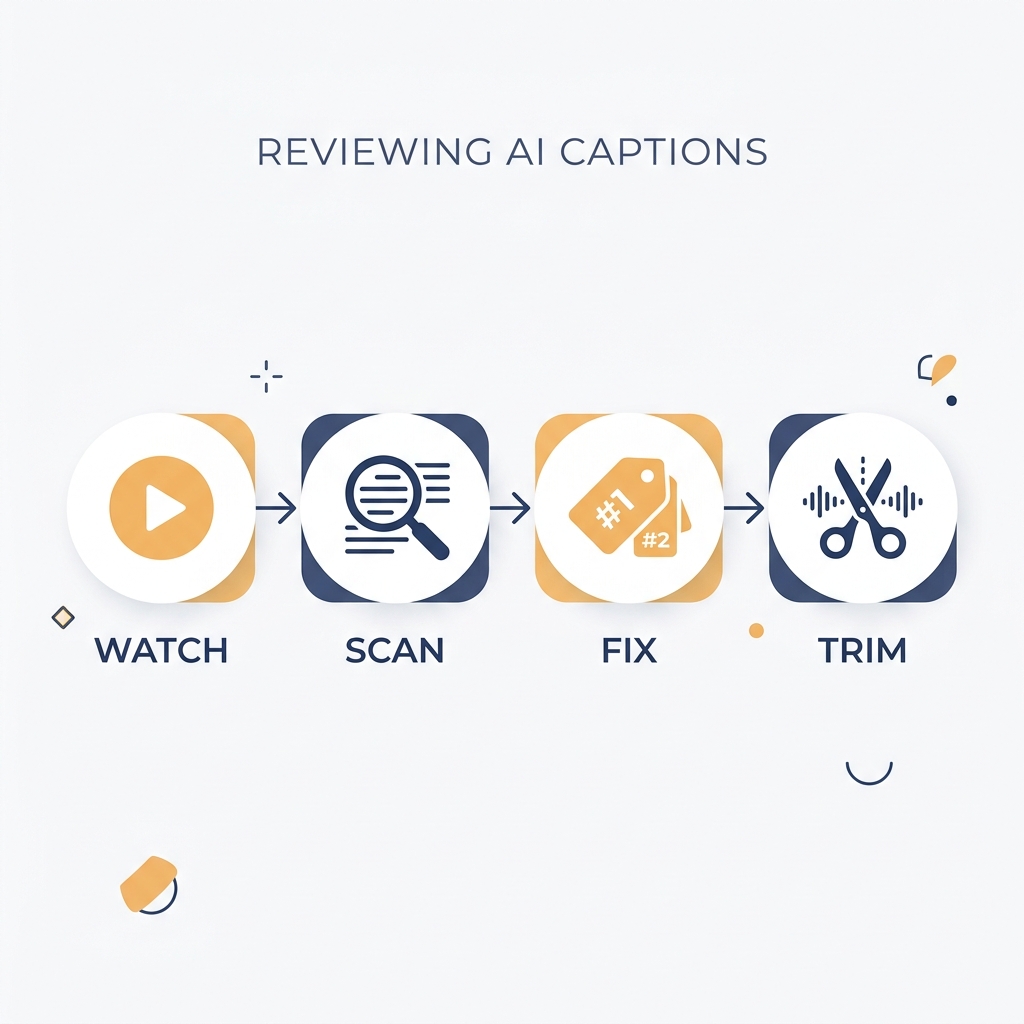
How to review AI captions before you publish:
- Play the video at 1.25x speed while reading the caption text in sync. This catches timing mismatches faster than reading the transcript alone.
- Search the transcript for proper nouns, brand names, and product names first. These fail most often and are the most visible errors in published content.
- Check numbers, dates, and prices. AI models mishear these more than they mishear common words.
- Listen specifically at cuts and scene transitions. Caption timing often drifts at these points.
- If the video has multiple speakers, verify that speaker changes are reflected correctly in the timing, not just the text.
- Read the full caption text once without the video playing. Errors that blend into audio become obvious in text-only review.
- For client-facing content, accessibility-required content, or multilingual audiences, do one full pass with the video playing at normal speed before approving.
For deeper context on how accuracy varies by tool type and audio condition, this breakdown of caption accuracy and tool selection covers the factors in more detail.
FAQ: What People Actually Want to Know Before Choosing an AI Caption Video Editor
What is the difference between an AI caption generator and an AI video editor?
An AI caption generator takes your audio and produces timed subtitle text. An AI video editor does that plus cuts, B-roll matching, scene detection, and noise removal. Many tools now bundle both, but they are distinct features. Some tools that call themselves AI video editors only touch captions. Check the editing depth before assuming. For more on the caption and subtitle distinction, see captions versus subtitles.
What does the free plan actually include for major AI caption video editors?
It varies, but the pattern is consistent: free plans give you a limited number of videos per month (often 5 to 10), watermark exports, and restricted file formats. GotReach is an exception: the free plan includes up to 30 videos per month, one connected social account, and no watermarks. Every other tool on this list adds a watermark or cuts export options before you reach meaningful volume.
Which AI video editor with captions is best for beginners?
For beginners who want to start free and learn the basics, CapCut is the most accessible entry point: free tier, mobile app, simple interface. When volume becomes a constraint or you need to publish across multiple platforms, GotReach handles that step up without requiring a new learning curve for every additional platform.
Can AI caption editors translate and dub videos into other languages?
Most tools can translate caption text into other languages. Far fewer offer dubbing, which means replacing or adding an AI voice speaking in the target language. These are different features with different quality levels. If multilingual publishing is a priority, verify both the number of supported languages and whether the tool offers dubbing or text-only translation before committing.
Do I need to review AI captions before publishing?
Yes, always. Every AI caption tool produces a first draft that requires human review before publication. The accuracy of that draft depends on your audio conditions, and errors in proper nouns, numbers, and fast speech are common across all tools. The review process takes less time than captioning manually, but skipping it entirely is not a viable option for content that represents your brand or requires accessibility compliance.
Which tool is right for my situation?
If you are publishing a few videos per week and editing them one at a time, Captions.ai or CapCut cover the basics. If you are a YouTube creator who needs deep editing alongside captions, Descript or VEED are closer fits. If you are a business, agency, or creator who needs to publish at volume across multiple platforms without rebuilding the workflow for every video, GotReach is the tool built for that problem. Single-video tools cannot match the output pace.
If you recognized your workflow somewhere in this comparison, and the single-video bottleneck is the problem, that is exactly what GotReach is built to remove.
Start your 30-day free trial today and see what 300 videos in 30 minutes looks like in practice.
Or, if you want to understand the full scope before committing: see how GotReach helps businesses and people create and publish more.