Caption Editor Style Guide: Names, Numbers, Swearing and Review
Auto captions save you hours. Then one spells your client's name wrong.
That isn't carelessness. Speech recognition hears sounds, not spellings. The fix is a short house style you set once, plus a review you run on every video. Decide the rules one time. Use them on every video in a recording batch.
This guide gives you both. A term sheet for names. A table for numbers and links. A call on swearing. A position on ums. And a checklist that ends with your phone on mute.
How do you get names and brand terms right in automatic captions?
Build a term sheet before you generate captions. List every name, brand, product and acronym you'll say, written exactly as it should appear on screen. After the captions generate, check each term and the ways it might be misheard. Fix every one. Then do a last pass for capitals and line breaks.
Names are where speech recognition slips most. The companies that build it say so in their own documentation. Brand names, acronyms, technical words and jargon may not come out right. Their own fix is a list of terms given ahead of time, with how each should look in the output. Your term sheet does that job by hand.
The bar is high. The FCC's caption quality rule for TV says captions must not swap in other words for proper names and places. Social videos aren't TV. It's still a good standard to hold.
- Build the sheet. Your name, your business, clients, guests, products, places and acronyms. Write how it looks, not how it sounds. Keep symbols, like C++. Keep accents where the person or brand uses them officially.
- Generate captions.
- Check each term. Look for the correct form and each likely mis-hearing. If your editor can search the text, use that.
- Fix every instance. Use the same spelling everywhere, across the whole video and the whole batch.
- Do a final pass. Check capitals. Check line breaks. Don't split a name across two lines, or a title like "Dr." from its name. The DCMP Captioning Key sets both of those rules.
An example term sheet:
| Correct form | Likely mis-hearings | Notes |
|---|---|---|
| GotReach | got reach, Got Rich | One word. Capital G and R. |
| Siobhán | Shivaun, Chevonne | Keep the accent. |
| SEO | S E O, CEO | All caps, no dots. |
| C++ | C plus plus | Keep the symbols. |
| Dr. Amara Osei | doctor Amara O'Say | Keep "Dr." on the same line as her name. |
Before: thanks to got reach and my client shivaun
After: Thanks to GotReach and my client Siobhán
Keep the sheet. Next batch, it's already done.
In GotReach, the AI caption generator is built into your video workflow to make your spoken message visible. We tell everyone to review auto captions before publishing. That's how you catch errors in names, specialized words, timing and readability. See where that review happens on the AI caption generator page.
How should numbers, prices and web addresses be written in video captions?
Write numbers the way your viewer would type or remember them. Spell out one to ten. Use numerals above ten. Use the percent sign, the dollar sign, and numerals for times. Turn spoken web addresses into their typed form. Copy codes exactly as they must be entered.
This isn't just style. Professional caption standards treat a wrong number as an accuracy error, the same as a wrong word. Prices, dates, links and codes are what viewers act on.
Most rules below come from the DCMP Captioning Key's numbers guide. Where we made a house-style call, we say so.
| Type | What was said | What raw captions may show | What to show |
|---|---|---|---|
| Small numbers | "three quick tips" | 3 quick tips | three quick tips |
| Large numbers | A number over ten, said aloud | The number in words | Numerals |
| Four digits | "twelve hundred followers" | 1200 here, 1,200 there | One form, every time |
| Percentages | A percentage, said aloud | The number and "percent" in words | Numerals and the % sign |
| Prices | A dollar amount, said aloud | The amount in words | The $ sign plus numerals |
| Times | "three thirty" | three thirty | 3:30 |
| Dates | "the sixth of March" | the 6th of March | 6th March |
| Web addresses | "got reach dot com" | got reach dot com | gotreach.com |
| Handles | "at your brand" | at your brand | @yourbrand |
| Discount codes | A code, said aloud | The code split into words, or in the wrong case | The code exactly as checkout expects it |
A few notes:
- Spell out a percentage if it starts a sentence.
- Dates go in the order they were said, minus "the" and "of".
- Dropping "www" is our house choice, when the address works without it. So is writing handles with @. No standard sets these. Pick one way and keep it.
- Codes follow one rule: copy them exactly. If checkout wants capitals, show capitals.
Once your house style is set, our guide to caption editing goes deeper on fixing text and timing.
How should you handle swearing in video captions?
Make the caption match the audio. If you left the word in the audio, leave it in the caption. If you bleeped it, mask it in the caption. Decide on the audio first, based on your audience, where you post and your brand tone. The caption follows that choice.
That's the professional rule. Caption standards say to caption profanity and slang if it's in the audio. Netflix's timed text style guide goes further. Dialogue is never censored unless the audio itself was dipped or bleeped.
If the audio is bleeped, use one asterisk per letter. Only show letters you can actually hear.
| Approach | On screen | When it fits | Matches the audio? |
|---|---|---|---|
| Full word | That's damn good. | The audio is uncut and your audience expects it. | Yes |
| Partial mask | That's d*** good. Or **** if none is audible. | The audio is bleeped. | Yes |
| Replacement | That's darn good. | Rarely. People who hear one word and read another notice. | No |
| Removal | That's good. | Only if you cut the word from the audio too. | Only if the audio is cut |
Decide once per brand. Who watches? Where is it posted? Is the audio bleeped? What's your tone? Write the answer into your house style. Then every video in a batch matches.
Check your tool's defaults too. In 2020, a journalist reported that a major video platform switched on a default that swapped "potentially inappropriate" words in auto captions for a blank marker. Whatever any tool does now, the lesson holds. Captions can change words on their own. Look for it when you review.
Should video captions match the spoken words exactly or be cleaned up?
Clean them up, lightly. Cut ums, false starts and repeated words. Keep every word that carries meaning, in the order you said it. This is called clean verbatim. It reads fast on a small screen, and it doesn't put words in anyone's mouth.
Captioners have debated this for years. The DCMP's guide to verbatim and edited captions calls it a recurring question. TV best practice leans near-verbatim, with as little paraphrasing as possible. Other guidance makes the case for editing, so viewers have time to read and still watch the picture. Editing can be as simple as removing what's redundant. The common ground is this. Trim only when reading speed or sync needs it. Never water down what was said. Fillers can go when space is tight, but keep as much as reads well.
| Style | Caption |
|---|---|
| Verbatim | So, um, what I— what I tell every client is, like, drink water before your coffee. |
| Clean verbatim | What I tell every client is, drink water before your coffee. |
| Heavily edited | Drink water first. |
The heavy edit is shorter. It also drops "every client" and "coffee". That changes what you said.
Fine to cut
- Ums and uhs
- Filler "like"
- False starts
- Words repeated by accident
Never change
- Quotes, and anyone famous speaking
- Song lyrics, poems and published work
- Slang or grammar used on purpose
- Names, numbers and meaning
AI handles the repetitive part. You stay in control of your content, and that includes your own words. For more on making AI captions sound natural, see our guide to making captions.
What should you check when proofreading AI-generated video captions?
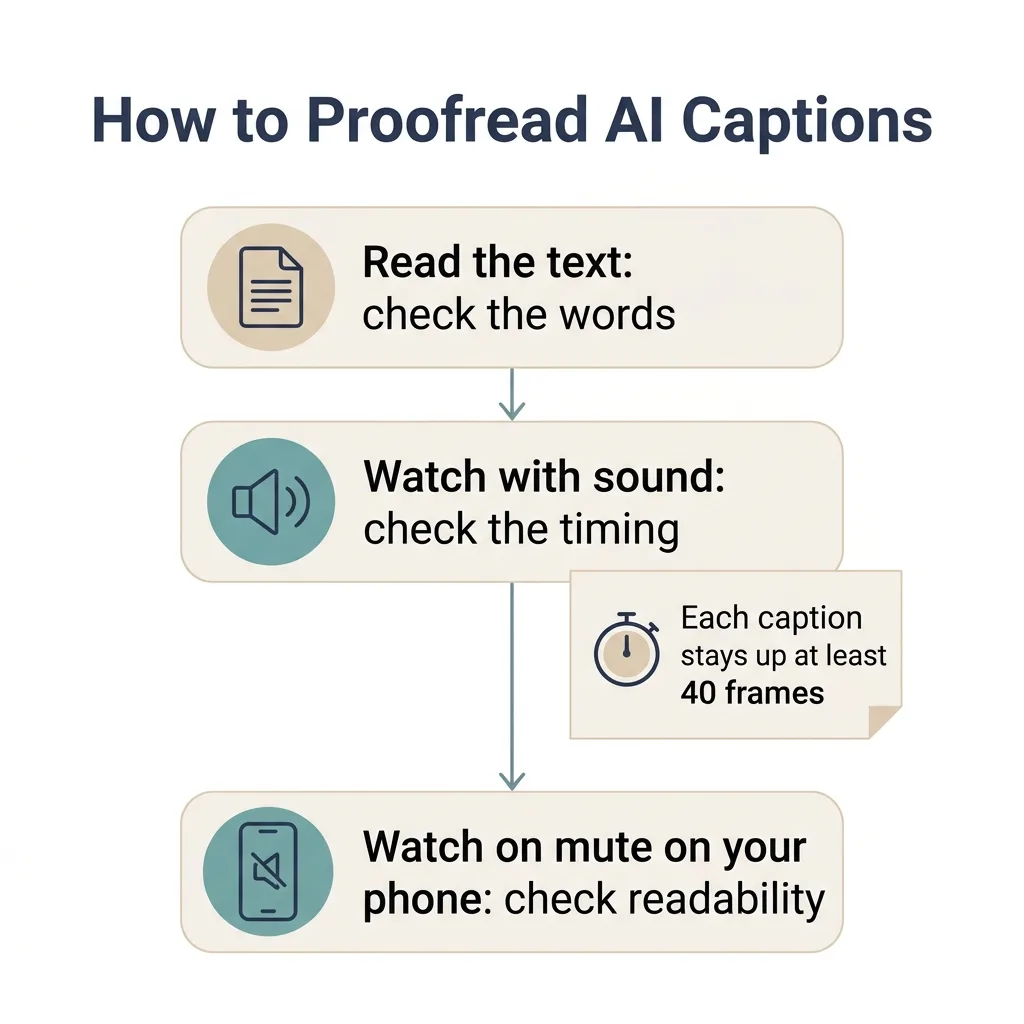
Check four things: words, timing, readability and placement. Do it in three passes. Read the text alone. Watch with sound. Then watch on mute, on your phone. Each pass catches what the others miss. With your term sheet and number table already set, each one goes quickly.
In GotReach, you choose a caption style, generate auto captions, then review the words and timing before publishing. Videos are edited and captioned for you. The review stays yours. Watch your finished video and check names, specialized words, timing and readability before publishing.
Pass 1: Read the text. Check the words.
- Names and brands match your term sheet.
- Sound-alikes are right: their, there, they're.
- Punctuation and capitals are right.
- Tense and plurals match what was said.
- Numbers, prices and links match your table.
- Swearing matches the audio.
- Quotes are word for word.
Pass 2: Watch with sound. Check the timing.
- Each caption appears when the speech starts.
- It ends about when the speech ends.
- Nothing flashes by. Standards set a floor of 40 frames, or 1 second and 10 frames.
Pass 3: Watch on mute, on your phone. Check readability and placement.
- Two lines per caption, at most.
- Each caption stays up long enough to read in full.
- The style matches across the video and the batch.
- No name splits across lines.
- Captions don't cover faces, on-screen text or what you're showing.
The mute pass matters most. It's how plenty of people will meet your video. If it makes sense with no sound on a small screen, it's ready.
For the full path from generation to export, see our caption workflow guide. Still choosing a tool? Read about the caption editor features that matter. Once this review is routine, it fits any batch. That's how one recording session becomes weeks of posts.
Frequently Asked Questions
Can spell check catch mistakes in video captions?
Only some of them. Spell check misses wrong words that are real words. It won't flag "your" for "you're" or "there" for "their". Speech recognition makes exactly that kind of mistake, because it picks real words that sound right. Spell check also flags correct names it doesn't know. If you check captions in a word processor, add your term-sheet names to its custom dictionary. Then read the captions anyway.
Do caption mistakes affect how a video performs on social media?
They can cost trust. We know of no evidence that platforms punish caption errors directly. But many viewers read instead of listen. In a 2019 survey of 5,616 U.S. adults aged 18 to 54, 69% said they watched video with the sound off in public. For them, the caption is the message. Research on online reviews found that spelling errors and typos affect how much people trust what they read. That was reviews, not captions. It's still a fair reason to check.
Should video captions use British or American spelling?
Match your audience. Professional guides use U.S. spelling for U.S. viewers and U.K. spelling for U.K. viewers. Where a word has two spellings, use the most common one for your variant. Spelling changes. Words don't. If a guest says "Mum", keep "Mum". Put your choice in your house style. If you check text in a word processor, set its proofing language to match.
Set the house style once. Review every video the same way. Captions become a quick check you control, not one more draining task.
Start a partnership inquiry
Sources
- eCFR (U.S. Code of Federal Regulations, 47 CFR 79.1) — eCFR :: 47 CFR 79.1 -- Closed captioning of televised video programming. · retrieved October 21, 2026
- Described and Captioned Media Program (DCMP) · retrieved October 21, 2026
- Described and Captioned Media Program (DCMP) — Captioning Key - Numbers · retrieved October 22, 2026
- Netflix (Partner Help Center) — English (USA) Timed Text Style Guide – Netflix | Partner Help Center · retrieved October 22, 2026
- Described and Captioned Media Program (DCMP) — Captioning Key - Presentation Rate · retrieved October 22, 2026
- Amazon Web Services (Amazon Transcribe documentation) — Improving transcription accuracy - Amazon Transcribe · retrieved October 22, 2026
- Liam O'Dell (journalist) — New YouTube Automatic Captions Setting Criticised By Deaf Campaigners - Liam O'Dell · retrieved October 22, 2026
- Amazon Web Services (Amazon Transcribe documentation) — Creating a custom vocabulary using a table - Amazon Transcribe · retrieved October 22, 2026
- Described and Captioned Media Program (DCMP) — Captioning Key - Special Considerations · retrieved October 22, 2026
- Netflix (Partner Help Center) — English (UK) Timed Text Style Guide – Netflix | Partner Help Center · retrieved October 22, 2026
- Microsoft Learn (Azure AI Speech documentation) — Improve recognition accuracy with phrase list - Foundry Tools | Microsoft Learn · retrieved October 22, 2026
- Legal Information Institute, Cornell Law School (47 CFR 79.1) — 47 CFR § 79.1 - Closed captioning of televised video programming. | Electronic Code of Federal Regulations (e-CFR) | US Law | LII / Legal Information Institute · retrieved October 22, 2026
- Described and Captioned Media Program (DCMP) — Captioning Key - Elements of Quality Captioning · retrieved October 22, 2026
- Described and Captioned Media Program (DCMP) — Captioning Key - Text · retrieved October 22, 2026
- The Writing Center, University of North Carolina at Chapel Hill — Editing and Proofreading – The Writing Center · retrieved October 22, 2026
- Purdue Online Writing Lab (Purdue University) — Proofreading for Errors - Purdue OWL® - Purdue University · retrieved October 22, 2026
- Microsoft Support — Add or edit words in a spell check dictionary | Microsoft Support · retrieved October 22, 2026
- Streaming Media (reporting Verizon Media and Publicis Media research) — 80% of Video Caption Users Aren't Hearing Impaired, Finds Verizon · retrieved October 20, 2026
- ScienceDaily (Indiana University release) — How errors affect credibility of online reviews | ScienceDaily · retrieved October 22, 2026
- Microsoft Support — Check spelling and grammar in a different language | Microsoft Support · retrieved October 22, 2026