AI Video Clipping Tools: How They Work, What to Look For, and How to Choose the Right One
If you've spent time on AI clipping tool homepages recently, you've seen the same promises repeated back to you: viral clips in minutes, 10x faster editing, AI that knows what performs. Every product page sounds nearly identical — which is precisely the problem. When every tool claims the same outcome, the homepage tells you nothing useful about which one actually fits your workflow.
This guide takes a different approach. It explains how AI clipping tools actually work under the hood, lays out an honest evaluation framework, and compares the leading tools on criteria that matter — genre compatibility, pricing transparency, editing control, and team features. The goal is to give you enough context to choose confidently, not to push you toward any single winner.
Key Takeaways
- AI clipping tools differ most on genre compatibility and pricing transparency — not clip speed, which most handle similarly.
- Free tiers are real but typically limited to three to five clips per month, often with watermarks and reduced export quality.
- No tool performs equally well across all content types — unscripted and poor-audio content is where most struggle most visibly.
- Caption accuracy claims of 97–98% sound reassuring until you do the math: on a 10-minute video, that still means roughly 45 incorrectly transcribed words.
- For agencies and teams managing multiple clients at volume, a full-workflow platform — creation, scheduling, and distribution in one system — often outperforms a single-feature clipping tool.
What AI Video Clipping Tools Actually Do (And How They Choose Your Clips)
Before you can evaluate these tools meaningfully, it helps to understand what they're actually doing when they "analyze" your video. The mechanics are more straightforward than the marketing suggests.
Transcript-based moment detection is the core of most AI clipping systems. The tool generates a speech transcript of your video, then scans that transcript to find moments where the speaker makes a complete, quotable, or high-signal point — a clear argument, a surprising statistic, a punchline. Think of it like a human editor skimming a script to circle the most shareable lines, except the AI does it in seconds and ranks candidates by a trained model's engagement prediction. Research into natural language processing for video highlight detection confirms that transcript-signal approaches are among the most reliable methods currently available for identifying candidate moments in spoken-word content.
Virality scoring is where the marketing language gets slippery. When a tool tells you a clip has "high viral potential," it means the model — trained on past content performance data — predicts that clip resembles previously high-performing content. That is a probabilistic signal, not a guarantee. Treat it as a useful filter, not an editorial decision.
Subject tracking and vertical reframing is the capability that converts a landscape-shot interview into a portrait-format clip for TikTok or Reels. The AI identifies the primary speaker and repositions the crop to follow them through the frame. This works well for single-camera, talking-head content. It tends to misfire on multi-camera productions, content with two speakers sitting side by side, or any video where the main subject moves unpredictably.
Caption generation accuracy deserves a reality check. A 97% accuracy claim sounds excellent in isolation. But at an average speaking pace of around 150 words per minute, 97% accuracy means roughly four to five incorrectly transcribed words per minute of speech. On a 10-minute video with approximately 1,500 spoken words, expect around 45 errors in the raw captions. For casual social posts, that may be acceptable with a quick scan. For brand or client publishing, plan for a manual caption review pass.
Understanding these four mechanisms won't make you an AI engineer, but it will help you ask better questions when a tool claims 99% accuracy or "perfect" reframing — and it gives you a realistic baseline for what the output will actually look like.
What to Look for When Evaluating an AI Clipping Tool
Evaluation criteria matter more than any tool's marketing claims. Here is what actually separates tools that fit your workflow from tools that waste your trial period.
Genre compatibility is the most commonly overlooked criterion. Most AI clipping tools are built and optimized for video podcast and interview formats — structured, single-camera, mostly one speaker at a time. If your content is a software tutorial, a gaming stream, a product demo, or a panel with four participants talking over each other, confirm that the tool handles your specific format before you commit. Ask for examples, not just a feature list.
Caption accuracy and language support require scrutiny beyond the headline percentage. Ask whether the stated accuracy figure was tested on clean studio audio or real-world recordings with background noise and accents. Also confirm whether the tool supports your language — and whether it handles regional accents without significant degradation. Many tools claim multilingual support but perform substantially worse outside of standard American English.
Platform output and aspect ratio coverage determine how much post-processing you'll need after clipping. Confirm the tool exports natively for each platform you publish to — TikTok (9:16, under 60 seconds for most formats), Instagram Reels, YouTube Shorts, LinkedIn — and that it handles each platform's caption styling and length constraints correctly. Some tools export a generic vertical crop; others handle platform-specific formatting automatically.
Free tier reality is consistently misrepresented in tool marketing. The question is not whether a free tier exists — it's what it actually includes: how many clips per month, whether exports carry watermarks, whether export resolution is reduced, and which specific action triggers a required upgrade. A three-clip-per-month limit is functional for evaluation but not for production. Know the ceiling before you build a workflow around a free plan.
Editing control and manual override determine how much the tool respects your editorial judgment after the AI has made its selections. Can you adjust which segment gets clipped? Can you edit the caption timing manually? Can you change the crop position after vertical reframing? The more granular the override controls, the more useful the tool is for professional publishing — where "good enough" from the AI is a starting point, not a finish line.
Team, collaboration, and volume features separate tools built for solo creators from tools built for teams. Multi-user access, client preview links, bulk processing, and centralized scheduling matter significantly when you're managing more than your own content. A tool that works well for one creator may become a coordination bottleneck at agency scale.
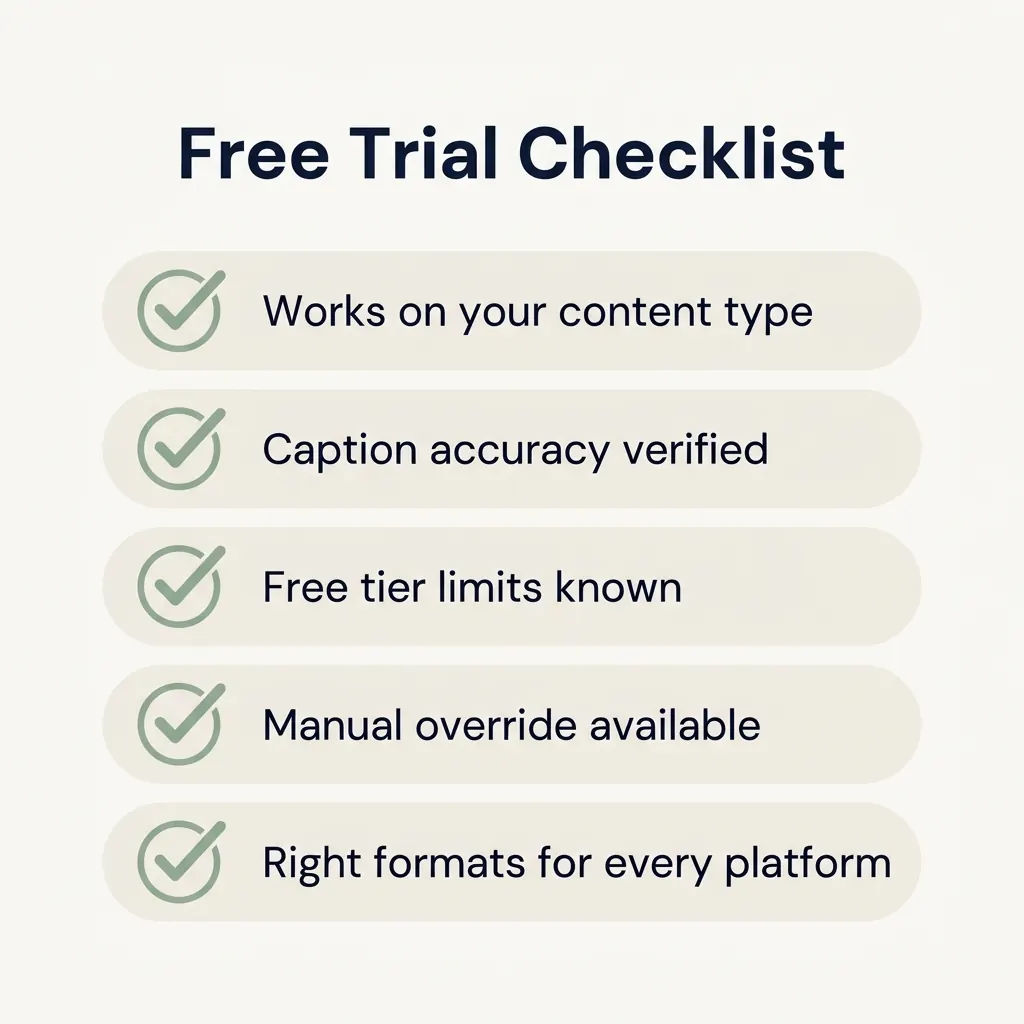
Use This Checklist When You Start a Free Trial With Any AI Clipping Tool
- Does it work on my specific content type (interview, stream, webinar, tutorial, product demo)?
- Is caption accuracy verified independently, or is the percentage only stated in marketing copy?
- What does the free tier actually allow — how many clips per month, are exports watermarked, and is export quality reduced?
- What specific action triggers a required paid upgrade, and how is credit consumption calculated per video?
- Can I manually override or refine the AI's clip selection, captions, and framing after processing?
- Does the tool output in the correct aspect ratios and length limits for every platform I publish to?
- Does it support team access, client preview links, or bulk processing if my workflow requires it?
AI Video Clipping Tools Compared: Features, Pricing, and What Each Does Best
The tools below are not interchangeable. They differ meaningfully on the criteria that matter at the decision stage — and choosing based on a homepage promise alone is the wrong move. Pricing figures are drawn from each tool's publicly available pricing page and reflect plans available at time of writing; verify directly before committing.
| Tool | Best For | Genre Compatibility | Caption Accuracy (Claimed) | Free Tier | Starting Paid Price | Platform Outputs | Team Features | API Access |
|---|---|---|---|---|---|---|---|---|
| OpusClip | Video podcasters and interview creators | Strong for talking-head, single-speaker; weaker on multi-camera | 97–98% (methodology unverified; see OpusClip pricing page) | Yes — limited clips/month, watermarked | ~$15–19/month | TikTok, Reels, Shorts, LinkedIn | Limited on lower tiers | Yes (higher tiers) |
| Vizard | Marketers repurposing webinars and presentations | Solid for structured presentations; limited on unscripted content | Not publicly specified | Yes — limited clips, watermarked | ~$10–20/month | TikTok, Reels, Shorts, LinkedIn | Team plans available | Limited |
| Munch | Marketing teams needing performance-focused selection | Interview and panel content; struggles with gaming or tutorials | Not publicly specified | Yes — limited | ~$49/month | Major social platforms | Collaboration features on paid plans | Limited |
| Klap | Individual creators, YouTube-to-Shorts workflows | Strong for single-speaker YouTube content; not optimized for streams | Not publicly specified | Yes — limited clips, watermarked | ~$29/month | TikTok, Reels, Shorts | Solo-focused; limited team features | No |
| WayinVideo | B2B and enterprise content repurposing | Business presentations and webinars; not optimized for entertainment | Not publicly specified | Free trial available | Custom/enterprise pricing | Enterprise platform outputs | Yes — built for teams | Yes |
| GotReach | Agencies and businesses managing multi-platform publishing at volume | Full-workflow automation platform — not a dedicated clipping tool | Not a dedicated clipping metric | 30-day free trial | See GotReach pricing | Seven social platforms | Built for multi-client, enterprise teams | Not confirmed |
A few things the table makes clear: OpusClip and Klap are optimized for the creator market — strong clip quality for podcast and YouTube content, but limited team infrastructure. Munch and Vizard lean toward marketing use cases with more structured content but carry higher price floors. WayinVideo positions at the enterprise end with custom pricing. GotReach operates differently from the others — it's a full content automation workflow covering creation, scheduling, and distribution across seven platforms in one system, which means it serves a different decision than "which clipping tool is fastest."
For agencies managing multiple clients at volume, GotReach combines video creation, scheduling, and distribution across seven platforms in one workflow — which means fewer tools to manage and no separate scheduling step after clipping. That distinction matters when the bottleneck isn't clip quality but coordination overhead.
Which AI Clipping Tool Is Right for Your Use Case?
The right tool depends on your content type, team size, and publishing volume. Here is a persona-matched breakdown to help you shortlist without parsing dense feature lists.
| Persona | Primary Need | Most Important Tool Criteria | What to Watch Out For |
|---|---|---|---|
| Podcasters and long-form interviewers | Accurate multi-speaker clip selection with clean captions | Strong transcript handling, two-speaker reframing, reliable caption accuracy | Reframing errors when both speakers appear on screen simultaneously; test with a real episode before committing |
| Streamers and gaming creators | Clips from unscripted, high-energy content with variable audio | Tolerance for non-speech audio, background noise handling, manual override controls | Most AI clipping tools are weakest in this category — plan for heavier manual review; no tool currently handles gaming streams reliably at a fully automated level |
| Marketers and e-commerce teams | Branded output with CTA overlays and platform-specific formatting | Template support, CTA overlay capability, platform-native export formatting | Tools optimized for creator content may not support branded templates or compliance-ready outputs — confirm before trialing |
| Agencies and enterprise teams | Multi-client volume processing with centralized scheduling and distribution | Multi-user access, client preview workflows, bulk processing, integrated scheduling | Single-feature clipping tools create coordination overhead at scale — evaluate whether you need an end-to-end workflow rather than a clip-only tool |
For high-volume, multi-platform publishing needs — particularly agencies managing several clients simultaneously — an end-to-end platform like GotReach may outperform a single-feature clipping tool. The ability to generate hundreds of publish-ready videos from a single session and distribute across seven platforms without a separate scheduling tool removes the operational friction that stacks up quickly at scale.
When AI Clipping Works Well — And When It Falls Short
No competitor page on the current SERP acknowledges where these tools genuinely struggle. Here is an honest breakdown.
AI clipping works well for:
- Structured interviews and podcast episodes with consistent speaker turns
- Keynote presentations and recorded webinars with clean audio
- Panel discussions where speakers have distinct, non-overlapping turns
- Single-camera talking-head content with consistent background and lighting
- Any content where the transcript is clean, the pacing is steady, and the audio is isolated
AI clipping struggles with:
- Dense tutorials where the topic shifts rapidly every 60–90 seconds
- Unscripted or highly improvisational content where no single moment stands out as clip-worthy
- Gaming streams with ambient music, sound effects, and variable audio levels
- Multi-camera productions without a clean primary-speaker transcript
- Content with significant background noise, crosstalk, or non-native accents the model wasn't trained on
A useful contrast: a clean 45-minute interview with two speakers in a quiet room is where AI clipping tools are genuinely impressive — the output often requires only light review before publishing. A two-hour gaming stream with commentary, background music, and variable audio is where most tools will produce clips that need significant manual cleanup to be usable.
How to improve AI output before uploading: Clean audio quality is the single biggest variable within your control. Reduce background noise at recording time, use a consistent microphone setup, and minimize crosstalk in multi-speaker recordings. A better input consistently produces better output, regardless of which tool you use.
When manual review is non-negotiable: Any clip intended for brand or client publishing should be reviewed by a human before it goes live. AI clip selection is a strong starting point — it reduces hours of scrubbing to minutes of review — but it is not a substitute for editorial judgment on content that represents a brand publicly.
Pricing and Free Tier Reality: What These Tools Actually Cost
Pricing transparency is a trust signal. A tool that buries its credit system or watermark policy in fine print is telling you something about how it treats customers — and how it will treat you when you hit a usage limit mid-month.
| Tool | Free Tier Clips/Month | Watermark on Free? | Starting Paid Price | Credit System | Watermark Removed At |
|---|---|---|---|---|---|
| OpusClip | ~60 minutes of processing/month (credits) | Yes | ~$15–19/month | Credit-based; 1 credit ≈ 1 minute of video processed | Paid plan |
| Vizard | Limited clips | Yes | ~$10–20/month | Clip-based limits | Paid plan |
| Munch | Limited clips | Yes | ~$49/month | Credit-based | Paid plan |
| Klap | ~3–5 clips | Yes | ~$29/month | Clip-based | Paid plan |
| WayinVideo | Free trial (duration varies) | Varies | Custom/enterprise | Enterprise volume pricing | Paid plan |
| GotReach | 30-day free trial (full workflow) | Not applicable — trial, not a permanent free tier | See pricing page | Not credit-based in the traditional sense | Trial covers full access |
How credit systems work in practice: Most paid plans allocate monthly credits consumed per minute of processed video. A 60-minute long-form video typically consumes 60 credits. A 100-credit monthly plan covers roughly one to two long-form videos — which is worth calculating before you assume a mid-tier plan will cover your full production volume. If you're processing eight to twelve videos per month, the math on a standard creator plan often pushes you to a higher tier within the first month.
Approximate cost ranges by use scenario:
- Solo creator processing two to four long-form videos per month: $15–$49/month depending on tool
- Marketing team processing eight to twelve videos monthly: $49–$150+/month across most platforms
- Agency processing twenty-plus videos across multiple clients: custom pricing territory for most tools, or a full-workflow platform like GotReach
GotReach's 30-day free trial gives agencies and marketing teams a low-friction way to evaluate the complete workflow — creation, scheduling, and distribution — before committing to a plan. If your bottleneck is coordination across tools and clients rather than clip quality alone, that is worth testing directly. See GotReach's pricing page for current plan details.
Frequently Asked Questions
What is an AI video clipping tool and how does it work?
An AI video clipping tool automatically identifies and extracts short highlight clips from longer video recordings. It reads your video's speech transcript to detect quotable or high-signal moments, scores them using a trained engagement model, then crops and reformats the output for short-form platforms like TikTok, Reels, and YouTube Shorts. The AI selects candidates; you review and publish.
Which AI video clipping tool is best for podcast or interview content?
OpusClip and Vizard are optimized for this format and perform well on structured, single-speaker or two-speaker content with clean audio. Klap is a strong option for single-speaker YouTube-style content. The key criteria to verify: multi-speaker reframing accuracy and caption reliability on your specific recording setup.
Are free tiers on AI clipping tools actually usable?
For evaluation, yes. For production publishing, usually not. Most free tiers are limited to three to five clips per month (or the equivalent in processing credits) and apply watermarks to all exports. They're genuinely useful for testing clip quality and workflow fit — but if you're publishing regularly, the math on a free tier runs out quickly.
How accurate is AI-generated captioning?
Most tools claim 97–98% accuracy. At 150 words per minute, 97% accuracy means roughly four to five errors per minute of speech. On a 10-minute video, expect around 45 incorrectly transcribed words in the raw output. Accuracy degrades further with non-native accents, overlapping speakers, or background noise. Plan for a manual caption review pass before brand or client publishing.
Can AI clipping tools handle gaming streams or unscripted content?
Generally, no — not reliably at a fully automated level. Gaming streams present the toughest conditions for AI clipping: variable audio, background music, no clean transcript signal, and no clear "quotable moment" structure. Most tools will produce clips from this content, but the output typically requires heavier manual review. If gaming or unscripted content is your primary format, test thoroughly before committing to a paid plan.
How do credit systems work, and how many credits does a typical video use?
Most credit-based plans allocate one credit per minute of processed video. A 60-minute interview uses approximately 60 credits. A 100-credit monthly plan covers one to two long-form videos — less than many creators or teams need. Check the credit-to-video math before selecting a tier, and confirm whether unused credits roll over or expire at month end.
When should I manually review AI-generated clips before publishing?
Always, for anything that represents a brand, client, or professional publication. AI clip selection reduces editing time substantially — a two-hour video that would take a human editor multiple hours to clip can be processed in under ten minutes — but the AI's selections are a starting point, not a final editorial call. A human review pass catches caption errors, awkward crop positions, and clips that are technically complete but tonally off-brand.