AI Video Clipping: How It Works, What to Look For, and How to Choose the Right Tool
Most creators and marketing teams are sitting on hours of recorded video that never gets repurposed — not because it lacks value, but because manual clipping is too slow to do at volume. AI video clipping tools promise to solve that: automatically extracting the best moments from long recordings and formatting them for short-form platforms like TikTok, Instagram Reels, and YouTube Shorts.
Before you pick a tool, it helps to understand what the technology actually does, where it performs well, and where it still falls short. This guide covers all three — plus a concrete framework for evaluating tools against criteria that actually matter for your content type and workflow.
Key Takeaways
- AI clipping tools analyze audio signals — speech energy, topic transitions, sentence completeness — to identify and rank candidate clips from long videos. They do not guarantee which moments will perform best.
- Long-form interview, podcast, and Q&A content sees the strongest results. Heavily visual formats and non-linear storytelling are harder for AI to clip coherently.
- The most important evaluation criteria are genre compatibility, caption accuracy, output resolution, platform support, editing control, and pricing transparency — not which tool has the most five-star reviews.
- Free plans across the category typically come with watermarks, monthly clip limits, or resolution caps. Test on a time-limited trial before building a workflow around any free tier.
- Human review of AI-suggested clips is still recommended before publishing. The AI narrows the field — it does not make final creative decisions.
How AI Video Clipping Actually Works
AI video clipping is software that analyzes a long-form video and automatically extracts short segments likely to hold viewer attention on social platforms. The output is a set of candidate clips — trimmed, reframed, and captioned — that you review and select from rather than building from scratch.
Understanding what the AI is actually analyzing makes the whole category easier to evaluate.
What the AI looks for
Most tools rely primarily on audio signals. The model scans the transcript and audio track for markers associated with viewer retention: moments where a speaker's energy rises, where a clear topic begins or concludes, and where a sentence or thought reaches a natural endpoint. Some tools also incorporate visual signals — detecting scene changes, on-screen text, or significant frame movement — but audio analysis is the foundation for most current tools.
Research into automated video moment detection (see this overview of video highlight detection approaches) confirms that signal combinations — speech energy, topic boundaries, pacing — are the most reliable indicators for identifying candidate moments from unstructured video.
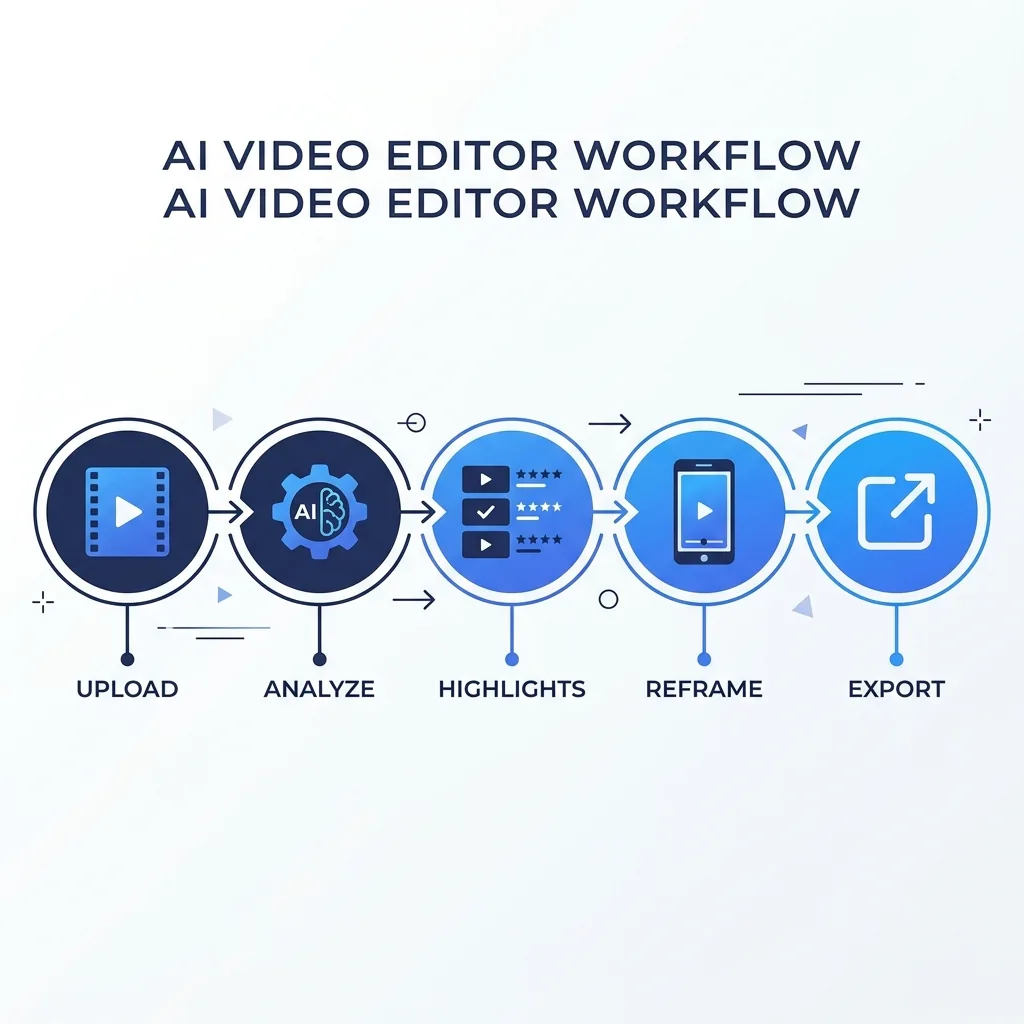
Here is how the process works end-to-end:
- Upload your source video — The tool ingests the full-length video file or a URL from a supported platform.
- AI analyzes the content — The model scans for audio signals (speech patterns, energy, topic shifts) and sometimes visual signals (scene changes, on-screen text) to identify candidate moments.
- Moment scoring and ranking — Each candidate clip is scored based on criteria the model associates with viewer retention — completeness of thought, speaker energy, pacing.
- Automated trimming and reframing — The tool trims the clip to a defined length and reframes it for the target aspect ratio (typically 9:16 for vertical platforms).
- Caption generation — AI transcribes the audio and overlays captions, with options to adjust style, font, and placement.
- Review and export — You review suggested clips, make manual adjustments if needed, and export or publish directly.
To make this concrete: a 45-minute podcast interview gets uploaded, the AI flags 12 candidate clips of 60–90 seconds based on speaker energy and topic completeness, and you review and select four to publish. Compare that to manual clipping — scrubbing through the full recording, identifying timestamps, trimming, exporting in multiple aspect ratios for each platform — and the time savings become tangible, especially at volume.
What the AI is not doing: it is not watching the video, it is not predicting virality, and it is not replacing your editorial judgment. The scoring reflects patterns the model was trained on, not a guarantee of what your audience will respond to. Human review before publishing is not optional — it is part of the workflow.
A platform like GotReach illustrates what a complete end-to-end workflow looks like: upload a source video, let the AI extract and format candidate clips, then schedule and publish directly across seven platforms from a single system — without needing a separate scheduling tool or a dedicated editor for every piece.
What AI Clipping Does Well — and Where It Still Falls Short
AI clipping tools are genuinely useful for the right content types. They are also genuinely limited for others. Knowing which category your content falls into before you choose a tool saves a lot of setup time.
Content types where AI clipping performs well
Long-form interviews, podcasts, Q&A sessions, webinars, and talking-head vlogs are the sweet spot. These formats share a common trait: the value is primarily audio-driven, sentences have natural endpoints, and topic transitions are easy for a model to detect. When a guest says something quotable or a host shifts to a new subject, the AI has a clear signal to work with.
Content types where AI clipping struggles
Heavily visual content is harder. A cooking tutorial, a sports highlight reel, or a product demo that depends on what's on screen — rather than what's being said — lacks the audio signal the AI needs to identify meaningful moments. The model may flag a clip that sounds complete but is visually incoherent, or miss the actual highlight entirely because nothing notable happened in the audio track.
Non-linear storytelling is another challenge. Content with a narrative structure that requires editorial judgment to clip — where you need to understand the arc of the story to know which 60 seconds matter — is something the AI cannot reliably handle. It will still produce clips, but they will require significantly more review and manual adjustment.
Caption accuracy also degrades with heavy accents, strong background noise, domain-specific vocabulary, or non-English audio. This varies by tool, but it is worth testing on your own content before committing to any platform.
Common output issues to watch for
Even on strong content types, two quality issues appear regularly: clips that start or end mid-sentence (the model scored the audio energy but missed the complete thought), and reframing errors where the speaker drifts to the edge of frame or gets partially cut off after the aspect ratio conversion.
These are fixable with manual adjustment — but they do require a review step before publishing.
Where AI clipping performs well
- Long-form interview, podcast, and Q&A content with clear speech
- High-volume repurposing where speed matters and you need consistent clip output
- Multi-platform publishing where aspect ratio conversion would otherwise require manual work for every clip
- Teams that need regular short-form output without a dedicated editor for each piece
Where AI clipping still struggles
- Heavily visual content where the narrative depends on what is on screen, not what is being said (cooking, sports, product demos)
- Complex storytelling with non-linear structure that requires editorial judgment to clip coherently
- Non-English audio, heavy accents, or technical vocabulary that degrades transcription accuracy
- Short source videos with no natural moment boundaries for the AI to detect
Key Features to Evaluate When Choosing an AI Clipping Tool
Most tool pages give you a feature list. What they rarely give you is a framework for knowing which features actually matter — and what red flags to watch for in each dimension. Here is what to evaluate.
Genre and content format compatibility Some tools are optimized almost entirely for talking-head or podcast formats. If you produce gaming content, cooking videos, sports highlights, or product demos, check whether the tool's moment detection actually works for visual-heavy formats — or whether it will produce clips that are technically trimmed but editorially useless.
Caption accuracy and language support Caption quality affects publishability. Ask whether the tool supports your language and accent, and look critically at any accuracy statistics the vendor reports — most are measured under clean acoustic conditions on standard English content. The only reliable test is uploading your own content and seeing what you get.
Output resolution, format, and export quality Free and entry-tier plans frequently cap export resolution. If you are publishing to platforms with specific quality requirements, confirm the tier you are considering actually exports at the resolution you need before building a workflow around it.
Platform and aspect ratio support Publishing short-form content across TikTok, Instagram Reels, and YouTube Shorts means working in 9:16, 1:1, and 16:9 formats. A good tool generates all required aspect ratios automatically from a single clip. If you have to manually reframe for each platform, the time savings largely disappear. Platform-specific specs and aspect ratio requirements are documented in resources like Sprout Social's social media video specs guide, which is worth bookmarking as a reference.
Editing control The AI's first pass is a starting point, not a final product. You need to be able to adjust clip start and end points, override AI selections, and make manual edits without rebuilding the clip from scratch. If the output is locked, you will either publish subpar clips or abandon the tool.
Publishing and scheduling integration Some tools stop at export. Others include direct publishing and calendar scheduling. If you are managing content across multiple platforms regularly, an export-only tool means adding a separate scheduling tool to your stack — which adds both cost and friction.
Pricing transparency The free plan question deserves its own section (coming up next), but at the evaluation stage, the key question is: what does the free tier actually include, and at what production volume does upgrading become necessary? Tools that obscure this information in their pricing page are worth approaching carefully.
| Evaluation Criterion | What to Look For | Red Flags |
|---|---|---|
| Video genre compatibility | Supports your content type (interviews, vlogs, gaming, etc.) | Only optimized for talking-head or podcast formats |
| Caption accuracy | Performs well on your language and accent; customizable styling | Vendor-reported stats with no methodology disclosed |
| Output formats and resolution | Exports at the quality your platforms require | Resolution caps or watermarks on standard exports |
| Platform and aspect ratio support | Generates 9:16, 1:1, 16:9 from a single clip | Single aspect ratio only, manual resizing required |
| Free plan genuine value | Usable clips without upgrade walls for testing | Watermarked exports, very low monthly clip limits |
| Publishing and scheduling integration | Direct to platform or calendar scheduling included | Export-only, no publishing — requires a separate tool |
| Team and brand controls | Multi-user access, brand presets, client workspace | Solo-account only, no brand-level settings |
AI Clipping by Use Case: Matching the Tool to Your Workflow
There is no single best AI clipping tool. There is the right tool for your content type, team size, and publishing workflow. Here is how the evaluation criteria from the previous section apply differently depending on who you are and what you are making.
Podcasters repurposing episodes The priority here is caption quality and audio-driven moment detection. Podcast clips live or die on whether the quote or insight lands cleanly in text form — captions are not optional. Clip length control also matters: you may want 30-second cuts for some platforms and 90-second cuts for others. Look for a tool that handles both without requiring separate workflows.
YouTubers building short-form from long-form Aspect ratio conversion is the biggest practical need — going from 16:9 YouTube footage to 9:16 vertical clips without losing the subject in the reframe. Editing control is equally important: AI selections from a YouTube video will often need refinement, and a tool that locks the output will create more work, not less. Platform publishing integration is a strong secondary priority if you are posting to multiple channels.
Streamers extracting highlights Streaming content tends to run long — multi-hour sessions where the highlights are scattered and the rest is filler. Processing speed for large files matters here, as does the tool's ability to detect visual moments (gameplay peaks, reactions, key plays) rather than relying solely on speech. Many current tools underperform on streaming content for this reason; test specifically on your source material before committing.
Marketing teams and brands Brand consistency at scale is the priority. Look for tools with brand presets — fonts, colors, logo placement — that apply automatically across clip output, along with team access so multiple people can work within the same workflow. Multi-platform scheduling from a single system removes the coordination overhead that otherwise builds up when a team is managing content across seven platforms simultaneously.
Agencies managing multiple clients Volume and client separation are the defining needs. A tool built for individual creators will hit structural limits quickly when you are managing separate brand identities, content calendars, and output volumes for multiple clients. GotReach is built specifically for businesses, marketing agencies, and enterprise teams at this scale — the platform is designed to turn a single session into hundreds of publish-ready videos distributed across seven platforms, which is what production at agency volume actually requires.
Quick self-qualification checklist by use case:
- Podcasters: Caption quality and accuracy • Clip length control • Audio-driven moment detection • Easy multi-platform export
- YouTubers: Aspect ratio conversion (9:16, 1:1, 16:9) • Manual editing and AI override • Platform publishing integration • Editing control for refinement
- Streamers: Large file processing speed • Visual signal detection (not just speech) • Long session support • Highlight precision
- Marketing teams: Brand presets (fonts, colors, logo) • Team collaboration access • Multi-platform scheduling • Consistent output at volume
- Agencies: Multi-client workspace management • Brand preset control per client • High-volume clip capacity • Centralized scheduling and publishing
Free vs. Paid AI Clipping: What You Actually Get
Most tools offer some version of a free plan. Most free plans are not production-ready. Understanding the difference before you build a workflow around a free tier saves a meaningful amount of setup time.
What free typically means
Across the category, free plans generally include some combination of: a monthly clip limit (often low enough to make regular publishing impractical), watermarked exports that are not publishable without branding you did not choose, lower export resolution than the paid tiers, or limited platform support. The tool works — it just works under constraints that become apparent quickly once you try to use it for anything beyond initial testing.
The pattern is consistent enough that it is worth treating free as a test environment, not a production plan.
| Feature | Typical Free Tier | Typical Paid Tier |
|---|---|---|
| Monthly clip limit | Low (often 5–10 clips) | Higher or unlimited depending on plan |
| Export watermark | Usually present | Removed on paid plans |
| Export resolution | Capped (720p or lower common) | Full resolution (1080p or higher) |
| Platform publishing | Export-only or limited | Direct publishing and scheduling |
| Team and brand features | Solo account only | Multi-user, brand presets, client workspaces |
| Customer support | Self-serve or community | Priority or dedicated support |
When free becomes insufficient
The free tier stops serving you when: your monthly clip volume exceeds the limit, you need watermark-free exports for actual publishing, you need higher resolution for platform quality standards, or you need publishing integration to avoid adding another tool to your stack.
Questions to ask before starting any free trial:
- What is the monthly clip limit, and does it cover a realistic week of publishing?
- Are exports watermarked at this tier, and can I publish them without upgrading?
- What resolution does the free tier export at, and does that meet my platform requirements?
- Is publishing included, or is this export-only — and what tool would I need to add for scheduling?
GotReach offers a 30-day free trial — which is a different structure than a permanent free plan with hard limits. A 30-day trial gives you enough time to run the tool against your actual content, at real publishing volume, before making a commitment. That is a more useful test than a clip-limited free tier that never shows you what the tool does at scale. When you are ready to evaluate pricing, explore GotReach's plans to understand what tier fits your production volume and team setup.
Frequently Asked Questions About AI Video Clipping
How does AI know which moments to clip from a long video? The AI analyzes the audio track for signals associated with viewer retention — speaker energy, topic transitions, and whether a thought reaches a complete endpoint. It scores and ranks candidate moments based on these patterns, then surfaces the highest-scoring clips for your review. It is identifying patterns the model was trained to associate with engagement, not predicting what your specific audience will respond to.
What types of videos work best with AI clipping tools? Long-form interviews, podcasts, Q&A sessions, webinars, and talking-head vlogs produce the strongest results — content where the value is primarily audio-driven and sentences have natural endpoints. Heavily visual formats (cooking tutorials, sports highlights, gaming content, product demos), non-linear storytelling, and short source videos with few natural moment boundaries tend to underperform with current AI clipping tools.
Are free AI clipping tools actually free, or are there hidden limits? Free plans across the category typically include real constraints: monthly clip limits that cap how much you can actually publish, watermarked exports that are not suitable for professional use, lower resolution output, or export-only functionality that requires a separate publishing tool. Free tiers are useful for testing a tool's core capabilities — they are generally not sufficient for building a production content workflow.
How accurate are AI captions, and do they handle accents and non-English content? Caption accuracy varies significantly by tool, acoustic conditions, and content type. Vendor-reported accuracy figures are typically measured on clean audio with standard English speech — real-world performance on accented audio, technical vocabulary, or non-English content is often lower. The only reliable test is uploading a sample of your own content and evaluating the output directly. Do not commit to a tool based on accuracy statistics alone.
Do I still need to review clips after the AI processes them? Yes — human review before publishing is recommended regardless of which tool you use. The most common issues are clips that start or end mid-sentence (the AI scored energy, not completeness), reframing errors that partially cut the speaker out of frame, and moments that are technically complete but lack the editorial context that makes them worth sharing. The AI narrows the field significantly; it does not make final creative decisions.
Is AI clipping good enough to replace a human video editor? For high-volume, repetitive clip extraction from structured long-form content, AI clipping handles the mechanical work well — identifying moments, trimming, reframing, and captioning at a speed and scale that is not practical manually. It does not replace editorial judgment for narrative quality, brand tone, or nuanced storytelling decisions. The more useful framing: AI handles the repetitive extraction work so editors can focus on the decisions that actually require human judgment.
Ready to See It in Action?
If you have reached this point, you have a clear picture of how AI clipping works, what to look for in a tool, and how to match the evaluation criteria to your specific content type and workflow.
The practical next step is testing a tool against your own content — not a demo video, not a sample file, but your actual source material at something close to real publishing volume.
GotReach's 30-day free trial is structured for exactly that kind of real-conditions evaluation: enough time to upload your content, review what the AI surfaces, and understand whether the output quality, platform distribution, and workflow integration fit what you actually need — before committing to a plan.
If you are managing video at scale for a business, agency, or enterprise team, the question is less about whether AI clipping works and more about whether the tool is built for the volume and brand control requirements your operation demands. See how GotReach helps businesses and enterprise teams create and publish at scale — or explore pricing plans to understand which tier fits your production volume.
AI clipping accelerates the work. The editorial judgment that makes content worth watching still belongs to you.