AI Generated Captions: How They Work, What to Expect, and How to Choose the Right Tool
If you are publishing video content across multiple platforms, captions are not optional — they are the difference between content that gets watched and content that gets scrolled past. Research by Verizon Media and Publicis Media found that the majority of social video is watched without sound, which means captions are not an accessibility add-on — they are the primary way many viewers experience your content.
But when people search for "AI generated captions," they are often looking for two completely different things — and most tools, guides, and comparison articles never acknowledge the gap. Some readers need subtitles synced to a video file. Others need social media post copy written by an AI. These are not interchangeable, and using the wrong tool for the wrong task wastes time and produces bad output.
This article resolves that ambiguity first, then covers how AI captioning actually works, where accuracy holds up and where it does not, how to choose the right output format for your platform, and how to evaluate which tool category fits your workflow — without the usual vendor hype.
Key Takeaways
- AI generated captions covers two different tasks: speech-to-text video subtitles and LLM-written social media post copy. Confirm which one you need before evaluating any tool.
- Burned-in captions are permanently embedded in the video file and are not indexable by YouTube's search algorithm. SRT and VTT files are separate subtitle files that YouTube indexes and that can be corrected after upload — the right format depends on your platform and SEO goals.
- AI caption accuracy is not a fixed number. Clean, single-speaker studio audio produces output that often needs only light review. Noisy multi-speaker recordings require meaningful editing regardless of which tool you use.
- Caption style is a strategy decision, not a visual preference. Word-by-word, karaoke, Hormozi, and minimal lower-third each perform differently depending on platform and content type.
- The right tool depends on your use case and volume. A solo creator producing a few YouTube videos per month needs something different from an agency publishing 50+ short-form videos per week across multiple client accounts.
What "AI Generated Captions" Actually Means (And Which Type You Need)
Before evaluating any tool or format, it helps to know which task you are actually trying to accomplish. The phrase "AI generated captions" is used to describe two fundamentally different outputs:
Type 1 — Speech-to-text video captions: AI listens to the audio in a video file, transcribes what is spoken, and syncs the text to timestamps. The result is a subtitle file (SRT or VTT) or text burned directly into the video. This is what you need if you are adding visible text to a video so viewers can follow along without sound.
Example: You upload a 60-second TikTok and the tool generates synced captions that appear word-by-word as you speak.
Type 2 — LLM-generated social caption copy: AI writes the post text that accompanies a video on social media — the text in the post body, not the text on the video itself. You describe the video, provide context, and the AI drafts a LinkedIn post, Instagram caption, or tweet.
Example: You describe a product launch video to an AI and receive a LinkedIn caption draft with a hook, three value points, and a call to action.
These are different inputs, different outputs, and different tools. A speech-to-text captioning tool cannot write your post copy. An LLM social copy tool cannot sync text to your video's audio track.
Quick rule: If you are adding text to a video file, you need Type 1. If you are writing a social post to accompany a video, you need Type 2.
| Video Captions (Type 1) | Social Caption Copy (Type 2) | |
|---|---|---|
| Input | Audio or video file | Text prompt, topic description, or content brief |
| Output | SRT file, VTT file, or burned-in text on video | Written post copy for social media |
| AI method | Speech recognition + timestamp sync | Large language model (LLM) text generation |
| Example tools | Captions.ai, VEED, Choppity | ChatGPT, Hootsuite AI, platform-native tools |
| When you need it | Adding subtitles to a video for viewers watching without sound | Writing the post body that introduces or frames a video |
How AI Caption Generation Works
You do not need to understand how these models were built to use them well — but understanding the input-output relationship helps you get better results and make sense of accuracy claims.
Video caption generation (Type 1)
The process follows a consistent sequence regardless of which tool you use:
- Audio extraction — the tool separates the audio track from the video file.
- Speech recognition — an AI model processes the audio and converts spoken words to text.
- Timestamp alignment — the transcribed text is paired with timing data so each word or phrase corresponds to when it was spoken.
- Format output — the tool packages the result as an SRT file, VTT file, or renders the text directly into the video (burned-in).
- Optional post-processing — some tools apply speaker identification, filler word removal, or style formatting before final export.
Social caption copy generation (Type 2)
- Prompt input — you provide context: what the video is about, who the audience is, the desired tone, and any specific angle or call to action.
- LLM interpretation — the model draws on its training to generate text that fits the described context.
- Draft output — the tool returns written post copy, often with variations.
- Revision — you refine based on brand voice, accuracy, and platform fit.
The practical takeaway for both types: better inputs produce better outputs. A vague prompt like "write a caption about my video" will return generic copy that sounds like it could belong to anyone. A specific prompt — "write a LinkedIn caption for a 60-second video about reducing onboarding time for remote teams, professional tone, end with a question" — gives the model enough context to produce something usable. The same principle applies to audio: cleaner recordings give the speech recognition model less noise to interpret, which directly improves transcript accuracy.
AI Caption Accuracy: Honest Expectations by Audio Condition
Most tools advertise high accuracy rates without stating what audio conditions those numbers assume. That omission matters enormously in practice.
AI caption accuracy is not a single number — it varies by audio quality, how many speakers are present, accent density, and vocabulary type. Here is what that actually looks like in practice:
Best conditions for high accuracy: Clean studio audio, one speaker, standard accent, general vocabulary. In these conditions, AI transcription output is often publish-ready with only light review — a quick scan for proper nouns and the occasional homophone.
Worst conditions for accuracy: Noisy background environments, multiple speakers talking over each other, heavy regional accents, or specialized technical, medical, or legal vocabulary. Under these conditions, expect meaningful errors that require substantive editing before publishing.
Platform auto-captions — YouTube's built-in captions or TikTok's native caption tool — are a starting point, not a standard. Dedicated AI caption tools generally outperform platform auto-captions in accuracy and customization, but the difference narrows on already-clean audio.
| Condition | Accuracy Impact | What to Expect |
|---|---|---|
| Clean studio audio, single speaker | High | Output is often publish-ready with light review |
| Moderate background noise, single speaker | Moderate | Expect some errors; review recommended before publishing |
| Multiple speakers, clear audio | Moderate | Speaker crosstalk creates gaps; attribution errors common |
| Multiple speakers, noisy environment | Low | Significant errors likely; plan for substantive editing |
| Heavy regional accent or dialect | Moderate to Low | Models trained on standard accents underperform; review required |
| Technical, medical, or legal vocabulary | Moderate | Jargon and proper nouns are common failure points |
| Heavily accented + noisy + multi-speaker | Low | Treat output as a rough draft only |
The honest answer: AI captions are publish-ready more often than skeptics assume — and more error-prone than vendors typically admit. The difference is almost always the audio conditions and content type, both of which are within your control to improve before recording.
Burned-In Captions vs. Subtitle Files: Which Format Do You Actually Need
This is the format decision most creators make by default rather than deliberately — and it affects search visibility, accessibility, and your ability to fix errors after publishing.
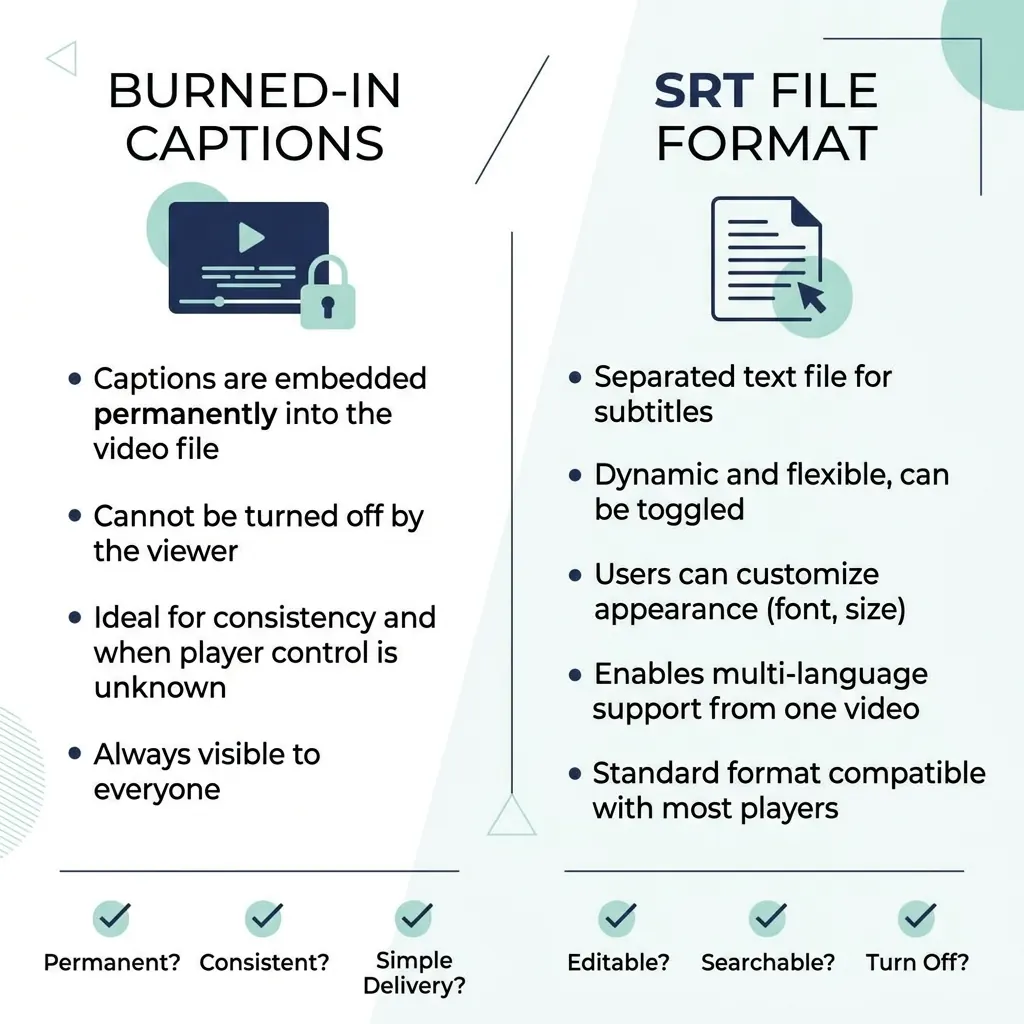
Burned-in captions (also called hardcoded captions): The caption text is permanently rendered into the video file itself. Viewers always see them — there is no toggle. If you find an error after export, you need to re-render the video to fix it.
SRT files (SubRip Text format): A separate text file containing the transcript and timestamps, uploaded alongside the video to a platform. The platform overlays the captions on playback. Viewers can toggle them on or off. Errors can be corrected by editing and re-uploading the file — no video re-render required.
VTT files (WebVTT format): Similar to SRT, but designed for web video players and HTML5 environments. Also platform-uploadable, also editable after the fact.
TXT transcripts: Plain text without timestamps — useful for podcast show notes, blog repurposing, or search indexing on platforms that accept raw transcripts, but not a subtitle format.
The YouTube SEO implication is significant: YouTube's search algorithm indexes the content of uploaded closed caption files (SRT and VTT), which means the words in your captions can appear in search results and help your video rank for the terms your audience is searching. Burned-in captions are not indexed — YouTube's algorithm cannot read text embedded in a video frame. If search visibility matters to your YouTube strategy, uploading an SRT or VTT file is the right call.
| Format | YouTube SEO Indexable | Editable After Export | Best For |
|---|---|---|---|
| Burned-in (hardcoded) | No | No | TikTok, Instagram Reels, cross-platform portability |
| SRT file | Yes | Yes | YouTube, accessibility compliance, platform flexibility |
| VTT file | Yes | Yes | Web video, HTML5 players, accessibility |
| TXT transcript | No | Yes | Podcast show notes, repurposing content |
Platform fit by format:
- TikTok and Instagram Reels: Burned-in captions are the norm. Most viewers watch in-feed without toggling captions on, so captions need to already be on the video.
- YouTube: SRT or VTT upload is almost always the better choice — you get indexability, the ability to correct errors, and platform-native accessibility compliance.
- LinkedIn: Either format works, but SRT upload is preferred for professional content that benefits from accessibility and editability.
- Web video (HTML5 players): VTT is the standard format for browser-based video players.
This is not a minor technical footnote. The format you choose determines whether your captions contribute to search visibility, whether you can fix mistakes without re-rendering, and whether your content meets WCAG accessibility standards for web-published video.
Caption Styles and Platform Best Practices
Caption style is not just a visual choice — it signals content tone, affects viewer engagement, and can work against you if it does not match the platform's expectations.
The four main video caption styles used in AI caption tools:
Word-by-word: Each word appears on screen as it is spoken, then disappears. Fast-paced and attention-grabbing.
Karaoke (highlighted word): The full sentence is displayed but the currently spoken word is highlighted as speech progresses. Common in music videos and scripted narration.
Hormozi-style (bold key phrases): Key words or phrases are displayed in large, bold text — often a few words at a time. Named after the format popularized in motivational content. High visual energy.
Minimal lower-third: Clean, small subtitle text positioned at the bottom of the frame in a consistent location. Professional and unobtrusive.
| Style | Best Content Type | Recommended Platforms | Avoid When |
|---|---|---|---|
| Word-by-word | Fast-paced talking-head video, punchy commentary | TikTok, Instagram Reels | Long explanatory content where full sentences provide more context |
| Karaoke (highlighted) | Music, scripted narration, structured presentation | YouTube, TikTok | Casual unscripted footage where pacing is inconsistent |
| Hormozi (bold key phrases) | High-energy, motivational, opinion-led content | TikTok, LinkedIn thought leadership | Subtle or corporate brand tone — it reads as aggressive in formal contexts |
| Minimal lower-third | Corporate, educational, interview, tutorial | YouTube, LinkedIn, web video | Short-form entertainment where visibility at small sizes is critical |
Platform placement notes:
- On TikTok, captions should sit in the upper two-thirds of the frame — the bottom UI (likes, comments, share) covers captions placed too low.
- On YouTube, lower-third captions should avoid overlapping embedded chapter markers or card elements.
- On LinkedIn, a significant share of viewers watch muted in-feed — this makes caption clarity and size more important than on platforms where sound-on viewing is more common.
For social caption copy (post text): The style logic is different. Lead with a hook in the first line — it is the only line visible before the reader taps "more." Match length to platform behavior: TikTok post copy is often just a few lines, while LinkedIn tolerates longer structured posts. Do not carry over video caption style choices (Hormozi formatting, word-by-word presentation) into post copy — they are different communication layers.
How to Review and Improve AI-Generated Captions Before You Publish
AI caption output is a draft, not a final product. That is not a weakness of the technology — it is the professional standard for any published content. The editing step is where accuracy becomes quality.
Common AI caption errors to catch
Homophones: Their/there/they're, to/too/two, your/you're. Speech recognition selects based on statistical probability, not grammar — it guesses wrong more often than you expect in casual speech.
Proper nouns: Brand names, product names, person names, and company names are common failure points. AI models are trained on general text, not your specific industry vocabulary or brand terminology.
Speaker crosstalk: In multi-speaker recordings, moments where speakers overlap or interrupt each other produce fragmented or merged transcript output. Review every transition between speakers.
Filler word leakage: Some tools remove filler words (um, uh, like) automatically — others do not. Know which setting your tool uses and check accordingly.
Improving social caption copy output
The fastest way to get better LLM-generated social post copy is a better prompt. Vague instructions produce generic output. Give the model: the specific topic, the target audience, the desired tone, and the intended action at the end. The more context you provide, the less the model has to guess — and the less it guesses, the less it defaults to generic patterns that dilute your brand voice.
After generation, read the output against your brand voice as a standalone check. AI models default to patterns — common phrasing, predictable structures, hedge-language that sounds professional but says nothing. An editor's eye catches this faster than any automated check.
QA is proportional to stakes
A casual Instagram post caption needs less review than a branded video series launching to an enterprise audience. An internal training video can tolerate minor caption errors in a way that a legal or medical explainer cannot. Scale your review process to the content's consequence, not to a single standard across all output.
Pre-publish caption QA checklist
- Check proper nouns: names, brand names, product names — verify spelling against source
- Review homophones: their/there, to/too, your/you're — read sentences in context, not in isolation
- Confirm speaker attribution if multi-speaker — each voice transition should be accurately assigned
- Remove or flag filler words (um, uh, like) if not already filtered by the tool
- Verify timing sync — captions should appear on the word spoken, not a beat late or early
- Read captions against brand voice — does the social copy sound like your brand or like a generic AI draft?
- Confirm format matches destination platform — SRT for YouTube, burned-in for TikTok, VTT for web video
Choosing the Right AI Caption Tool for Your Use Case
There is no single best AI caption tool. The right choice depends on what type of captions you need, how many you are producing, and how many platforms you are distributing across. Volume and distribution scope change the decision entirely.
| Tool Category | Primary Use Case | Volume Fit | Free Tier | Key Limitation |
|---|---|---|---|---|
| Video caption specialists (e.g., VEED, Captions.ai, Choppity) | Speech-to-text video subtitles, style presets, SRT export | Low to medium — individual video workflows | Usually available with export or length limits | Not built for multi-platform publishing or high-volume batch output |
| Social copy generators (e.g., ChatGPT, Hootsuite AI) | LLM-written post copy for social media | Medium to high — text generation scales well | Often available with output or feature limits | No video subtitle or SRT capability |
| Integrated video production and publishing platforms (e.g., GotReach) | High-volume video creation and multi-platform distribution from a single workflow | High — built for teams producing at scale | 30-day free trial | Not a caption-specialist tool — designed for teams managing production and publishing together, not individual caption editing |
Decision path by use case:
Solo creator, YouTube-focused, 3–5 videos per month: A caption specialist like VEED or Captions.ai with SRT export is sufficient. Focus on accuracy quality and the ability to export subtitle files for YouTube upload.
Marketer producing social content across Instagram, TikTok, and LinkedIn: You likely need both types — a video caption tool for burned-in or SRT output and a social copy generator for post text. Evaluate each separately.
Agency or enterprise team producing 50+ short-form videos per week across multiple client accounts: Standalone caption tools create bottlenecks at this volume. Managing caption generation, style adjustments, and publishing separately for five client accounts multiplies operational overhead. A platform that handles video production and multi-platform distribution from a single workflow — like GotReach, which is built for businesses and agencies managing high-volume video output across seven platforms — changes the math significantly.
Free tier reality check: Free tiers are useful for testing and light use. Once volume climbs — especially if you are producing content for multiple accounts or brands — the time cost of manual workarounds typically exceeds the cost of a paid plan. Review what the free tier actually covers in terms of export length, monthly video count, and platform connections before assuming it meets your production needs. GotReach's pricing page outlines what is available at each plan level, including the 30-day free trial for teams evaluating the platform.
Conclusion
AI-generated captions are genuinely useful — and genuinely limited in specific, predictable ways. The creators who get the most out of them are not the ones using the most sophisticated tools. They are the ones who understand which type of captions they need, choose the right output format for their platform, set accurate expectations for AI accuracy by audio condition, and apply a proportional QA step before publishing.
For teams producing a handful of videos per month, a caption specialist tool with SRT export handles the workflow. For agencies and enterprise teams producing content at scale across multiple platforms, the bottleneck is not caption accuracy — it is the operational overhead of managing production and publishing separately for every client and every channel.
GotReach is built for that second scenario: a single workflow for creating hundreds of publish-ready videos from a single idea and distributing across seven platforms without multiplying team effort. If you are producing at that volume, the 30-day free trial is a low-friction way to see whether centralizing production and distribution actually reduces the overhead you are currently absorbing.
Start your 30-day free trial of GotReach — no long-term commitment required.
Not ready to trial yet? Follow GotReach for updates, early access, and future launch news.
Frequently Asked Questions
Are AI-generated captions accurate enough to use without editing?
On clean, single-speaker studio audio with standard vocabulary, AI caption output is often accurate enough to publish with only a light review pass. On noisy recordings, multi-speaker conversations, or content with heavy technical vocabulary or proper nouns, expect meaningful errors that require editing. Accuracy is not a fixed number — it is a function of your audio conditions and content type.
What is the difference between burned-in captions and SRT subtitle files?
Burned-in captions are permanently embedded in the video frame — viewers always see them and they cannot be edited after export without re-rendering the video. SRT files are separate text documents uploaded to a platform that overlays captions during playback. SRT captions are toggleable by viewers, editable after upload, and indexed by YouTube's search algorithm. Burned-in captions are not.
Do captions help with YouTube SEO?
Yes, but only if they are in a separate caption file. YouTube indexes the content of uploaded SRT and VTT subtitle files, which means the words your speakers say can appear in search results and contribute to keyword relevance. Burned-in captions — text rendered into the video frame — are not readable by YouTube's algorithm and do not contribute to search indexing.
Which AI caption tool is best for TikTok and Instagram Reels?
For short-form platforms, you need a tool that produces burned-in captions with style presets — word-by-word or Hormozi-style bold text tends to perform best in the in-feed context. Captions.ai, VEED, and Choppity are commonly used for this. The right choice depends on your output volume and whether you need style customization or just accuracy and fast export.
Can AI generate captions in multiple languages?
Many dedicated caption tools offer multilingual support and translation capabilities, but quality varies significantly by language and audio conditions. If multilingual output is a requirement, evaluate tools specifically on the languages you need, not general accuracy claims. Test on a representative sample of your actual content — a clean English interview may translate well, while a noisy panel discussion in a second language may not.
How do I get better results from an AI caption or social media copy generator?
For video captions: start with the best audio quality you can produce. Clean recording conditions have a larger impact on output accuracy than tool selection in most cases. For social caption copy: write specific prompts. Include the topic, target audience, tone, platform, and desired action. A detailed prompt like "LinkedIn caption, remote team productivity video, professional tone, end with a question" produces meaningfully better output than a vague description.