Best Captions Apps for TikTok: Honest Comparison Including Free Options and TikTok's Built-In Tool
Most creators searching for a TikTok captioning app don't realize TikTok already has one built in — and it's free. Before you pay for anything, you should know what you already have. Research consistently shows that captions improve engagement and accessibility on short-form video — which is why enabling them is worth the two-minute setup. This guide starts there, then compares the major third-party apps using consistent criteria: real pricing, free tier reality, caption accuracy context, and the CapCut data privacy question that too many roundups skip entirely. By the end, you'll have a clear pick based on how you actually work — not a diplomatic list that leaves you where you started.
Key Takeaways
- TikTok has a free built-in auto-caption tool most creators have never turned on — start there.
- Third-party apps earn their cost in specific situations: animated caption styles, multi-platform repurposing, or noisy recording environments.
- CapCut is free and powerful, but it is owned by ByteDance, the same parent company as TikTok — creators with privacy concerns have documented alternatives.
- Nearly every captioning app has a meaningful free tier limit; knowing the ceiling before you start saves time and money.
- For creators posting at volume across platforms, captioning one video at a time becomes the real bottleneck — there is a solution built for that scale.
Does TikTok Already Have Auto-Captions? (Yes — Start Here)
TikTok has had a built-in auto-caption feature since 2021, available directly inside the app's editing panel. Most creators have never turned it on. That's the first thing to fix before spending money on a third-party app.
According to TikTok's official auto-captions announcement, the feature generates captions automatically from your video audio and lets you review and edit them before posting — all without leaving the app.
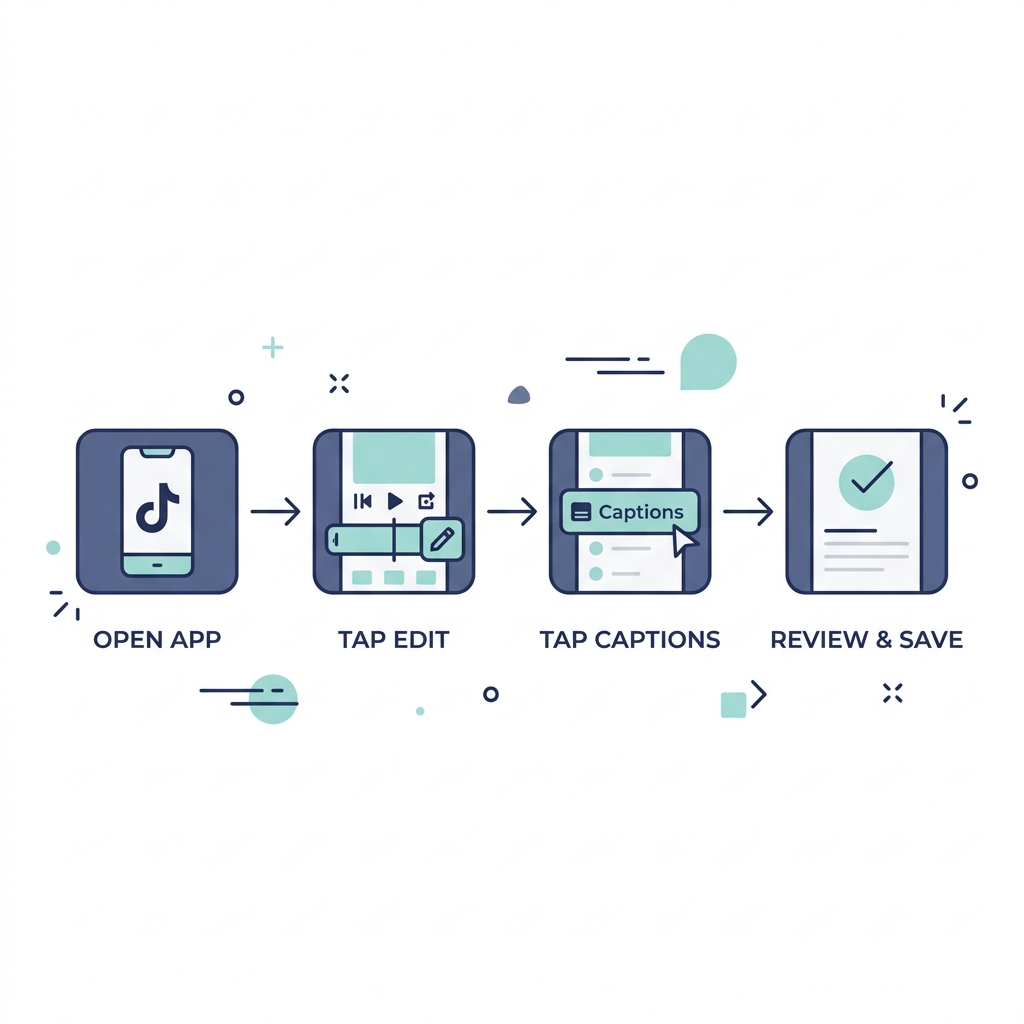
Here's how to enable TikTok's native auto-captions:
- Open TikTok and tap the + icon to record or upload a video.
- After recording or selecting your clip, tap Next to enter the editing panel.
- On the right-side editing panel, tap Captions.
- TikTok will auto-generate captions from your audio — this takes a few seconds.
- Review the captions and tap any word to correct errors.
- Tap Save, then proceed to post as normal.
That's it. A creator recording a simple talking-head video in a quiet room gets accurate captions at zero cost.
What TikTok's native captions can do: Auto-generate from audio in English and select other languages, display inline on video, allow basic word-level editing before posting.
What they cannot do: Produce animated word-by-word highlight styles, offer advanced font or color customization, export captions to other platforms, or handle noisy environments and heavy accents reliably.
The verdict: native TikTok captions are the right starting point for creators posting primarily to TikTok with clean audio. A third-party app earns its cost when those conditions don't apply. For a deeper look at how AI caption accuracy varies across tools, that distinction matters more than most comparison articles acknowledge.
Which TikTok Captioning App Fits Your Workflow?
Before reading every app entry, identify which creator type you are. The right tool changes significantly based on three variables: how many platforms you publish to, how many videos you post per day, and your budget ceiling.
| Creator Type | Platform Count | Daily Volume | Budget | Best Tool Category |
|---|---|---|---|---|
| TikTok-only, casual poster | 1 | 1 or fewer per day | Free preferred | TikTok native captions |
| TikTok-first, wants styled captions | 1 to 2 | 1 to 3 per day | Low to mid paid | Mobile-first app (Captions app) |
| Multi-platform repurposer | 3 or more | 2 to 5 per day | Mid paid | Browser-based tool (Kapwing, Descript) |
| High-volume creator or agency | 3 or more | 5 or more per day | Growth budget | Volume-first platform (GotReach) |
A creator posting once a day to TikTok only: TikTok native or a mobile-first app covers the need. A creator repurposing content to TikTok, Reels, and YouTube Shorts: needs a browser-based tool with multi-platform export. A creator or agency publishing ten or more videos per day: the single-video captioning workflow becomes the bottleneck, and that is where the math changes entirely.
Top TikTok Captioning Apps Compared: Honest Pricing, Accuracy, and Real Limitations
Here is how the major options stack up across the criteria that actually matter for a purchase decision.
| App | Free Tier Reality | Paid Price | Accuracy Notes | Mobile / Desktop | TikTok-Style Output | Language Support | Key Limitation |
|---|---|---|---|---|---|---|---|
| TikTok Native | Fully free, no watermark, no cap | Free | Good in quiet environments; struggles with noise, accents, fast speech | Mobile only | Static only, no animation | English + select languages | No export, TikTok-only use |
| Captions App | Limited free exports per month | ~$19/month (Pro) | Strong in standard conditions; accuracy drops with heavy accents | Mobile (iOS/Android) | Animated, word-by-word highlight, trending styles | 28+ languages | 5 to 10 min processing per video; one video at a time |
| CapCut | Generous free tier; some templates locked | Free with premium add-ons | Good overall; handles music and speech separation | Mobile + Desktop | Strong TikTok-style animated options | 20+ languages | Owned by ByteDance (see section below) |
| Submagic | Limited free trial | ~$20/month (Starter) | Marketed as high-accuracy; independent verification limited | Mobile + Browser | Animated captions, emoji overlays | 48+ languages | Virality and engagement claims are unverified marketing |
| Kapwing | 720p export free with watermark | ~$16/month (Pro) | Solid; performs well in clean audio conditions | Browser-based | Styled subtitles; less TikTok-native feel | 70+ languages | Browser-only; less suited for quick mobile posting |
| Descript | 1 hour transcription free | ~$24/month (Creator) | Transcription-first; excellent for spoken word, podcasts, long-form | Desktop + Browser | Limited TikTok-style animation | English primary | Overkill for short-form only; steep learning curve |
A few notes on specific tools:
The Captions app delivers genuinely strong TikTok-style animated captions and a clean mobile experience. The limitation is real, though: processing one video at a time at 5 to 10 minutes each means posting three times a day creates 15 to 30 minutes of captioning overhead before any editing or posting happens. At Pro tier, throttling on batch processing makes high-frequency posting painful.
Submagic markets itself heavily on engagement and virality outcomes. Those claims are not independently verified. The captioning quality is solid, and the language support is broad, but evaluate it on those merits rather than the marketing copy.
For creators who need browser-based captioning software and desktop editing alternatives, Kapwing and Descript both hold up well in multi-platform workflows, though neither is optimized for the quick mobile-post rhythm TikTok demands.
The CapCut Question: What Creators Need to Know About ByteDance
CapCut is owned by ByteDance, the same parent company that owns TikTok. That is not a rumor or a vague concern — it is documented corporate structure.
In 2024, U.S. Congressional scrutiny of ByteDance-owned apps intensified significantly, and CapCut was explicitly named alongside TikTok in legislative discussions about data privacy and national security. The Congressional Research Service report on TikTok and ByteDance-affiliated apps provides detailed policy context on the regulatory landscape as of 2025. The core concern: apps owned by ByteDance may be subject to Chinese data laws that could compel data sharing with the Chinese government.
CapCut: Weigh the Tradeoffs
Pros:
- Free with a generous feature set
- Strong TikTok-style animated caption output
- Mobile and desktop access
- Regularly updated with trending templates
Cons:
- Owned by ByteDance, subject to the same regulatory scrutiny as TikTok
- U.S. legislative actions in 2024 to 2025 specifically flagged ByteDance-affiliated apps
- Data handling practices governed by Chinese corporate law
- Using it means trusting the same entity that owns the platform you're posting to
For creators who want to avoid ByteDance-affiliated tools, Kapwing, Submagic, Descript, and the Captions app all deliver comparable captioning features without that connection. If data privacy is a priority for you, those alternatives give you comparable output without the ByteDance layer.
When Captioning One Video at a Time Becomes the Bottleneck
Here is the math that changes the conversation: at 5 to 10 minutes of processing per video, captioning three TikToks a day means 15 to 30 minutes of captioning overhead before a single second of editing or posting begins. For an agency managing ten creator accounts, that number compounds fast.
The captioning app is not the real problem at that scale. The single-video-at-a-time workflow is.
GotReach is built for creators and teams who have outgrown that ceiling. The platform creates up to 300 videos in 30 minutes from a single idea and publishes across seven platforms from one centralized workflow. That is not a captioning feature — it is a volume and distribution solution that removes the constraint entirely. The free plan includes up to 30 videos per month with one connected social account and no watermarks.
GotReach keeps the creator's human voice intact. AI handles the volume and distribution; you bring the ideas and authenticity. For creators spending 30 minutes a day on captions alone, that is 30 minutes reclaimed for content and community.
See GotReach's plan options to find the tier that fits your publishing volume. Or if you're ready to stop captioning one video at a time, start your 30-day free trial today.
FAQ: Quick Answers on TikTok Caption Apps
Does TikTok have a built-in auto-captions feature?
Yes. TikTok has had native auto-captions since 2021. You can enable them directly in the app's editing panel by tapping the Captions option after recording or uploading your video. The feature is free and requires no third-party app. See the step-by-step instructions in the first section above.
What is the best free captioning app for TikTok?
TikTok's own native caption tool is the best free option for creators posting directly to TikTok with clean audio. If you want animated or styled captions without paying, CapCut's free tier is the most capable alternative, though its ByteDance ownership is worth factoring in. Every other app on this list limits free use meaningfully.
Is CapCut safe to use for TikTok creators?
CapCut works well as a captioning tool, but it is owned by ByteDance, which owns TikTok. U.S. Congressional scrutiny of ByteDance-affiliated apps escalated in 2024 and 2025 over data privacy concerns. If that risk matters to you, Kapwing, Submagic, Descript, and the Captions app are all non-ByteDance alternatives with comparable output. See the full CapCut section above for more detail.
How accurate are AI-generated captions for TikTok videos?
Accuracy depends more on your recording environment than the app you choose. Clean audio in a quiet room produces reliable results across most tools. Background noise, fast speech, heavy accents, and technical vocabulary all reduce accuracy noticeably. For a deeper breakdown of what to look for when evaluating captioning accuracy, the conditions matter more than the brand name on the app.
Can you add captions to a TikTok video after it has already been posted?
Not directly through TikTok's native tool. Once a video is posted, you cannot edit captions within TikTok's app. Your options are to delete and repost with captions added, or to use a third-party app to caption a downloaded version and re-upload. The cleanest approach is always to caption before posting.
Which captioning app produces the most TikTok-style animated captions?
The Captions app and CapCut both produce strong animated, word-by-word highlight captions that match TikTok's current aesthetic. The Captions app has slightly more polished TikTok-native styling; CapCut matches it closely and adds templates. If animation style is your primary criteria, either works. Processing time on the Captions app is the differentiator at higher posting volumes.
Ready to Move Past One Video at a Time?
Caption apps solve the per-video problem. If you are posting at volume across platforms, the single-video workflow itself is the constraint worth solving. GotReach creates up to 300 videos in 30 minutes, publishes to seven platforms from one workflow, and keeps your voice at the center of everything it produces.
Start your 30-day free trial and see what a volume-first workflow actually feels like.