
Create Video From Videos: Join, Remix and Finish Your Clips
You know short video matters. Keeping up is the hard part. Filming every version from scratch eats the week. That is not a lack of effort. It is too much work for one person.
There is a smaller job. Film your hooks once. Film your solutions once. Then pair them up.
This guide works in any editor. It covers five things. You will join clips, film clips that swap cleanly, and count your videos. Then you will keep each version fresh and finish it for posting.
How do you combine several video clips into one short video?
Put your clips on one timeline, one after another. Set the project to vertical first. Order the clips as hook, then solution, then close. Trim the dead air at both ends. Match the sound and the look. Then preview it. Transitions are optional. A clean cut between two well-filmed clips is often enough.
Every timeline editor works the same basic way. One major software company's help page for its browser editor describes merging as combining clips on the timeline. Placed side by side, they play in a row.
- Start a vertical project. Set the frame to 9:16 before you add anything. Then nothing gets cropped later.
- Add your clips. Know where each new clip lands. In iMovie on iPhone, it goes before or after the clip closest to the playhead. Check it after each add.
- Put them in order. Hook first, then solution, then close. On a phone timeline, touch and hold a clip until it pops off. Then drag it to its new spot.
- Trim dead air at both ends. Apple Support's iMovie guide shows the usual way. Drag the clip's edge toward its center.
- Close the gaps. No black frames between clips.
- Even out sound and look. Clips filmed at different times can drift. Play each cut and listen. Your voice should sound equally loud. Light and skin tone should match.
- Add transitions only if a cut feels rough. One major video platform's own creator guide suggests filming in segments. Segments filmed to fit make plain cuts flow.
- Preview on your phone. Watch once with sound. Watch once without.
The order to aim for:
Hook → Solution → Close
GotReach is built around this order. You record different hooks and solutions once. Then you mix and match them into multiple short videos. AI helps you develop ideas, hooks and solution scripts. It then assists with editing and captions. See it on our content repurposing page, with its plant care example.
How do you record clips so they can be mixed and matched into different videos?
Film each hook and each solution as its own clip. Each one should work without the clip before it. Keep the frame, light, clothes and background the same for every take. Lock focus and exposure. Film vertical. Leave a clean pause at each end. Then any hook can sit beside any solution.
Use this checklist on set:
- Separate scripts. Write hooks and solutions apart.
- Lines that stand alone. No "as I just said." Each clip is a complete thought.
- Locked focus and exposure. On iPhone, touch and hold the focus area until AE/AF Lock appears. Apple Support's camera guide explains it. Tap the screen to unlock.
- Same frame every take. One major video platform's camera has an align tool for lining up takes. A tape mark on the floor works too.
- Same clothes, light and background. Swaps only work if nothing jumps.
- Vertical frame. A social media management company's guide says Reels look best at 1080 x 1920 pixels, a 9:16 ratio. Film in that shape and skip the crop.
- A clean pause before and after. Silence at both ends makes trimming easy.
- Clear file names. Hook-1, Hook-2, Solution-1. You will thank yourself later.
A sample shot list:
| Clip | What to say |
|---|---|
| Hook 1 | A question your customers ask |
| Hook 2 | A common mistake you see |
| Solution 1 | Your first fix |
| Solution 2 | Your second fix |
| Solution 3 | Your third fix |
GotReach's workflow includes AI script generation and batch recording with a teleprompter. Those help you get the words down. The know-how is still yours. You bring your expertise, record the clips, and review the finished videos.
One limit, plainly. GotReach is for planned short recordings. It does not pull clips out of long videos.
How many different short videos can you make from one recording session?
Multiply your hooks by your solutions. Two hooks and three solutions give six possible videos from five clips. That is the ceiling, not the target. Some pairs won't make sense. Some will look too alike. Cut those. The number you post is usually lower than the number you can build.
| Solution 1 | Solution 2 | Solution 3 | |
|---|---|---|---|
| Hook 1 | Video 1 | Video 2 | Video 3 |
| Hook 2 | Video 4 | Video 5 | Video 6 |
Our plant care example on the repurposing page shows the same idea. Five clips, six possible videos.
Now mark each cell. Ask two questions. Does this hook set up this solution? Would a follower think it's the same as another one? Keep the clear yes answers. Drop the rest.
This matters. Platforms are pushing back on videos made from one template with little change between them. The goal is different videos, not more of them.
Then spread what's left across your calendar. Pick a posting rhythm you can keep. Our guide to a month of videos splits one subject into twelve useful answers. It groups them by week. One recording session. Weeks of social videos.
How do you keep videos made from the same clips from looking repetitive?
Change something real in each version. Lead with a different hook. Open on a different first frame. Rewrite the on-screen text and the post caption. Swap the music or B-roll. Vary the call to action. Space out videos that share a solution clip. Then watch comments and results for signs people feel they've seen it.
Platforms are paying attention. TechCrunch reports that YouTube now names repetitive content as inauthentic. That includes template-made videos with little variation between them. Channels dedicated to it are removed from the YouTube Partner Program. That holds whether AI made it or not.
Instagram and Facebook aim mostly at reposting. PetaPixel reports that Instagram will stop showing some accounts to non-followers. These are accounts that mainly share work they didn't create or haven't meaningfully transformed. TechCrunch also reported that Facebook cuts the reach of duplicate copies. Remixing your own clips is not the target. Still, meaningfully transformed is a good bar for each version.
What to change between versions:
- Hook
- First frame
- On-screen text
- Caption style
- Music
- B-roll or crop
- Call to action
- Posting order
A simple rotation. No solution runs twice in a row:
| Post | Hook | Solution |
|---|---|---|
| 1 | Hook 1 | Solution 1 |
| 2 | Hook 2 | Solution 2 |
| 3 | Hook 1 | Solution 3 |
| 4 | Hook 2 | Solution 1 |
| 5 | Hook 1 | Solution 2 |
| 6 | Hook 2 | Solution 3 |
Put other posts between these when you can.
Then check. Read your comments. A note like "didn't you post this?" is a signal. Compare versions that share a clip. If one falls well behind its twin, change more next time. If you boost videos as ads, Meta's Ads Manager can show a creative fatigue message. That means the audience has seen the ad too often and results are slipping.
In GotReach, Analytics sits beside your video library and publishing. Review what worked. Then plan your next recording.
What do you need to add to combined clips to make a finished short video?
Add captions and check them by hand. Put hook text on screen in the opening seconds. Clean up the audio and set music under your voice. Add light branding and one call to action. Keep text clear of platform buttons. Pick a cover frame, write the post caption, watch it through, then schedule.
Work through it in this order:
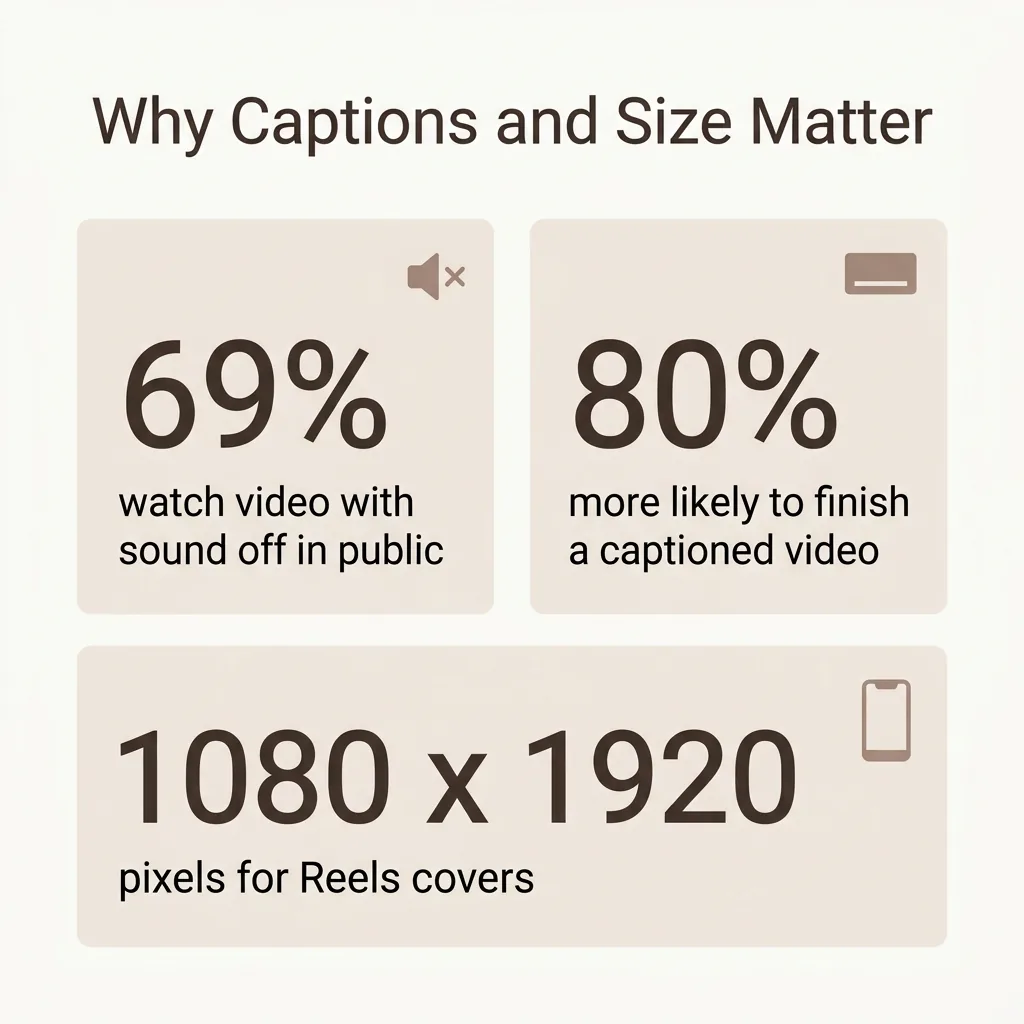
- Captions, reviewed. Many people watch with the sound off. In a 2019 survey, 69% said they watched video without sound in public. A 2019 report found 80% of consumers were more likely to finish a video with captions. AI captions are a start, not the finish. Check names, specialized words, timing and readability. Read how AI captions work and when to trust them. For styling, see what matters in a caption editor.
- Hook text up front. One major video platform's creator guide says to grab attention in the first few seconds. Otherwise viewers scroll. That 2019 report also said to design for sound off with on-screen text or open captions.
- Audio cleanup and music level. Cut hum and noise. Keep music under your voice.
- Branding. Your name or logo, small.
- Call to action. One per video. Make it clear.
- Text clear of platform buttons. Buttons and captions cover the edges. Preview on a phone to check.
- Cover frame. A social media management company's guide puts Reels covers at 1080 x 1920 pixels. That is the same size as the video.
- Post caption. Write it fresh for each version.
- Final watch-through. Once more, start to end.
- Schedule. Pick the day and time.
In GotReach, the Instagram post scheduler takes four steps. Connect an Instagram account. Choose a finished short video. Prepare the post and set the schedule. Then review the result. Facebook and Instagram need to be business or professional accounts before GotReach can publish to them.
Supported formats, account eligibility, and direct publishing options depend on Instagram permissions and the connection available in GotReach. Do not assume every native Instagram effect, audio feature, or post format is available in a third-party scheduler.
Frequently Asked Questions
How can you combine video clips online for free?
Use a free editor, but check its export terms first. One major software company's free browser editor exports up to 1080p with no watermark. Its free plan lets you export as many videos as you like. Not every free editor works that way. Some add a watermark. Some editors run on your phone, so you can join clips without uploading them. GotReach also has a Free plan for new users.
How long should each clip be when combining clips into a short video?
Short enough that the hook lands in the first few seconds. There is no set length for each clip. Trim by ear. Cut every pause and repeat. The outer limits are wider than most videos need. One major platform's own announcement says its short videos can run up to 3 minutes. A social media management company's guide says Instagram doesn't show Reels over 3 minutes to new audiences.
What file format should you export a short social video in?
Export an MP4 with H.264 video and AAC audio, at 1080 x 1920 in 9:16. A social media management company's guide recommends that one setting for Reels, TikTok, Shorts and Stories. The same guide lists 23 to 60 frames per second for TikTok in-feed video. Your clips set the ceiling. In iMovie on iPhone or iPad, the best-quality clip sets the movie's resolution. Film at full quality from the start.
Once your clips are joined, the next steps sit together in GotReach. Captions, Schedule and Analytics share one workspace. Ready to plan your first session?
Start a partnership inquiry
Sources
- Apple Support — Trim and arrange videos and photos in iMovie - Apple Support · retrieved October 22, 2026
- Apple Support — Use iPhone camera tools to set up your shot - Apple Support · retrieved October 22, 2026
- TechCrunch — YouTube clarifies policies around AI slop and upsetting videos | TechCrunch · retrieved October 22, 2026
- PetaPixel — New Instagram Policies Target Reposted Content | PetaPixel · retrieved October 21, 2026
- TechCrunch — Following YouTube, Meta announces crackdown on 'unoriginal' Facebook content | TechCrunch · retrieved October 22, 2026
- YouTube Official Blog — Your guide to getting started with YouTube Shorts - YouTube Blog · retrieved October 21, 2026
- Apple Support — Arrange video clips and photos in iMovie on iPhone - Apple Support · retrieved October 22, 2026
- Apple Support — Add video clips and photos in iMovie on iPhone - Apple Support · retrieved October 22, 2026
- Microsoft Support (Clipchamp) — How to combine videos | Microsoft Support · retrieved October 21, 2026
- Jon Loomer Digital — Creative Fatigue: What It Is and How to Prevent It - Jon Loomer Digital · retrieved October 22, 2026
- Buffer — Instagram Post Size Guide 2026: Post, Story, and Reels Dimensions · retrieved October 22, 2026
- Streaming Media — 80% of Video Caption Users Aren't Hearing Impaired, Finds Verizon · retrieved October 20, 2026
- Next TV (Broadcasting & Cable) — Mobile Videos Often Watched Without Audio, Study Finds | Next TV | Broadcasting+Cable · retrieved October 20, 2026
- Microsoft Clipchamp — Compare free editing tools and premium access with Microsoft 365 · retrieved October 22, 2026
- YouTube Official Blog — Tall updates coming to Shorts - YouTube Blog · retrieved October 21, 2026
- Sprout Social — The Ultimate 2026 Social Media Video Specs Guide | Sprout Social · retrieved October 20, 2026
- Apple Support — Create a new iMovie project - Apple Support · retrieved October 22, 2026