The Best Tool for Scheduling Social Media Posts Depends on Your Week
Long tool lists. Every vendor ranks itself first. Prices that don't match. If you're already juggling apps, that's tiring.
Here's the short version. There is no single best tool. There is the one that fits where your work gets stuck. Each question below gets a direct answer, then the steps.
GotReach is our tool, so weigh that as you read. We'll say where it fits and where it doesn't. We won't name or rank other tools.
Are free social media scheduling tools good enough to use?
Yes, for light posting. If you post a few times a week to one or two accounts, a free plan or the platform's own scheduler can cover it. Free stops being enough when your batch is bigger than your queue. It also stops being enough when you add channels or a second person.
Start with the apps you already use. The Meta Help Centre says public Instagram accounts can schedule reels, photos and carousel posts right in the Instagram app. Without a subscription, that reaches up to 30 days ahead. It costs nothing.
Free third-party plans have caps. One scheduling vendor's pricing page allows 10 scheduled posts per channel on its free plan. A slot opens again once a post goes live. Its help center puts it plainly: at one post a day, you can plan about 10 days ahead. The same vendor locks any channel past its free plan's three-channel limit. Another vendor offers its plans free for 14 days. That's a trial, not a free plan.
Free terms change. Check the current page before you build your week on one.
A free plan is enough if:
- You post a few times a week.
- You use one to three accounts.
- The platform's own scheduler reaches as far as you plan.
- You work alone.
- You don't mind refilling the queue often.
Upgrade when:
- Your batch is bigger than your queue.
- You add a channel the free plan locks.
- A second person needs to post or approve.
- You want results and replies next to your schedule.
- The free option turns out to be a trial.
Our own Free plan includes 30 monthly video generations and 1 social account. That's its limit. Facebook and Instagram need business or professional accounts before GotReach can publish to them. You can see what each GotReach plan includes before you spend anything.
How do you choose a social media scheduling tool as a solo creator?
Start from your real week, not a feature list. Write down where you post. Check how far each platform's own scheduler reaches. Count the videos in one batch. Skip the team features. Then test the tool with your own clips. Judge it by where your work gets stuck: making, publishing, approvals or account coverage.
- List your platforms. Write down every account you post to. That number shapes everything else.
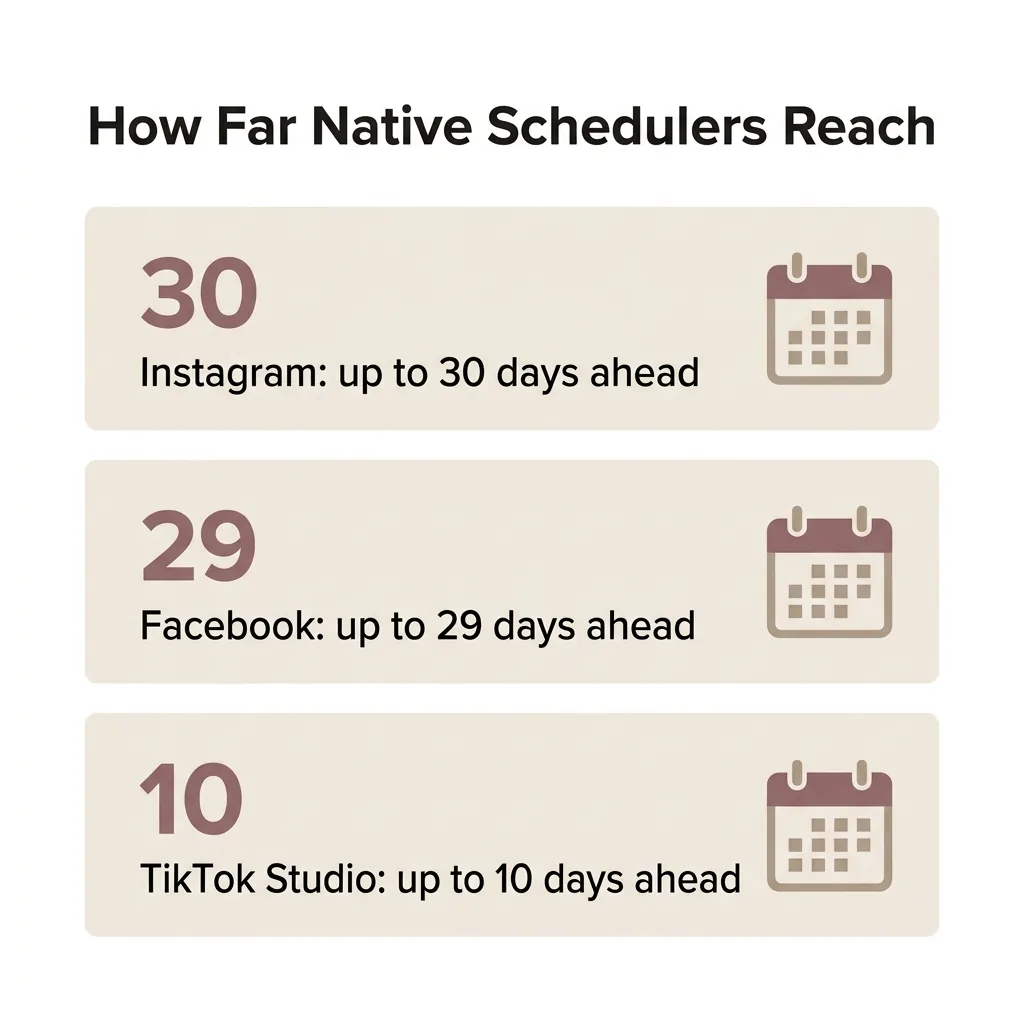
- Check each native window. Instagram's own scheduler reaches 30 days ahead without a subscription. Facebook's reaches 29 days, a scheduling vendor's blog notes. The same blog puts TikTok Studio at up to 10 days out. If native reaches far enough, you may not need more.
- Count your batch against the queue. Many queue limits count posts waiting at one time. One vendor's help center says its limit is not daily, weekly or monthly. It's how many posts a channel's queue holds at once. A big batch needs a deep queue, not just a big posting allowance.
- Skip what you won't use. Entry tiers are often pitched at people working alone. One vendor's plan guide aims its entry plan at solo practitioners, freelancers and small businesses. Approval workflows sit on its higher tier. If you're the only one posting, you don't need approvals.
- Make sure you can see what went live. Look for a clear publishing status on each post. If a post doesn't go out, you want to know without opening every app.
- Test with a real week. Use a trial or free plan. Load your own videos. Schedule them. Watch what happens.
GotReach puts scheduling next to video creation and your media library. In GotReach you can schedule, track and respond to posts. A batch of finished videos is the start of a consistent publishing plan.
For a trial checklist and a workflow comparison, read our guide to comparing scheduling tools for video. To see each step from batch to schedule, read how to schedule social media posts from a batch of videos.
What is the best social media scheduling tool for a small business?
There's no single winner. The right tool depends on your networks, how many accounts you run, who posts and whether you make video. Match your situation to a type of tool. Then check that the entry tier covers your accounts. Last, test it on one real week before you commit.
Know where your customers are. The Small Business & Entrepreneurship Council's 2026 tech use survey asked owners which platforms matter most for revenue and brand building. Facebook led at 62%. Instagram came next at 43%. YouTube followed at 36%, then TikTok at 26%. Among owners who use TikTok, 91% said it's important to their viability.
Account limits differ by tier. One vendor's entry plan manages up to 10 accounts. Another's entry plan publishes across 5 profiles. Count your accounts before you compare.
| Your situation | Type of tool that fits | What to check |
|---|---|---|
| One-person shop, a few posts a week | Native scheduler or free plan | How far ahead it reaches; queue cap |
| Local business mostly on Facebook and Instagram | Native schedulers, or one tool covering both | Business or professional accounts; account count |
| Several people posting | Team tool with seats and permissions | Cost per seat; approvals; who can publish |
| Many brand accounts | A tier with enough account coverage | Account limit on the entry tier |
| Video-led brand | Video-first workspace, such as GotReach | Recording, captions, scheduling and results in one place |
| Little or no video | Distribution-only or native tool | GotReach isn't built for this |
This post comes from GotReach. It fits businesses that run on short video. It begins with planning and recording. Then editing, captions, publishing, analytics and conversations sit in the same workspace. GotReach's Starter plan includes unlimited video generation and 4 social accounts. Premium includes unlimited generation, 7 social accounts and an enterprise workspace. If you rarely make video, a native or distribution-only tool may be all you need.
Facebook and Instagram need business or professional accounts before GotReach can publish to them.
For a fuller look, see our guide to social media management tools for short-form video.
How much does a social media scheduling tool cost?
It depends on what the vendor counts. Some charge per channel. Some charge per user, per seat or per brand. Annual billing often shows a lower monthly rate than paying month to month. So count your accounts and your people first. Then compare prices. The same tool can cost very different amounts for two different businesses.
The prices below are as vendors listed them at the time of writing. They change, so check before you buy.
| Pricing model | What it counts | Example entry price | What makes it grow |
|---|---|---|---|
| Per channel | Each connected account | Free plan, then from $6/month per channel | Each account you add |
| Per user | Each person who logs in | From $99/user/month, billed annually | Each teammate |
| Per seat | Each seat on the plan | $79/seat/month billed annually, or $99/seat/month billed monthly | Each added seat at the full rate; monthly billing |
| Per brand | Each brand you manage | $20/month for up to 5 brands, billed annually | More brands; monthly billing |
A few things the table hides. One per-user vendor's own plans page lists tiers at $99, $199 and up to $399. One seat-based vendor bills each extra seat at the same rate as your plan. So every teammate repeats the full price. One brand-based vendor shows its prices on annual billing, which it says saves up to 24% against monthly. A software roundup lists another entry plan from $29/month.
Here's how GotReach prices. Our Free plan includes 30 monthly video generations and 1 social account. Starter includes unlimited video generation and 4 social accounts. Premium includes unlimited generation, 7 social accounts, an enterprise workspace and extra seats at $79/seat/month. Add up every subscription you already pay for. Five separate tools can reach $415.99/month. The GotReach homepage lists GotReach at $99/month. Our pricing page lists what each plan includes, so you can match one to your accounts and team.
If you're a founding member, your pricing is locked in. No changes needed.
What is the best social media scheduling tool for short-form video?
The one that treats video as a workflow, not a single post. It should take a finished clip, keep it organized, schedule the whole batch, show what published and feed results into your next recording. Native apps handle light video posting. A batch of Reels, TikToks and Shorts often needs more runway than free options give.
Native first. Instagram lets public accounts schedule reels from the app. A longer window, up to 365 days, needs a paid Meta One plan. TikTok Studio reaches up to 10 days out, a scheduling vendor's blog notes. That's short for a big batch. Free third-party queues can be tight too. A 10-post queue per channel holds about 10 days at one post a day.
This post comes from GotReach. Here is the workflow, with what to check in any tool and how we handle each step.
- Start with finished clips. Check that the tool takes finished short videos. GotReach turns one recording session into several short videos by mixing and matching hooks and solutions. It's built for planned short recordings. It does not currently extract clips from long-form videos. Review auto-generated captions before you publish. Check names, specialized words, timing and readability.
- Keep a library. Check that clips stay easy to find. GotReach organizes your video library automatically.
- Schedule the batch. Check that you can set a whole batch at once. In GotReach you choose content, prepare the post and set the schedule. Batch scheduling keeps your posting plan moving. You stay in control of the content.
- Check publishing status. Check that you can see what went out. GotReach tracks publishing status for your posts.
- Review what worked. Check that results sit near your schedule. In GotReach, analytics sits beside your library and publishing. Review it, then plan your next recording.
For Instagram, you can schedule supported content to a connected account. You can plan posts straight from a finished video batch. Third-party scheduling has limits next to native features. Supported formats, account eligibility, and direct publishing options depend on Instagram permissions and the connection available in GotReach. Do not assume every native Instagram effect, audio feature, or post format is available in a third-party scheduler.
See how GotReach schedules short-form video. The page includes a sample you can click through. Interactive sample with fictional data. Nothing is published, sent, or saved to an account.
Instagram first? Read the Instagram post scheduler steps. Need to fill the batch first? Here's how to turn one recording session into a month of short videos.
Frequently Asked Questions
How many social media accounts can you connect to a scheduling tool?
It depends on the plan. One vendor's free plan connects up to 3 channels. One entry paid tier manages up to 10 accounts. Some higher tiers have no account cap. GotReach's Free plan includes 1 social account, Starter includes 4 and Premium includes 7. Count your accounts before you pick a plan.
Is a scheduler that used to be free still free?
Not always. One widely used scheduling vendor's plans page now offers a 14-day trial, with no credit card needed. A software roundup lists its paid plans from $99/user/month, billed annually. For free scheduling, start with each platform's own tools. Instagram schedules up to 30 days ahead without a subscription. Some tools still keep free tiers, so check their current terms. Our Free plan includes 30 monthly video generations and 1 social account.
Why should you use a tool to schedule social media posts?
So you can show up consistently without recording every day. You make a batch once. The tool posts it on plan. One scheduling vendor's 2025 study of more than 100,000 of its own users found its most consistent posters got 5x more engagement per post. Its data also says top accounts post more often and more consistently. That's their users, not a promise for yours. The same vendor suggests 3 to 5 Instagram posts a week as a pace you can keep without burning out.
Scheduling doesn't replace showing up after a post goes live. The U.S. Small Business Administration suggests a daily block, about 15 minutes, to check replies and comments. One vendor's data ties replying to comments to 21% more engagement. In GotReach you can schedule, track and respond to posts in one place.
Ready to see if GotReach fits your week?
Start a partnership inquiry
Sources
- Meta Help Centre — How to schedule posts and reels further in advance on Instagram with Meta One | Meta Help Centre | Meta (en-gb) · retrieved October 21, 2026
- Small Business & Entrepreneurship Council · retrieved October 21, 2026
- U.S. Small Business Administration — Setting Up a Social Media Calendar for Your Small Business - Small Business Administration · retrieved October 21, 2026
- Buffer — Pricing | Buffer · retrieved October 21, 2026
- Buffer Help Center — Help Center - How many posts can I schedule in advance? · retrieved October 21, 2026
- Sprout Social — Which Sprout Social Plan is Right for You? | Sprout Social · retrieved October 21, 2026
- Hootsuite Blog — How to schedule TikTok posts on mobile and desktop · retrieved October 21, 2026
- Hootsuite Blog — How to schedule a post on Facebook (3 methods) · retrieved October 21, 2026
- Metricool — Metricool Premium Plans: Built To Grow With Your Workflow · retrieved October 21, 2026
- Hootsuite — Hootsuite Plans, Prices, and Features · retrieved October 21, 2026
- Zapier — The 10 best social media management tools in 2026 | Zapier · retrieved October 21, 2026
- Later — Later Pricing Plans for Brands, Agencies & Social Media Managers · retrieved October 21, 2026
- Buffer — Consistent Posting Means 5x More Likes, Comments, and Shares: Study · retrieved October 21, 2026
- Buffer — The State of Social Media Engagement in 2026: 52M+ Posts Analyzed · retrieved October 21, 2026
- Buffer — How Often Should You Post on Instagram in 2026? What Data From 2 Million Posts Tells Us · retrieved October 21, 2026
- Buffer — How to Get More Followers on Instagram in 2026 (Tried & Tested) · retrieved October 21, 2026