How to Make YouTube Shorts That Actually Get Views
Most creators upload their first Short and get almost no views. The content is fine. The problem is that they skipped the decisions the algorithm actually rewards. This article covers both the creation process and the strategic layer underneath it — because the tool you pick matters less than understanding what makes a Short worth watching in the first place.
Key Takeaways
- The first three seconds of your Short determine whether the algorithm distributes it — hook structure is not optional.
- Watch completion percentage matters more than view count for Shorts Feed distribution.
- AI auto-clipping tools work best for podcast, interview, and talking-head content. Scripted, gameplay, and slide-based video needs more editorial judgment.
- A consistent posting cadence builds an algorithmic signal faster than volume alone.
What Actually Makes a YouTube Short Perform (Start Here)
The Shorts Feed is a recommendation system that reads viewer behavior, not creator effort. The two signals it weighs most heavily are watch completion percentage and replays. Upload frequency does not build momentum on its own.
The first two to three seconds function as your hook. If a viewer swipes away before the hook lands, the algorithm records that as a negative signal and reduces distribution. That means the opening of your Short is not a warm-up — it is the audition.
Strong hooks are specific and immediate. A few patterns that work by content type:
- Educational: "Here is the one thing most creators get wrong about short-form video."
- Entertainment: "I posted one Short every day for 30 days. Here is what the data actually showed."
- Tutorial: "In the next 45 seconds I will show you exactly how to format a Short that gets replayed."
None of these are mysterious. They make a specific promise in the first breath and then deliver on it.
Not every video translates well to a 60-second vertical clip. Talking-head, interview, and podcast content repurpose naturally because the transcript carries the story. Scripted narrative, gameplay, and slide decks require more editorial judgment — the visual context and pacing often do not survive a tight trim.
The right mindset before you open any tool: strategy determines results, tools accelerate execution. A well-chosen 45-second clip with a strong hook will outperform a perfectly edited Short with no reason to watch.
How to Make a YouTube Short: The End-to-End Process
You have two paths. Which one fits depends on your content library, not on which is inherently better.
Path 1: Record natively in the YouTube app. Open the app, tap the plus icon, and select "Create a Short." Record up to 3 minutes in vertical format directly from your phone. No editing software required. This works well if you are starting from scratch with no existing video library.
Path 2: Repurpose a longform video. If you have a backlog of podcast episodes, interviews, or talking-head content, this path compounds faster. One 60-minute podcast episode can yield 8 to 12 Shorts if the content is conversational and hook-rich. This is where AI tools provide the biggest time advantage.
For the repurposing path, here is the workflow:
- Identify the source video. Prioritize talking-head, interview, or podcast content where the transcript carries the narrative.
- Find the hook moments. Look for moments where a strong claim, surprising insight, or clear question opens the clip naturally.
- Trim to under 60 seconds. Under 60 seconds typically performs better for early-stage channels where the algorithm is still building a signal.
- Reformat to 9:16 vertical. Horizontal video uploaded as a Short degrades quality and reduces algorithmic distribution.
- Add captions. Open captions — burned into the video file — improve watch time for viewers watching without sound. For a detailed look at caption formats and how to add them, that resource covers every option clearly.
- Write a specific title. Front-load the most compelling detail. Vague titles that tease without delivering increase swipe-away rate.
- Select your cover frame manually. The auto-default is rarely the most compelling moment in the clip.
AI Tools for YouTube Shorts: How They Work and How to Choose
AI auto-clipping works like this: the tool analyzes the video transcript, identifies moments with high information density or strong phrasing, and scores clip candidates based on signals associated with viewer retention. It surfaces the best candidates. It does not guarantee performance. For a deeper breakdown of how AI clip generators work, the mechanics are worth understanding before you commit to a tool.
Where AI tools excel: podcast, interview, and talking-head content where the words carry the story. Where they underperform: scripted narrative, gameplay, and slide-based video where visual timing and context matter as much as the transcript.
The bottleneck problem is real. Manual editing takes 5 to 10 minutes per Short. For creators who need a consistent posting cadence across multiple platforms, that math stops working fast. You end up either posting inconsistently or burning hours on production.
Two categories of tool illustrate the tradeoff clearly. AI avatar tools solve the speed problem but create an authenticity problem — the creator's voice is replaced by a synthetic one, and that replacement is often the thing that made the content worth watching. Single-video tools preserve the human voice but cannot support scale. At 5 to 10 minutes per clip, a consistent multi-platform schedule becomes unsustainable.
When evaluating any AI Shorts tool, weigh these criteria:
- Watermark policy on the free plan — a watermarked free tier means paying before you know if the tool fits your content.
- Free tier volume limits — how many clips per month before you hit a paywall.
- Caption quality — auto-generated captions vary significantly in accuracy.
- Direct Shorts publishing support — some tools export video files; others push directly to platforms.
- Bulk creation capability — can the tool process a full episode into multiple Shorts in one session, or is it one video at a time?
- Human voice preserved — does the tool clip your content or replace your voice with an AI avatar?
GotReach is built for scale without the bottleneck. It produces up to 300 videos in approximately 30 minutes from a single idea, distributes across seven platforms from one workflow, and keeps your voice exactly as it is. The free plan includes up to 30 videos per month with no watermark.
| Tool | Watermark on Free Plan | Free Tier Limit | Caption Quality | Shorts Publishing | Bulk Creation | Human Voice Preserved |
|---|---|---|---|---|---|---|
| GotReach | No watermark | 30 videos/month | Auto-generated | Yes | Yes (300 videos/30 min) | Yes |
| AI avatar tool category | Varies | Limited | Varies | Varies | No | No (AI voice replaces creator) |
| Single-video tool category | Varies | Limited | Varies | Varies | No (5-10 min per video) | Yes |
For a full breakdown of what is included at each tier, see GotReach pricing and plan options.
Technical Requirements Before You Publish
Technical errors are preventable. A Short that fails because of wrong aspect ratio or missing captions is a waste of a good hook.
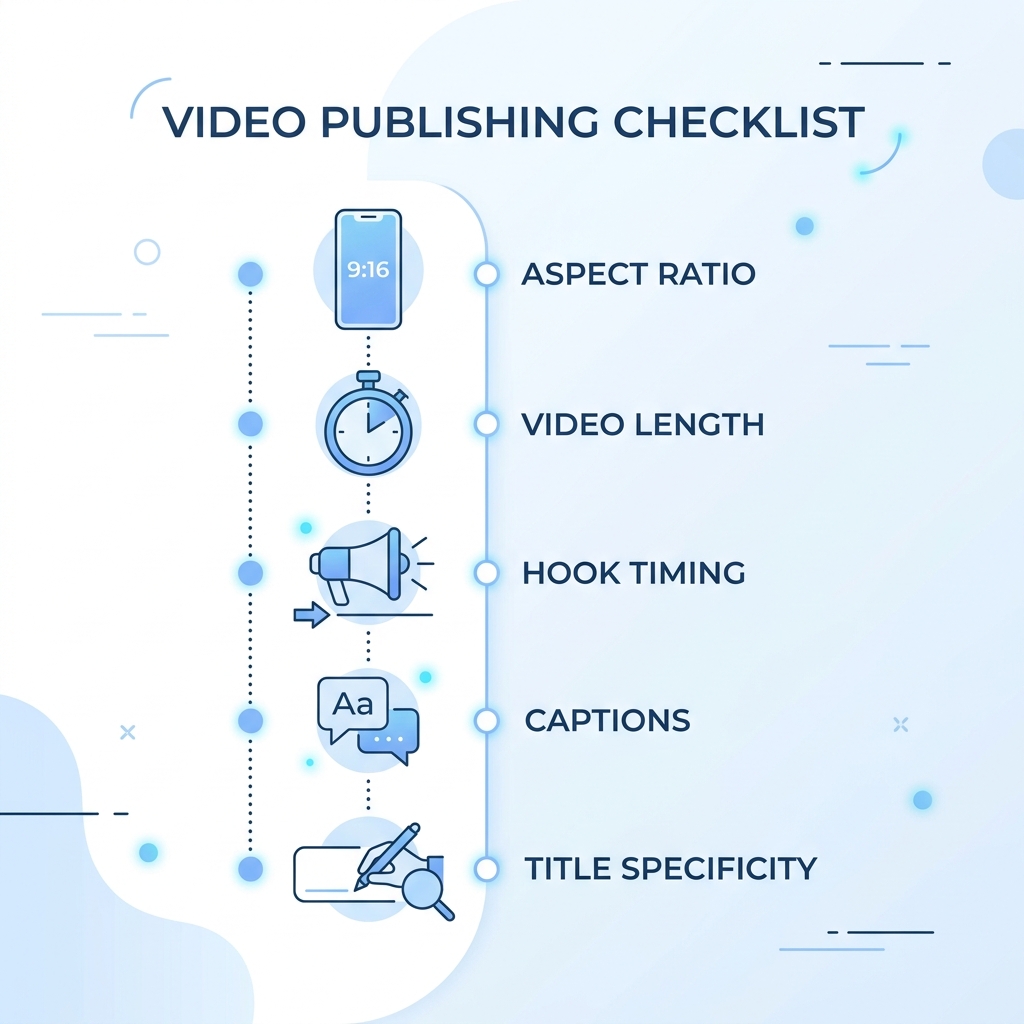
Aspect ratio: 9:16 vertical is required. Uploading horizontal video as a Short degrades quality and reduces algorithmic distribution.
Resolution: 1080x1920px minimum. Lower resolution is processed but performs worse in feed placement.
Length: YouTube now allows Shorts up to 3 minutes, but under 60 seconds typically performs better for early-stage channels. The algorithm needs a watch completion signal, and shorter clips are easier to complete.
Captions: Burned-in captions exported into the video file are the most reliable option. YouTube's auto-generated captions are a fallback, not a substitute for accuracy. For a detailed look at caption format options, the guide to video caption options covers burned-in, SRT, and auto-generated formats.
Before you hit publish, run through this list:
- Aspect ratio is 9:16 vertical
- Resolution is at least 1080x1920px
- Length is under 60 seconds (or intentionally longer with a strong retention reason)
- Hook lands in the first 2-3 seconds
- Captions are included (burned-in preferred)
- Title front-loads the most specific or compelling detail
- Relevant hashtags added (niche-specific, not just #Shorts)
- Cover frame is manually selected
How the Shorts Feed Works and How to Get Seen
The Shorts Feed is a separate recommendation system from the main YouTube algorithm. A video that performs well in longform does not automatically carry that authority to Shorts. The two systems read different signals.
Watch completion and replays are the primary distribution signals on the Shorts Feed. According to how the Shorts Feed algorithm distributes content, a Short that gets watched 80% through consistently will be pushed to more viewers than one with high view count and low completion. High swipe-away rate tells the algorithm the content is not landing.
Title optimization matters more than most creators expect. A vague title that generates curiosity but does not deliver on it increases swipe-away rate, which the algorithm reads as negative feedback. Front-load specificity: tell the viewer exactly what they are about to get.
For early-stage channels, posting consistency matters more than volume. Two Shorts per week published consistently will develop an algorithmic signal faster than seven Shorts in one week followed by silence. The algorithm needs a pattern to learn from.
Monetization and What to Actually Expect
Shortsmonetization is real but modest. The YouTube Partner Program has two eligibility paths:
- Standard path: 1,000 subscribers plus 4,000 watch hours from longform video in the past 12 months.
- Shorts path: 1,000 subscribers plus 10 million Shorts views in the past 90 days.
- Shorts RPM is lower than longform. For most early-stage creators, Shorts income alone is not a primary revenue source.
- Best use of Shorts: top-of-funnel growth that converts viewers to subscribers and longform watch time.
New channels typically see low initial views before the algorithm develops a signal for their content. That is not evidence that Shorts do not work. It is evidence that the signal is still being built.
The compounding effect is worth understanding: a consistent Shorts cadence that drives subscribers also accelerates longform monetization eligibility. The two formats work together. Creators who treat Shorts as a subscriber acquisition tool rather than a direct revenue source will have more accurate expectations and more patience to let the algorithm develop.
Start Without the Production Bottleneck
If you have been putting off Shorts because editing takes too long, that is exactly the problem GotReach is built to remove. Produce up to 300 videos in about 30 minutes, publish across seven platforms from one workflow, and keep your voice exactly as it is.
Start your 30-day free trial and see how many Shorts you can build from content you already have. No credit card required to get started.
Not ready to trial yet? Join the GotReach updates list for launch news, early access, and potential discounts as new features roll out.
Frequently Asked Questions
How long should a YouTube Short be to get the most views?
Under 60 seconds typically performs better for early-stage channels. The algorithm rewards high watch completion, and shorter clips are easier for viewers to finish. Longer Shorts can work, but only if the retention reason is strong enough to hold attention through the additional length.
Do I need an AI tool to make YouTube Shorts, or can I edit them manually?
Manual editing works, but at 5 to 10 minutes per Short, a consistent multi-platform posting cadence becomes hard to maintain. AI tools make bulk creation practical. For creators repurposing longform content regularly, the time difference is significant.
Why are my YouTube Shorts getting zero views?
Low early views are normal while the algorithm builds a signal for your content. The most common fixable causes are: no strong hook in the first two to three seconds, low watch completion rate from weak content-to-format fit, and inconsistent posting cadence. Check those three before assuming the content itself is the problem.
Can I post the same video as a Short and a TikTok?
Yes, with minor adjustments. The 9:16 vertical format works across YouTube Shorts, TikTok, and Instagram Reels. Captions and title framing may need platform-specific tweaks, but the core clip transfers. Multi-platform publishing tools handle the distribution from a single workflow.
How many Shorts should I post per week as a new creator?
Two per week published consistently is a practical starting cadence for early-stage channels. Consistency builds an algorithmic signal faster than irregular volume. Seven Shorts in one week followed by two weeks of silence works against you.
When do I start making money from YouTube Shorts?
Monetization requires meeting YouTube Partner Program thresholds first. The Shorts-specific path requires 1,000 subscribers and 10 million Shorts views in 90 days. Even after qualifying, Shorts RPM is lower than longform. Treat Shorts as subscriber and audience acquisition, not immediate income.