AI Caption Generators: How They Work, What to Compare, and Which One Fits Your Workflow
Manual captioning takes 5 to 10 minutes per video. At 20 videos a week, that is two to three hours of editing time that could go toward content strategy, scripting, or filming. AI caption generators exist to close that gap, but most tool pages skip the part that actually matters: there are two fundamentally different types of AI caption tools, and choosing the wrong one wastes exactly the time you were trying to save.
This article gives you a criteria-based evaluation framework, a platform-by-platform format reference, and honest accuracy expectations so you can pick the right tool for your specific workflow, not just the one with the best landing page.
Key Takeaways
- There are two distinct types of AI caption generators: video transcription tools and social media caption copywriting tools. Choosing the wrong type is the most common mistake.
- Transcription accuracy typically runs 90 to 93 percent on clean audio, meaning roughly one error every six to ten seconds. Plan for a review pass.
- Free tiers vary significantly. Some add watermarks, some cap exports, some restrict languages. Evaluate what "free" actually means before committing.
- Platform format matters: TikTok and Instagram Reels favor burned-in captions; YouTube and LinkedIn support SRT file uploads for better SEO and accessibility.
- If you are producing video at volume across multiple platforms, a single-video captioning tool is not a sustainable workflow.
Two Types of AI Caption Generators (and Why the Difference Matters)
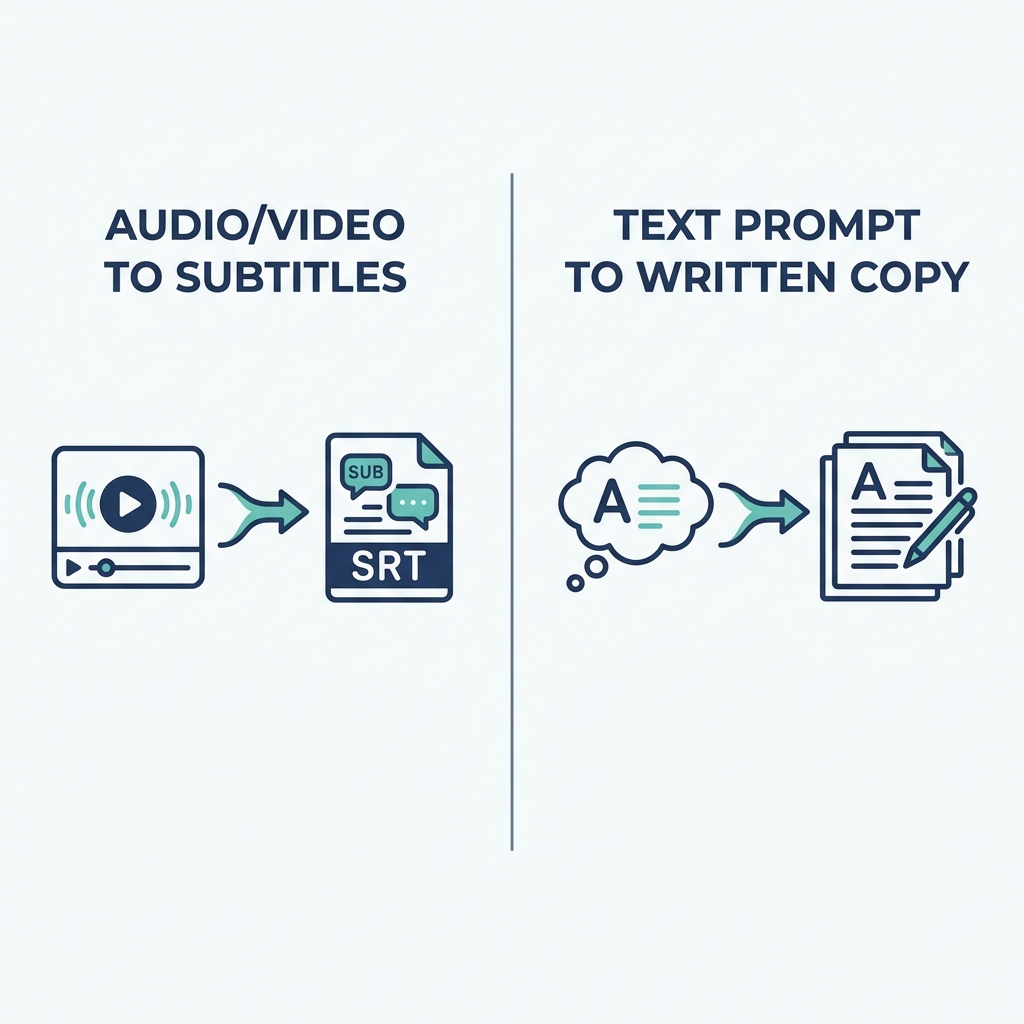
Most search results treat AI caption generators as one category. They are not. Before you evaluate accuracy, pricing, or export formats, you need to know which type of tool you actually need, because the inputs, outputs, and use cases are entirely different.
Video transcription captioning tools take an audio or video file as input, extract the speech, convert it to text using a speech-to-text model, align each word to a timestamp, and output the result as burned-in captions (baked into the video frame) or as a subtitle file such as an SRT or VTT. No writing is involved. The tool is transcribing what was said, not generating new copy. For a full breakdown of the difference between captions and subtitles, that distinction matters for compliance and platform strategy.
Social media caption generators work differently. You provide a prompt, topic, or one-sentence brief, and a language model generates written copy for a post caption. There is no audio file. The tool is writing, not transcribing. These tools help with Instagram captions, LinkedIn post text, TikTok descriptions, and similar written accompaniments to content.
Here is how they compare side by side:
| Feature | Video Caption Generator | Social Media Caption Generator |
|---|---|---|
| What it does | Transcribes speech from audio or video | Generates written copy from a text prompt |
| Input required | Audio or video file | Text prompt, topic, or brief |
| Output format | Burned-in MP4, SRT file, VTT file, or TXT | Written text (copy for a post caption) |
| Best use case | Subtitling a YouTube video, adding burned-in captions to a Reel | Writing five Instagram caption variations from a product brief |
A transcription tool cannot write your Instagram caption. A copywriting tool cannot subtitle your video. This single distinction eliminates half the confusion in this category before you evaluate a single feature.
How AI Caption Generation Works (and What Affects Accuracy)
Understanding the pipeline helps you know where errors enter and what you can do about them before you ever open an editing interface.
For how AI captions work at the foundational level, the process runs like this:
- Audio extraction: The tool isolates the audio track from your video file.
- Speech-to-text processing: A speech recognition model converts the audio into raw text.
- Timing alignment: The model maps each word (or phrase) to a timestamp in the original audio.
- Output generation: The tool renders the result as burned-in captions overlaid on the video frame, or exports a subtitle file (SRT or VTT) that a video player reads alongside the video.
For social media caption generators, the pipeline is simpler: you supply a prompt, the language model generates text based on that input, and you edit or publish.
What degrades transcription accuracy:
- Background noise (traffic, music, HVAC systems)
- Overlapping speakers or crosstalk
- Strong regional accents or non-native speakers
- Technical or industry-specific vocabulary the model has not seen often
- Audio recorded far from the microphone or with a low-quality mic
What 90 to 93 percent accuracy actually means in practice:
Research on automatic speech recognition benchmarks, including recent ASR evaluation studies, consistently places general-purpose AI transcription in the 90 to 93 percent range on clean audio. On a one-minute clip with roughly 150 words spoken, that is 10 to 15 errors. On a 3-minute video with 450 words, expect approximately 30 errors, about one every six seconds of audio. A quick review pass catches most of them. Skipping review entirely means those errors go live.
Accuracy claims from tool vendors are almost always self-reported on ideal conditions. Plan for the realistic range, and build a review step into your workflow rather than hoping the tool gets it right every time.
Key Criteria for Evaluating an AI Caption Generator
Every tool page in this category leads with its own features. This section gives you a framework you can apply to any tool, so you are evaluating against your requirements rather than a vendor's positioning.
| Criterion | What to look for | Why it matters | Red flag to avoid |
|---|---|---|---|
| Transcription accuracy | Published accuracy range with stated conditions, plus word-level editing | Errors in published captions hurt credibility and accessibility | Unsourced claims of "99% accuracy" with no qualifying conditions |
| Language and accent support | Depth of quality in your target languages, not just the count of languages listed | A tool supporting 100 languages poorly is less useful than one handling 20 well | "Supports 75+ languages" with no accuracy detail per language |
| Free tier real limits | What is actually free vs. watermarked, export-capped, or feature-gated | Free plans vary dramatically; some are genuinely useful, some are demo-only | Prominent "Free" badge with watermarked exports or 1-video-per-month caps |
| Export format flexibility | Burned-in MP4, SRT, VTT, and TXT export options | Different platforms and use cases require different formats | Tools that only export burned-in video lock you into one platform approach |
| Privacy model | Whether audio is processed on-device or uploaded to a cloud server | Matters for proprietary content, client work, and regulated industries | No stated data handling policy or vague "we value your privacy" language |
| Platform compatibility | Caption sizing, styling, and file format support for your target platform | A caption formatted for desktop YouTube looks wrong on a mobile TikTok screen | One-size output with no platform-specific styling or format options |
| Ease of correction | Word-level editing interface, find-and-replace, error highlighting | All AI captions need review; correction ease determines how long it takes | Correction locked behind a paid tier, or only paragraph-level editing available |
| Volume and scale | Single-file upload vs. batch processing or automated workflow | At 20+ videos per week, one-at-a-time tools create a recurring bottleneck | No batch upload or API access when your workflow requires consistent volume |
Use this table against any tool you are evaluating. If a tool cannot answer the red flag questions clearly in its documentation, that absence is itself a signal.
Platform-Specific Captioning: Format Requirements and Best Practices
Captioning requirements are not uniform across platforms. Using the wrong format costs you reach, accessibility, and in some cases, indexability. When you are repurposing long-form recordings into captioned clips for multiple platforms, the format decision becomes part of your production workflow, not an afterthought.
Here is the reference table. Official format documentation for YouTube is available at Google's captioning support page.
| Platform | Recommended format | Burned-in vs. file upload | Character limit note | Key consideration |
|---|---|---|---|---|
| TikTok | Burned-in captions | Burned-in strongly preferred | Keep captions to 1 to 2 lines; avoid text near screen edges | Platform auto-captions have limited reliability; burned-in gives you full style control |
| YouTube | SRT or VTT file upload | File upload preferred | No hard per-line limit, but 42 characters per line is the readability guideline | SRT files create searchable text, improving SEO indexing and watch time signals |
| Instagram Reels | Burned-in captions | Burned-in most reliable | Keep text to 1 to 2 short lines visible on mobile | Platform accessibility toggle exists but formatting control is limited; burned-in is more consistent |
| SRT file upload | File upload supported for native video | No enforced limit, but brevity matches platform tone | Professional tone alignment matters more here than animated or stylized caption fonts | |
| Closed caption file upload (SRT) | File upload available for organic and paid video | Organic posts: no hard limit; ad formats have specific placement rules | Caption length and placement requirements differ between organic posts and ad placements |
For TikTok and Instagram Reels, burned-in captions are the most reliable approach because they are visible regardless of how the viewer has their device accessibility settings configured. For YouTube and LinkedIn, SRT file uploads give you searchable text, which has measurable SEO and accessibility advantages over burned-in captions alone.
How to Get Better Results From Any AI Caption Tool
Output quality is partly a function of the tool and partly a function of what you give it. Most readers can improve results significantly before switching tools.
For video captioning (transcription accuracy):
The single biggest variable is audio quality, not the AI model. Record with a quality microphone positioned close to the speaker, minimize background noise, and speak at a measured pace. Reduce crosstalk by having one speaker finish before the next begins. These adjustments cost nothing and often improve accuracy more than upgrading to a paid plan.
For social media caption generators (prompt quality):
Vague inputs produce generic outputs. Compare these two prompts:
- Weak: "New product launch"
- Strong: "Write three Instagram Reels captions for a sustainable skincare brand launching a new moisturizer for Gen Z, using a casual tone and ending with a question to drive comments."
The second prompt gives the model tone, audience, platform context, format expectation, and a specific call to action. The output reflects that specificity.
Quick-reference input improvements:
For video captioning:
- Record in a quiet room with minimal echo
- Use a cardioid or lavalier microphone rather than a built-in camera mic
- Speak clearly at a conversational pace; avoid rushing
- Limit crosstalk in multi-speaker segments
- For technical content, check whether your tool supports custom vocabulary or glossaries
For social media caption generation:
- Name the platform in your prompt (Instagram, LinkedIn, TikTok behave differently)
- Specify tone (casual, professional, playful, authoritative)
- Name the target audience explicitly
- Include the desired action or outcome (comment, share, click link in bio)
- Ask for multiple variations so you can choose rather than edit
When to trust AI output vs. when to review carefully:
Clean audio, general topic content, and a native English speaker talking directly into a quality mic is where AI transcription performs best. A light review pass is sufficient. Technical vocabulary, strong accents, non-English audio, compliance-sensitive content, and anything with legal or medical implications all require deliberate review before publishing.
Accessibility and Compliance: When AI Captions Are Enough
This section is relevant if you publish video on behalf of an organization subject to ADA, Section 508, or WCAG 2.1 requirements. It is not legal advice, and compliance-sensitive use cases should be reviewed with qualified counsel.
Under the Americans with Disabilities Act and Section 508, organizations covered by these standards must provide accurate closed captions for prerecorded video content with audio. "Accurate" is a legal standard here, not a marketing term. The WCAG 2.1 captioning guidelines at Level AA define captions as needing to be synchronized, accurate, complete, and properly positioned.
AI-generated captions can meet these standards when produced carefully. They cannot substitute for human review in high-stakes contexts where errors carry liability.
Compliance self-audit checklist:
- Captions are synchronized with the audio (timing aligns with speech)
- Captions are accurate (WCAG 2.1 defines accurate as free from significant errors)
- Captions are complete (include all spoken words and relevant non-speech sounds such as [laughter] or [applause])
- Captions are properly positioned (do not obstruct important visual content on screen)
- AI-generated captions have been reviewed for technical vocabulary, accent-related errors, and named entities before publishing in any compliance context
- Closed captions are available for all prerecorded video with audio (required under ADA and Section 508 for covered organizations)
- Non-English content has been reviewed by a fluent speaker, not relied on from machine output alone
For general topic content with clean audio and a human review pass, AI captions are a workable path to compliance. For legal depositions, medical training content, government communications, or anything with a defined error tolerance, use a professional captioning service or apply thorough human review before publishing.
When a Caption Tool Is Not Enough: Scaling Beyond One Video at a Time
Work through the evaluation framework above and many readers arrive at the same realization: their problem is not which tool captions one video best. It is that their content volume has outgrown any one-at-a-time workflow.
At 5 to 10 minutes per video for manual captioning, publishing 20 videos a week means 2 to 3 hours of caption editing alone. Single-video captioning tools do not change that math. They just move the bottleneck from "manually typing" to "uploading, processing, correcting, and downloading one file at a time."
GotReach is built for the volume problem, not just the caption problem. From a single idea, GotReach creates up to 300 videos in approximately 30 minutes and distributes them across seven platforms in the same workflow. Captioning is part of that pipeline, not a separate step requiring a separate tool.
For agencies and teams managing multiple clients or accounts, GotReach Enterprise provides a centralized dashboard for bulk video creation and consistent publishing across accounts without juggling disconnected tools.
GotReach's free tier allows up to 30 videos per month with one social account connected and no watermarks. For creators who want to test the workflow before committing, that is a usable starting point.
The AI handles editing and scheduling. The creator stays focused on ideas and authentic voice. That distinction matters: automation should remove friction, not replace the creative judgment that makes content worth watching.
If your bottleneck is volume, not just captions, try the AI caption generator as part of the full GotReach workflow and see how far a single idea can actually go.
Start your 30-day free trial today and stop spending production hours on per-video captioning tasks that should not require that much time at your output level.
See how GotReach helps businesses and people create and publish more.
Frequently Asked Questions
What is the difference between a caption generator and a subtitle generator?
Caption generators produce text that includes all audio information, including non-speech sounds like [music] or [applause], intended for viewers who cannot hear the audio. Subtitle generators produce text of spoken dialogue only, intended for viewers who can hear but may not understand the language. In practice, many tools use the terms interchangeably. For a detailed breakdown of when each term applies, see the full guide on the difference between captions and subtitles.
How accurate are AI caption generators, and how much manual editing will I need?
Most AI transcription tools perform in the 90 to 93 percent accuracy range on clean audio with a clear speaker and minimal background noise. On a 3-minute video with approximately 450 words, that translates to roughly 30 errors. A review pass that targets named nouns, technical terms, and proper nouns catches the majority of them in a few minutes. Accuracy drops noticeably with background noise, strong accents, overlapping speakers, or domain-specific vocabulary. Plan for a review step regardless of the tool.
Are free AI caption generators actually free, or do they add watermarks?
It depends on the tool. Some free tiers are genuinely usable: no watermarks, a reasonable monthly export cap, and access to the core transcription feature. Others add visible watermarks, restrict exports to short clips, gate language support behind a paid plan, or limit the number of files per month to a point where the free tier is essentially a demo. Always check the published pricing and terms, not just the "Free" label on the homepage.
Should I use burned-in captions or upload an SRT file?
It depends on the platform and use case. Burned-in captions are visible regardless of how the viewer has their device settings configured, making them reliable for TikTok and Instagram Reels where silent autoplay is common. SRT file uploads are preferable for YouTube and LinkedIn because they create searchable, indexable text and allow viewers to toggle captions on or off. When you are publishing across both types of platforms, you may need both formats from the same source video.
Can AI caption generators handle non-English video accurately?
Some tools handle a small number of non-English languages well; most handle the long tail of supported languages with noticeably lower accuracy. The count of supported languages in a tool's marketing tells you less than the quality of support for your specific language. For content in languages other than English, test the tool on a representative clip before relying on it, and plan for a fluent-speaker review pass before publishing. Machine translation of non-English audio into English captions adds another accuracy variable on top of transcription.
Do AI caption generators upload my video to their servers?
Most browser-based and cloud-hosted AI caption tools upload your audio or video to their servers for processing. This is standard for cloud-based tools and generally disclosed in the privacy policy or terms of service. If you are captioning proprietary content, client work, or anything that falls under a confidentiality agreement, check the tool's data handling policy before uploading. Some tools offer on-device processing or enterprise data agreements that prevent your content from being retained or used for model training.