
How to Make Captions for Video and Social Media: A Complete Guide
Adding captions to a single video takes 5 to 10 minutes. At five videos a day, that is close to an hour of editing before you publish anything. Multiply that across multiple platforms and the math gets painful fast.
What makes this harder is that "caption making" actually refers to two different tasks. One is writing the text copy that appears below a video or image on social media. The other is embedding or syncing text to speech inside a video file. Most guides pick one and ignore the other. This one covers both.
By the end of this guide, you will know what type of captions you need, how to create them efficiently, what each major platform requires, and how to choose an approach that fits your volume and workflow.
Key Takeaways
- Caption making covers two distinct tasks: writing text captions for social posts and adding subtitle captions to video files. The right tool depends on which you need.
- AI auto-captioning works well for clean audio but struggles with accents, background noise, and technical vocabulary. Always review before publishing.
- Platform requirements differ: TikTok and Instagram favor burned-in captions; YouTube and LinkedIn support SRT file uploads.
- Accessibility-grade captions must meet WCAG 2.1 and FCC standards. AI captions alone do not satisfy compliance requirements without human review.
- High-volume creators cannot sustain single-video captioning workflows. Automation across platforms is the only scalable answer.
What "Caption Making" Actually Means
Before picking a tool or workflow, it helps to know which type of caption you are actually trying to make. The confusion here is real and it costs people time.
Social media text captions are the written copy that accompanies a post. They appear below a video or image in the feed and are written to make someone stop scrolling, understand the context, or take action. They are copywriting, not captioning in the technical sense.
Video captions (subtitles) are text synchronized to speech inside a video file. They can be embedded directly into the video or stored as a separate file that a platform reads. There are three main types:
- Open captions (burned-in): Text is permanently embedded into the video frame and cannot be turned off. What you see on most TikTok and Instagram Reels content is a burned-in caption.
- Closed captions: Separate from the video file and can be toggled on or off by the viewer. The CC button on a YouTube video activates closed captions.
- Subtitle files (SRT or VTT): Text files that platforms read alongside the video. SRT stands for SubRip Text; VTT stands for WebVTT. Both store caption timing and text in a format that YouTube, LinkedIn, and Facebook can ingest directly.
For a deeper look at where captions end and subtitles begin, see captions vs. subtitles: when to use each.
| Caption Type | What It Is | Best Use Case | Platform Example |
|---|---|---|---|
| Open (burned-in) | Text permanently embedded in the video frame | Short-form social video where file uploads are not supported | TikTok, Instagram Reels |
| Closed captions | Toggleable captions stored separately from the video | Long-form video, accessibility compliance | YouTube (CC toggle) |
| Social media text captions | Written post copy beneath a video or image | Driving engagement, context-setting in the feed | LinkedIn, Instagram, Facebook posts |
| Subtitle files (SRT / VTT) | Timed text files uploaded alongside a video | Platform-native caption display without burning text into video | YouTube, LinkedIn, Facebook |
How to Make Captions for Video
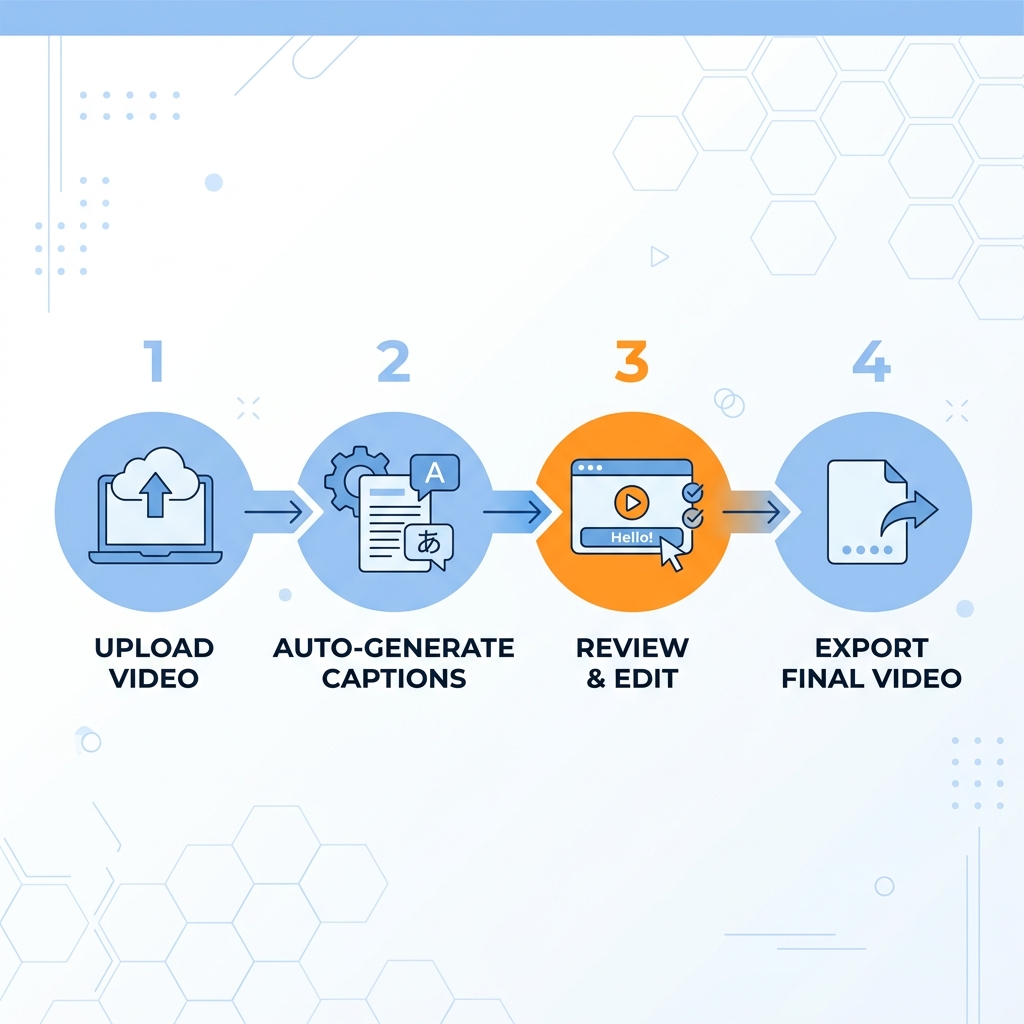
The most efficient starting point for video captioning is an AI tool that generates a first draft automatically. Here is the end-to-end workflow:
- Upload your video. Most AI caption tools accept common formats (MP4, MOV). Upload the clip or paste a video URL if the tool supports it.
- Auto-generate captions. The tool transcribes speech and syncs text to timing. This step takes seconds to a few minutes depending on video length.
- Review and correct errors. Read through the output. Fix proper nouns, brand names, technical terms, and any word substitutions the AI got wrong. Pay extra attention to fast speech and speaker transitions.
- Export in the right format. Choose burned-in MP4 for platforms that do not accept caption files (TikTok, Instagram). Choose SRT or VTT for platforms that support file uploads (YouTube, LinkedIn, Facebook).
AI handles the first pass quickly. Your job is knowing where it struggles and fixing those spots before you publish.
Three conditions that degrade AI caption accuracy:
- Accented speech: the model may substitute words it finds more probable in standard speech
- Background noise: music, crowd sound, or overlapping audio causes transcription errors
- Technical or domain-specific vocabulary: jargon, brand names, and product terms are frequently misspelled or replaced
For readers who want to go deeper on the review and editing step, the manual and AI caption editing process is covered separately in the GotReach blog.
If you are captioning five or more videos a week, the per-video bottleneck adds up fast. Tools like Captions.ai process one clip per session at 5 to 10 minutes each. The GotReach AI caption generator automates captioning inside the same workflow that publishes your video, cutting the per-video overhead significantly. At scale, that is the difference between an hour of daily editing and a workflow that runs in the background.
Platform-Specific Caption Requirements
Choosing the wrong caption format wastes effort. Here is what each major platform actually supports.
TikTok generates its own auto-caption sticker, but creators have no control over font, size, or position. Burned-in captions give you full style control. TikTok does not support external SRT file uploads.
YouTube supports SRT and VTT file uploads and is the strongest platform for closed-caption accessibility. YouTube's auto-generated captions exist but are error-prone and do not meet ADA or WCAG standards on their own. Upload your own file for accurate caption display.
Instagram Reels has an auto-caption sticker with limited style control and language support. Burned-in captions are the safer choice if you care about consistency. External SRT files are not supported.
LinkedIn and Facebook both support SRT file uploads for native caption display. Text captions in the post copy also drive reach on muted feeds. For multi-platform publishing, burned-in captions remain the lowest-risk default because they work everywhere.
If you are repurposing video across multiple platforms from one workflow, burned-in captions eliminate the format-matching problem entirely.
| Platform | Recommended Format | File Type Supported | Key Note |
|---|---|---|---|
| TikTok | Burned-in captions | None (no SRT upload) | Auto-caption sticker lacks style control |
| YouTube | SRT or VTT file upload | SRT, VTT | Auto-captions exist but are not compliance-grade |
| Instagram Reels | Burned-in captions | None (no SRT upload) | Auto-caption sticker has limited language support |
| SRT file upload or burned-in | SRT | Text captions in post copy also effective | |
| SRT file upload or burned-in | SRT | Native captions display well on muted feeds |
How to Write Effective Social Media Captions
Social text captions are copywriting. The same effort that goes into producing a video should go into the text that gets someone to watch it.
Hook first. The first line of a social caption determines whether anyone reads the rest. It must create curiosity, surface a specific problem, or make a claim that earns a second look. "Check out our latest video on caption making" is not a hook. "You are spending 45 minutes a day on captions. Here is how to get that down to five." is.
Match tone to platform. LinkedIn captions run longer and lean narrative or insight-led. They work best when they open with an observation or question that invites comment. TikTok and Instagram captions are short, punchy, or conversational. Facebook sits in the middle with community-forward framing.
One CTA, not three. End with a single clear action: comment, share, or click a link. Multiple asks dilute all of them.
Hashtags and formatting. Three to five targeted hashtags outperform thirty broad ones. Use line breaks to improve mobile readability. A wall of text in the caption will lose readers before they reach your CTA.
Where AI helps and where it does not:
AI social caption tools are fast at generating first drafts and useful for matching a general tone. They are poor at brand voice specificity, cultural nuance, and the kind of insider knowledge that makes a caption feel like it came from a real person in the space.
| AI-Written Social Captions | Manually Written Social Captions | |
|---|---|---|
| Pros | Fast first drafts, good for volume, helpful for writer's block | Brand-specific voice, cultural accuracy, genuine expertise signal |
| Cons | Generic tone, misses brand nuance, may need heavy editing | Time-intensive, harder to sustain at posting volume |
The practical approach for most creators: use AI to draft, then edit for voice, specificity, and accuracy before publishing.
Caption Accuracy and Accessibility
AI caption tools perform well under specific conditions: clear audio, a single speaker, and standard pronunciation. Outside those conditions, accuracy drops.
The three factors that degrade output most: background noise, overlapping speakers, and heavy accents or technical vocabulary. A product demo with industry jargon, a panel interview with four people talking over each other, or a video shot outdoors with wind noise will all produce more errors than a clean studio recording.
Accessibility standards are not optional for all content. Three standards are relevant here:
- WCAG 2.1 (Web Content Accessibility Guidelines): Requires captions for pre-recorded video with audio for content that must meet web accessibility standards. See the official WCAG 2.1 captioning success criteria for specifics.
- ADA Title III: Applies to public-facing digital content for businesses covered under the Americans with Disabilities Act.
- FCC captioning rules: Apply to broadcast and online video programming derived from broadcast.
AI-generated captions do not automatically satisfy any of these standards. Human review is required for content that must meet legal accessibility requirements. "AI generated it" is not the same as "it is accessible."
Captions serve three audiences at once: viewers watching on mute, deaf and hard-of-hearing viewers, and non-native speakers who follow along more easily with text support.
For deeper guidance on evaluating AI caption accuracy and choosing a tool that fits your accuracy requirements, the linked post covers tool-selection criteria in detail.
Before You Publish: Caption Review Checklist
- Proper nouns and brand names are spelled correctly
- Speaker changes are reflected with appropriate line breaks
- No missing words in fast-speech or overlapping-dialogue segments
- Accented speech has been manually reviewed
- Caption timing matches speech with no significant lag or early display
- No offensive or embarrassing auto-correction errors
Choosing the Right Caption Making Approach
There is no universally best caption tool. There is the right tool for your volume, your platform, and your accuracy requirements.
Five criteria frame the decision:
- Content type: Are you writing social post copy or captioning a video file?
- Target platform: What format does your platform accept?
- Accuracy and compliance requirements: Is this content for engagement, or does it need to meet WCAG, ADA, or FCC standards?
- Export format: Do you need a burned-in video, an SRT file, or a VTT file?
- Publishing volume: How many videos are you publishing per week across how many platforms?
Three tool categories to know:
- AI video caption generators: Fast first-pass transcription with export to SRT or burned-in video. Accuracy varies by audio quality.
- Social caption writing tools: AI-assisted post copy generation. Useful for drafts; still require human editing for voice and specificity.
- Platform-native captioning features: Built into TikTok, YouTube, and Instagram. Free and fast but limited in style control and not compliance-grade without review.
Honest tradeoffs: Free plans on most tools include watermarks or capped exports. Manual captioning is still the right choice for compliance-critical or high-stakes content. AI is a starting point, not a finished product.
For a low-volume creator publishing to one platform, platform-native captions or a free AI tool with manual review is genuinely sufficient. The decision becomes different at scale.
| Your Situation | Recommended Approach |
|---|---|
| Social post copy only | Write manually or use an AI caption writing tool with editing |
| Short-form video, casual content, low volume | Platform-native auto-captions or a free AI tool |
| Short-form video, accessibility required | AI tool plus thorough human review against WCAG checklist |
| Long-form video, high accuracy needed | AI first pass plus manual editing; consider professional captioning for compliance-critical content |
| High-volume publishing across multiple platforms | GotReach: batch workflow handles captioning and distribution across seven platforms in one step |
Adding captions one video at a time takes 5 to 10 minutes per clip. At five videos a day across multiple platforms, that is before you have published a single thing. GotReach automates captioning inside the same workflow that edits and publishes your video, producing up to 300 videos in approximately 30 minutes and distributing them across seven platforms from one centralized workflow. No separate captioning tool. No extra step.
For agencies managing multiple client accounts, GotReach Enterprise provides a centralized dashboard so you are not juggling separate tools per client. Captioning, scheduling, and distribution all run from one place.
If captioning one video at a time is slowing you down, the GotReach AI caption generator is the logical starting point. Start your 30-day free trial today with up to 30 videos per month, one connected social account, and no watermarks. Try it, see what it solves, then decide.
Frequently Asked Questions
What is the difference between captions and subtitles?
Captions are designed for viewers who cannot hear the audio, so they include dialogue, speaker identification, and relevant sounds. Subtitles assume the viewer can hear but does not understand the language, so they translate spoken words only. In practice, the terms are often used interchangeably on social platforms, but the distinction matters for accessibility compliance.
What is the difference between open captions, closed captions, and burned-in captions?
Open captions and burned-in captions mean the same thing: text is permanently embedded in the video frame and cannot be turned off. Closed captions are stored separately and can be toggled by the viewer. Burned-in captions are the default for TikTok and Instagram; closed captions are standard on YouTube.
How accurate are AI caption generators and what degrades their performance?
AI caption accuracy is high for clean audio with a single speaker and standard pronunciation. Accuracy drops with background noise, overlapping speakers, heavy accents, and technical or domain-specific vocabulary. Always review AI output before publishing, especially for proper nouns and brand names.
What file format should I use for captions on YouTube versus TikTok versus Instagram?
YouTube accepts SRT and VTT file uploads and is the best platform for closed-caption accessibility. TikTok and Instagram do not support external caption file uploads, so burned-in captions are the recommended format for both.
Do AI-generated captions satisfy WCAG or ADA accessibility requirements?
No. AI-generated captions are a starting point, not a compliance solution. WCAG 2.1, ADA Title III, and FCC standards all require accurate captions, which means human review is required before AI output qualifies as accessibility-grade. Using AI without review does not satisfy legal accessibility requirements.
How long should social media captions be on each platform?
There is no single rule, but platform norms differ. LinkedIn captions can run several paragraphs and perform well when insight-led. TikTok and Instagram captions work best when short and punchy, with the hook in the first line. Facebook sits in the middle. On every platform, lead with the hook and end with one clear call to action.
Can I make captions for free without watermarks?
Yes, on some platforms and tools. YouTube's caption upload is free. GotReach's free tier includes up to 30 videos per month with one connected social account and no watermarks. Many third-party AI caption tools offer free tiers but add watermarks to exported video or cap the number of exports per month.
When is manual captioning still the better choice over AI?
Manual captioning is the right choice when accuracy is non-negotiable: compliance-critical content, medical or legal subject matter, content featuring heavy accents or technical vocabulary that AI consistently misreads, or any content that must meet WCAG, ADA, or FCC standards without the time budget for thorough review.