How to Clip Short Videos from Long-Form Content: AI Tools, Platform Specs, and What Makes a Clip Worth Posting
If you have a library of long recordings and almost none of them have become short clips, the bottleneck is not creativity. It is production time. Manual clipping runs 5 to 10 minutes per video. At 10 clips a week, that is over an hour of editing that is not strategy, content, or rest. Most creators never close that gap because the math does not work at volume.
AI clipping tools promise speed, and the speed is real. But most creators hit a second problem quickly: the AI generates clips, and then what? Which ones are actually worth posting? How long should they be on each platform? What separates a publishable clip from one that loses viewers in the first two seconds?
This guide covers all of it: how AI clipping works in plain terms, a repeatable pre-publish checklist, precise platform specs for TikTok, Instagram Reels, and YouTube Shorts, and a lean framework for evaluating any AI clipping tool before you commit.
Key Takeaways
- AI clipping tools transcribe your video first. Clip quality depends entirely on how accurately the audio is captured.
- The AI scores transcript segments for hook strength, sentence completeness, and pacing. It does not watch the video the way a human would.
- AI gets you to a strong candidate pool fast. Deciding which clips actually get published is still a human judgment call.
- Format compliance is non-negotiable. A great clip in the wrong aspect ratio or wrong length loses algorithmic placement before a single viewer sees it.
- GotReach produces up to 300 videos in approximately 30 minutes from a single recording, with no watermarks on the free plan (up to 30 videos per month).
How AI Clipping Tools Actually Turn Long Video Into Short Clips
The phrase you see everywhere, "AI finds your best moments," skips the part that actually matters. Here is what the process looks like under the surface:
- Transcription. The tool converts your audio into a text layer. Every scoring decision that follows depends on transcription accuracy. A tool that struggles with accented speakers, fast delivery, or technical vocabulary will produce clips that cut mid-sentence or skip the strongest exchanges entirely. No scoring algorithm fixes a bad transcript.
- Segment scoring. The transcript is analyzed segment by segment. The tool looks for signals: does the sentence open with a hook phrase? Is it a complete thought? Is the pacing tight? This is not magic, and it is not predicting what will perform. It is pattern recognition on text.
- Extraction and reframing. Top-scoring segments are trimmed to complete thoughts and reframed from landscape to 9:16 vertical. The output is a set of candidates, not finished clips.
For a deeper look at how AI clip generators approach this process, this guide to converting long video into short clips covers the core workflow in more detail.
Manually, one clip takes 5 to 10 minutes. GotReach automates all three steps at volume, producing up to 300 videos in approximately 30 minutes from a single source recording.
How to Clip Short Videos Step by Step
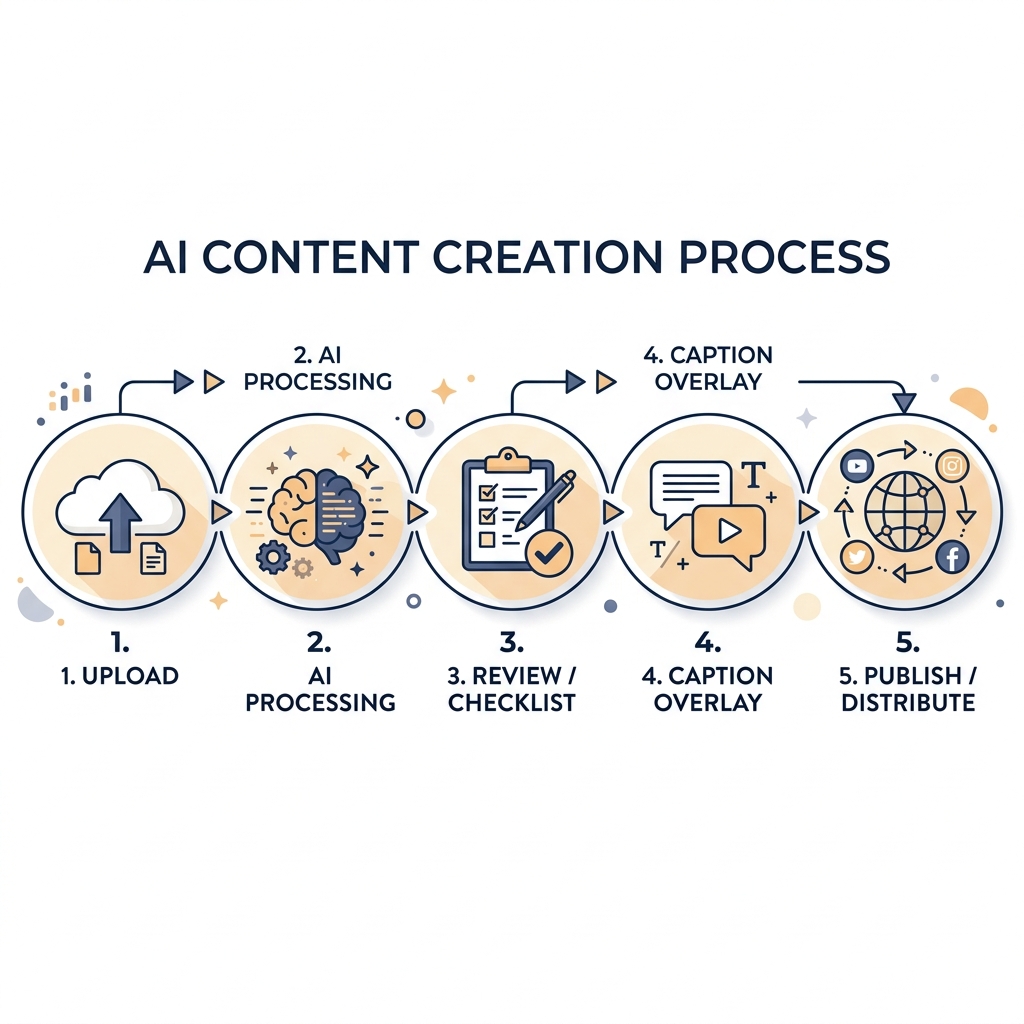
The workflow from source video to published clip is straightforward. The friction is not in the generation step. It is in the review step, which is where most creators either skip too fast and post weak clips, or get stuck and post nothing at all.
- Upload or link your source video. Drop your recording into your AI clipping tool. Most tools accept direct file upload or a URL. Longer source videos give the AI more to work with, which matters for clip variety.
- Let the AI generate clip candidates. The tool processes the transcript and returns a set of scored segments. Review these as a starting pool, not a finished queue.
- Review clips against quality criteria. Before accepting any clip, run it against the checklist in the next section. This is the step that separates consistent publishers from creators with a folder full of clips they never posted.
- Apply captions and confirm framing. Add burned-in captions if the tool has not done it automatically, verify the subject is centered in the 9:16 frame, and trim to the platform-appropriate length.
- Export and publish or schedule. GotReach distributes finished clips across seven platforms from a single workflow, removing the re-upload loop entirely. For creators managing their own publishing schedule, scheduling and distributing clips directly to social platforms keeps the pipeline consistent without manual re-uploading.
What Makes a Short Clip Worth Posting: The Human Review Layer
This is the section every AI tool marketing page skips. The tool generates candidates. You decide what gets published. Here is what that decision actually looks like.
A strong hook in the first 1 to 2 seconds is non-negotiable. A clip that opens mid-thought gives viewers no reason to stay. The hook has to land immediately, with a visual action, a direct statement, or a question that creates tension. A clip that opens with "...and that's why the algorithm changed" has already lost. A clip that opens with "The algorithm changed because platforms stopped rewarding watch time and started rewarding saves" earns a stay.
The clip must be a complete thought. Viewers who have not seen the source video have no context. If the clip requires prior knowledge of what came before, it is not ready to publish.
Length must match the platform, not just be short. TikTok, Reels, and Shorts each have different optimal windows. The specs are in the next section.
Mute-watchable is required, not optional. Most mobile views happen without sound. Research on mobile video viewing behavior confirms that a large share of social video is consumed on mute, which makes burned-in captions a core engagement feature, not an accessibility add-on.
One clear takeaway per clip. A clip that tries to summarize a longer argument loses the viewer before the payoff. If you cannot name the single point a viewer walks away with, the clip is not ready.
Pre-Publish Clip Checklist
Apply this before posting any AI-generated clip:
- Hook lands in the first 2 seconds (visual action or a complete, punchy verbal statement)
- Clip is a complete thought with no dangling context from the source video
- Length fits the target platform (TikTok: 15-30s optimal; Reels: 30-60s; Shorts: under 60s)
- Audio is clear, or burned-in captions are readable at mute
- Single clear takeaway, not a summary of a longer argument
- No abrupt mid-sentence cut at the start or end
- Aspect ratio is 9:16 and the subject is centered in frame
AI gets you to a strong candidate pool fast. The final call on which clips go live is still yours.
Ready to put this checklist to work? GotReach's 30-day free trial gives you up to 30 videos per month with no watermarks, so you can test the full workflow on your actual content before committing. Start your 30-day free trial at gotreach.com/pricing.
Platform Requirements: TikTok, Instagram Reels, and YouTube Shorts
A great clip in the wrong format loses algorithmic placement before a single viewer sees it. Each platform has distinct specs, and none of them are interchangeable without adjustment.
TikTok rewards short, punchy clips. The audience is trained to swipe fast, so the hook window is tighter and animated captions are expected, not a bonus. Instagram Reels allows slightly more length and is more tolerant of moderate pacing, but muted-feed performance still depends on high-contrast burned-in captions. YouTube Shorts carries a specific eligibility threshold: the video must be under 60 seconds and in 9:16 format to qualify as a Short, and the title carries more keyword weight here than on either of the other platforms.
For caption-specific guidance across platforms, why burned-in captions drive muted-feed retention covers the tools and formats in detail.
| Platform | Aspect Ratio | Optimal Length | Hook Timing | Caption Style |
|---|---|---|---|---|
| TikTok | 9:16 | 15-60s (15-30s performs best) | Within 1s | Burned-in animated captions |
| Instagram Reels | 9:16 or 4:5 | 30-60s (up to 90s allowed) | Within 2s | Burned-in, high contrast |
| YouTube Shorts | 9:16 | Under 60s to qualify | Within 2s | Burned-in or overlay; keyword title matters |
Format compliance is the floor. Everything above it, hook strength, clip completeness, caption readability, is what separates performance from placement.
How to Evaluate an AI Clipping Tool Before You Commit
Most AI clipping tools look similar in a demo. The differences show up when you run your actual content through them.
Transcription accuracy is the only variable that matters first. Test the tool on your real content type before assuming the output will be usable. An interview tool that degrades on technical vocabulary or multiple speakers will produce clips that cut mid-sentence no matter how good the scoring logic is.
Multi-speaker handling. Tools that process a single talking head often struggle with interviews or panels. If your content involves more than one voice, this is a requirement, not a preference.
Caption customization. Burned-in captions that look off-brand undermine the clip. Check for font control, animation style, and whether captions export as part of the video or require a separate pass.
Free plan honesty. Check upload limits, watermark policy, and export restrictions before assuming the free tier is usable at real volume. GotReach's free plan includes up to 30 videos per month with one connected social account and no watermarks.
Volume capacity. Manual, single-video clipping tools cap out fast for creators publishing daily across platforms. GotReach produces up to 300 videos in approximately 30 minutes. That is a different operating model, not a marginal efficiency gain.
For a deeper tool comparison, this guide to evaluating AI clipping tools covers selection criteria across a broader range of use cases.
| Evaluation Criterion | What to Look For |
|---|---|
| Transcription accuracy | Test on your actual content type before committing |
| Multi-speaker handling | Essential for interviews, podcasts, and panels |
| Caption customization | Font control, animation style, burned-in export |
| Free plan real utility | Upload limits, watermark policy, export format |
| Volume capacity | How many clips can be processed per session |
| Processing speed | Matters for creators publishing daily at scale |
Conclusion
The production bottleneck is real, and it compounds every week you do not solve it. AI clipping removes the per-video editing cost and makes high-volume publishing possible. But the tool does not decide which clips are worth posting. That judgment, the hook check, the completeness check, the platform format check, is what the checklist in this guide is for.
Use the checklist before you post anything. Use the platform table every time you export a clip for a new destination. And if the volume of content you need to publish has outgrown what manual editing can realistically produce, the math on AI clipping changes fast.
Creators who want to extract a full week of content from a single recording can do that consistently with GotReach's content repurposing workflow.
GotReach's 30-day free trial includes up to 30 videos per month with no watermarks and no credit card pressure. Start your free trial at gotreach.com/pricing and run your own content through the full workflow before deciding anything.
Want to stay current on new features and publishing tools? Join the GotReach updates list for launch news and early access.
Frequently Asked Questions
How does AI decide which moments from a long video are worth clipping? The tool transcribes the full audio into text, then scores each segment based on signals like hook phrases, sentence completeness, and pacing. It does not watch the video. It reads the transcript and ranks segments by how well they match the patterns associated with strong standalone clips.
What is the ideal clip length for TikTok, Instagram Reels, and YouTube Shorts? For TikTok, 15 to 30 seconds performs best, though clips up to 60 seconds are supported. For Instagram Reels, 30 to 60 seconds is the optimal range for retention, with up to 90 seconds allowed. For YouTube Shorts, the clip must be under 60 seconds to qualify as a Short.
Are free plans on AI clipping tools genuinely useful? It depends on the tool. Many free tiers add watermarks, limit exports to low resolution, or cap uploads at a level that does not support a real publishing schedule. GotReach's free plan includes up to 30 videos per month with no watermarks and one connected social account, which is functional for testing the full workflow on real content.
Do I still need editing skills, or can AI handle the full process? AI handles transcription, segment scoring, trimming, captioning, and reframing to vertical format. The skill you still need is judgment: knowing which clips pass the pre-publish checklist and which ones need to be rejected or adjusted. That review step does not require editing software, but it does require a clear sense of what makes a clip watchable.
Is AI clipping worth using for occasional projects or only for high-volume creators? For a single clip from a single video, manual editing is often faster. AI clipping earns its value at volume, when the goal is generating 10 or 20 clips from one recording, or publishing consistently across multiple platforms every week. At that volume, 5 to 10 minutes per clip manually becomes unsustainable without automation.