How AI Video Clipping Tools Actually Work — and How to Pick the Right One for Your Content
You already know what an AI video clipping tool is supposed to do: take a long recording and turn it into short, platform-ready clips without you spending hours in an editor. The problem is that every tool on the market promises exactly the same thing — speed, accuracy, viral-ready clips — without ever explaining how any of it actually works.
That opacity makes comparison nearly impossible. If you do not know what the tool is actually detecting, you cannot know whether it will work for your content type. And if you cannot evaluate the detection method, you are choosing based on homepage copy, not performance.
This article explains how AI clipping detection actually works, what separates tools that deliver from tools that just market well, and how to match the right option to your specific content and workflow.
Key Takeaways
- AI clipping tools use two fundamentally different detection approaches. Knowing which one a tool uses tells you which content types it will handle well before you run a single test.
- Most accuracy and virality claims are marketing metrics, not independent benchmarks. The only number that matters is how the tool performs on your content.
- Clip volume, watermark policies, and scheduling integration vary significantly across free and paid tiers. GotReach's free plan includes 30 videos per month with no watermarks, which is a meaningfully different starting point from many alternatives.
- GotReach can produce up to 300 videos in approximately 30 minutes from a single idea. Tools like Captions process one video at a time, typically 5 to 10 minutes per video. At any real publishing volume, that math compounds quickly.
- The article includes a pre-commitment checklist of questions to ask before choosing any tool. Run through it during your free trial, not after you have built a workflow around the wrong platform.
What AI Video Clipping Tools Actually Do — and How the Detection Works
An AI video clipping tool analyzes a long recording, identifies the moments most worth sharing, and extracts them as short, formatted clips automatically. No manual scrubbing through a timeline. No frame-by-frame editing. Upload the file, wait for processing, and you get a set of clips ready for review.
That is the promise. What actually determines whether the tool delivers on it is the detection method underneath.
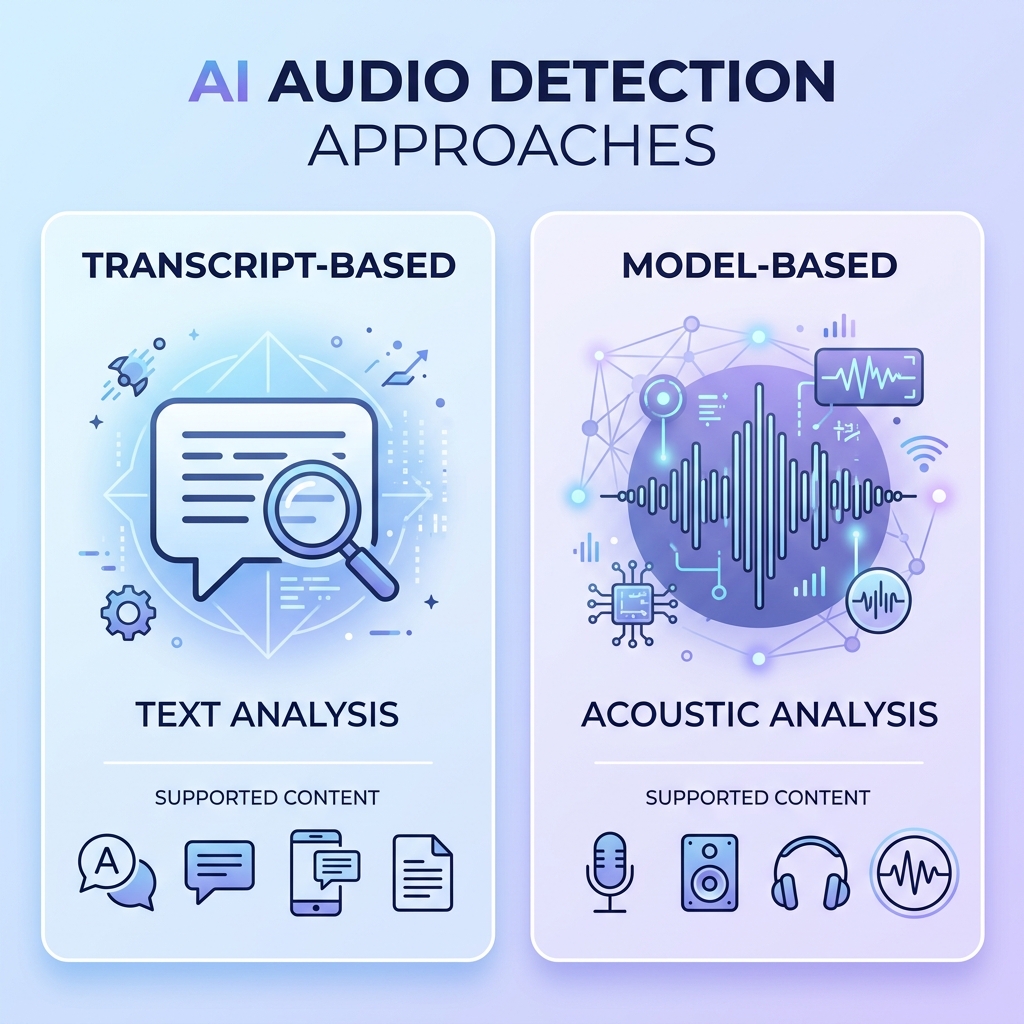
Transcript-Based Detection
Transcript-based tools convert your audio to text first, then analyze that text using natural language processing (NLP) to find clip-worthy moments. The tool looks for complete thoughts, quotable sentences, high-keyword-density passages, and moments where the speaker energy peaks in the language itself.
This approach works well when your content is structured spoken dialogue: podcasts, interviews, panel discussions, Q&A sessions. The AI has clean text to analyze, clear sentence breaks to work with, and recognizable patterns of conversational emphasis.
It tends to struggle with unstructured content. A gaming livestream with ambient commentary, a workout video with sparse dialogue, or a cooking show with mostly visual action gives the transcript-based tool very little usable input.
Model-Based Detection
Model-based tools do not rely on a clean transcript. Instead, they read audio energy levels, visual motion and pacing, engagement signal patterns, and speaker body language cues to identify high-value moments. The model has been trained on large volumes of video to recognize what a compelling clip looks like even when the spoken content is sparse or unscripted.
This approach handles unstructured content more reliably. A livestream with variable pacing, a tutorial with long visual demonstrations, or a performance clip can all produce strong results when the detection is reading the right signals.
Why This Is the First Question to Ask
The detection method determines content-type fit. That is the single most important thing to understand before you evaluate any other feature. A tool that excels at structured podcast interviews using transcript-based detection may produce weak results for your livestream content, and no amount of template customization or scheduling integrations will fix that upstream problem.
Understanding this is also how you read past the marketing. When a tool says it uses AI to find your best moments, what it means is one of these two approaches, or some combination. Ask which one. Then test it on your actual content.
For a broader look at how turning long-form recordings into short-form social content fits into a full repurposing workflow, the GotReach content repurposing overview covers the bigger picture.
The Features That Actually Separate AI Clipping Tools — and How to Evaluate Them
Every tool homepage lists features. Clip detection. Auto-captions. Multi-platform export. The list looks roughly the same across the category, which makes comparison feel pointless.
The difference is not which features appear on the list. It is what each feature actually means for your workflow and content type.
Here is a framework for evaluating the features that genuinely separate tools from each other:
| Evaluation Criterion | Why It Matters | What to Look For | Red Flag to Watch |
|---|---|---|---|
| Clip detection quality | Determines whether the AI finds moments you would have chosen yourself | Content-type fit documentation or test results on your format | Only demo content shown; no option to test your own files |
| Caption accuracy in context | Headline accuracy percentages do not account for your accent, jargon, or language | Accuracy on your real content, not a demo reel | Claims of 99% accuracy with no stated conditions or methodology |
| Reframing and aspect ratio automation | Vertical formats for TikTok, Reels, and Shorts require different framing than horizontal source video | Automatic crop and reframe with manual override option | Manual adjustment required for every clip and every platform |
| Publishing integrations and scheduling | The clip is only useful when it reaches your audience; exporting to a hard drive is a bottleneck | Native scheduling to the platforms you actually use | Publishing listed as a feature but requiring a separate tool or manual upload |
| Branding controls | Fonts, colors, logos, and template consistency matter for creators and are non-negotiable for agencies | Per-clip or per-brand customization with template saving | One default template with no brand customization |
| Team and agency features | Single-user tools do not scale to multi-client workflows | Multi-client dashboard, team access, centralized brand management | Per-user or per-client additional charges with no team tier |
| Output volume relative to price | Clip caps on free and low-tier plans become a bottleneck faster than most creators expect | Monthly clip volume, export resolution, and watermark policy at each tier | Low cap on free tier with a sharp price jump to unlock volume |
A creator publishing five days a week across three platforms needs high clip volume and native scheduling built in. A tool that allows 10 clips per month on its free tier will force an upgrade on day one. An agency managing six client brands cannot operate from a tool that requires a separate account login per client.
After the clipping step, scheduling and publishing clips directly to social platforms without switching tools is where workflow efficiency either holds together or falls apart.
Matching the Right Tool to Your Content Type and Workflow
There is no single best AI video clipping tool. There is the right tool for your content type, your publishing volume, and your workflow. Start there, not with the homepage that promises virality.
Here is how the evaluation shifts based on creator type:
Podcast and interview creators should prioritize multi-speaker handling, transcript accuracy, filler-word removal, and caption quality for structured dialogue. Transcript-based detection is your ally here, as long as the tool can distinguish between speakers and follow conversational thread across turn changes.
Livestream and unstructured video creators need detection logic that works without clean dialogue. Look for tools that read audio energy and visual engagement signals rather than relying on a clean transcript. A transcript-dependent tool will underperform on content where most of the value is in moments that are felt, not said.
Educational and long-form explainer creators face a different challenge: non-conversational pacing. The AI needs to identify value from information density and concept transitions, not speaker energy. Not all tools handle this well, and it is worth testing on a real lesson before assuming any tool will clip it intelligently.
Solo creators at high publishing frequency need to think about clip volume caps and scheduling integration before anything else. Manual export-and-upload at scale is the exact production bottleneck these tools are supposed to eliminate. GotReach produces up to 300 videos in approximately 30 minutes from a single idea. Compare that to tools like Captions, which process one video at a time at roughly 5 to 10 minutes per video. At 30 or more clips per week, the math matters. For a closer look at the end-to-end process of converting long recordings into short clips, that workflow breakdown is worth reading alongside this evaluation.
Agencies and teams managing multiple clients need centralized multi-client control, per-brand customization, and team collaboration features. These are not optional at agency scale. GotReach Enterprise is built specifically for this use case, providing centralized management across clients without requiring separate logins per account.
| Creator Type | Content Format | Top Feature Priorities | Watch Out For |
|---|---|---|---|
| Podcast host | Structured multi-speaker dialogue | Transcript accuracy, multi-speaker detection, filler-word removal, caption styling | Tools that only handle single-speaker audio cleanly |
| Livestreamer | Unscripted, variable pacing, ambient audio | Model-based detection, audio energy reading, visual cue recognition | Transcript-dependent tools with no model-based fallback |
| Educational creator | Long-form explainer, non-conversational | Information-density detection, concept-boundary clipping, clean caption output | Tools optimized for high-energy conversational content |
| Solo creator (high volume) | Any format, high publishing frequency | Clip volume cap, processing speed, native scheduling, no watermarks | Low monthly clip caps, manual export steps, no scheduling integration |
| Agency or team | Multi-client, multi-brand | Multi-client dashboard, branding controls per brand, team access, centralized management | Single-user tools or per-client pricing with no team tier |
What Accuracy and Virality Claims Actually Mean — and How to Pressure-Test Them
Every tool claims the highest accuracy and the best viral results. None of them explain how they measured it. This is where the marketing noise is loudest and where the evaluation framework matters most.
Caption Accuracy in Practice
Word error rate (WER) is the standard metric used to measure speech recognition accuracy. A 99% accuracy claim means that 1 in every 100 words is wrong on average, under the conditions where the tool was tested. The conditions matter as much as the number.
A tool that achieves 99% accuracy on clear American English with a single speaker in a quiet room may produce far more errors on content with a regional accent, technical industry vocabulary, a second language, or overlapping speakers. The tool's accuracy claim is not false, but it is not universal. It reflects the conditions under which it was measured.
A 99% accurate caption tool that struggles with your industry jargon will still produce clips you need to manually correct before posting. That manual correction is exactly the production work the tool was supposed to eliminate.
Virality Scores Decoded
"Viral potential" rankings typically use a combination of signals: speaker energy, sentence completeness, keyword density, pacing, and engagement pattern matching based on what has performed well historically. The score tells you which moments the model predicts will hold attention, based on those inputs.
What it cannot account for: your specific audience, the platform algorithm at the moment of posting, your posting frequency, and the broader content context. Virality depends on many factors that no tool can fully predict. Use the score as a starting signal, not a guarantee.
Red Flags to Watch For
Unsourced percentage claims with no stated conditions. Unnamed social proof framed as "thousands of creators." Speed multipliers like "10x faster" with no stated baseline for the comparison. These are marketing signals, not evaluation data.
How to Evaluate Real Output Quality
Test the tool on your own content, not a demo reel. Check caption accuracy for your accent and your vocabulary. Verify that the clips the AI selects are moments you would have chosen manually. Confirm export resolution matches your platform requirements. For platform-specific formatting requirements for TikTok, Instagram Reels, and YouTube Shorts, that breakdown covers aspect ratios and export specs in detail.
Pre-Commitment Checklist
Before you commit to any AI video clipping tool, run through these questions during your free trial:
- Does the free plan include watermark-free output?
- What is the monthly clip volume cap on the free tier and on the first paid tier?
- How does the tool handle multi-speaker audio, and does caption quality hold up across speakers?
- How does the tool handle non-English content or content with a regional accent?
- What export resolution and aspect ratios are supported, and are vertical formats included?
- Does the tool include scheduling natively, or is publishing a separate manual step?
- Are there team or agency features, and what do they cost?
- What are the content ownership and data privacy terms for uploaded recordings?
Free Plans, Paid Tiers, and What You Are Actually Getting
Free plans across the AI video clipping category are legitimate starting points for evaluation. They are not permanent workflows for consistent multi-platform publishing.
Knowing the standard limitations before you start a trial means you will not mistake a crippled free tier for a reflection of the tool's real output quality.
Free Plan Realities
- Watermarks on exported clips, which require removal before posting
- Monthly clip volume caps that are too low for real publishing frequency
- Lower export resolution or slower processing queues than paid users
- Limited platform connections or scheduling restricted to one account
- Reduced access to branding controls or caption styling options
What Paid Plans Typically Unlock
- Higher or unlimited monthly clip volume
- Watermark-free output across all clips
- Higher export resolution and priority processing
- Additional connected social accounts and native scheduling
- Full branding controls: fonts, colors, logos, templates
- Team seats or agency dashboard access
GotReach's free plan is a concrete benchmark here: 30 videos per month, one connected social account, and no watermarks. That is a meaningfully different starting point from a tool that watermarks every free-tier export and caps output at 10 clips. It means you can actually evaluate the output quality during the trial period without a watermark degrading every clip you test.
The right question is not which tool has the cheapest plan. It is which tool's paid tier unlocks the volume and workflow fit you actually need before you build a production process around it.
FAQ: AI Video Clipping Tools Answered Honestly
How does an AI video clipping tool actually decide which moments to clip?
Most tools use one of two approaches: transcript-based detection or model-based detection. Transcript-based tools convert your audio to text and use natural language processing to find complete, quotable, high-energy moments in what was said. Model-based tools read audio energy levels, visual pacing, and engagement signal patterns to find compelling moments even when the spoken content is sparse. The detection method determines which content types the tool handles well, which is why it is the first question worth asking.
Do AI-generated clips need manual editing before you post them?
It depends on your content type, the tool's detection quality for that format, and your caption accuracy requirements. For most creators, a light review pass adds reliability, catches caption errors, and lets you trim a clip that is close but not quite right. The goal is to eliminate the heavy production work, not to remove your judgment entirely. AI handles the tedious parts. You stay responsible for the final call.
Are free AI video clipping tools good enough for real use?
For evaluation and low-volume testing, yes. A well-designed free tier gives you enough output to assess clip detection quality, caption accuracy on your content, and export resolution before committing. For consistent multi-platform publishing at any real frequency, free tier limits, including clip volume caps and watermark policies, usually become a bottleneck. GotReach's free plan at 30 videos per month with no watermarks is a usable evaluation starting point.
Which AI video clipping tools work for content types other than podcasts?
Most tools in this category were optimized for structured spoken content, which is why podcasts and interviews tend to produce the strongest results across the board. Livestreams, gaming content, educational explainers, and non-conversational video require either a model-based detection approach or specific content-type support from the tool. Before assuming any tool handles your format, test it on a real recording, not a produced demo.
How accurate are AI-generated captions in practice?
Context-dependent. A tool's stated accuracy rate reflects the conditions under which it was tested, typically clear speech in a single language with a standard accent. Language, regional accent, technical or industry vocabulary, and multi-speaker audio all affect real-world accuracy in ways that headline percentages do not capture. Test caption output on your own content before deciding whether the accuracy is acceptable for your workflow.
What should I test during a free trial before committing to a paid plan?
Start with the pre-commitment checklist above. The four most important tests: caption accuracy on a real recording with your accent and vocabulary, clip selection quality compared to moments you would have chosen manually, export resolution and aspect ratio output for the platforms you publish to, and whether the scheduling workflow connects to your accounts natively or requires a separate manual step. If a tool cannot pass those four tests on your content during the trial, the paid plan will not fix it.
The Honest Bottom Line
The AI video clipping tool category is full of identical-sounding promises. Speed. Accuracy. Viral clips. The marketing is nearly interchangeable across every homepage.
What is not interchangeable is how each tool detects clip-worthy moments, how well that detection method fits your specific content type, and whether the workflow scales to your actual publishing volume.
GotReach is built for creators and businesses that need speed and volume without losing the human voice behind the content. Up to 300 videos in approximately 30 minutes from a single idea. Distribution across seven platforms from one centralized workflow. Automated scheduling built in, not bolted on. And a free plan that lets you evaluate the real output before you commit to anything.
Start your 30-day free trial today and test GotReach on your own content. Not a demo. Not a sample reel. Your recordings, your workflow, your result.
If you want to see the full picture first, see how GotReach helps creators and businesses produce and publish more before you decide.