How to Create Clips from Long Videos (AI Tools, Workflow, and What to Expect)
Most creators have the same problem: hours of recorded content and no efficient path from that footage to published clips. Manual editing runs 5 to 10 minutes per video if you're fast. Tools that process one video at a time make a 20-clip content calendar a half-day project. AI clip creation was supposed to fix this, and for many use cases it does. But the gap between what tool landing pages promise and what actually happens in the workflow is wide enough to cause real frustration.
This guide explains how AI clip detection actually works, what a complete clip creation workflow looks like from upload to publish, what free tools realistically deliver, and which criteria actually matter when choosing a tool. You'll leave with a real understanding of the process, not another feature list.
Key Takeaways
- AI clip creation works by analyzing transcripts, audio energy, and scene changes to surface high-value moments. It's probabilistic, not magic, and source quality determines output quality.
- Most AI clip tools process one video at a time. Tools built for volume can produce hundreds of clips from a single session. GotReach produces up to 300 clips in approximately 30 minutes.
- Free tiers vary significantly. Some add watermarks to exports; others don't. GotReach's free tier includes 30 videos per month with no watermarks and one connected social account.
- Platform format differences matter more than most creators realize. The same clip exported without platform-specific adjustments will underperform or look wrong across platforms.
- AI clip selection is a starting point. Review, trim adjustment, and platform formatting still require human judgment, especially for non-interview content.
What Happens When You Create Clips with AI
AI clip creation is not manual editing handled by software. It's a fundamentally different process: the AI scans your long-form video and surfaces moments most likely to work as standalone short clips, based on patterns in the content itself.
Here's what the AI is actually analyzing:
- Transcript analysis: The tool processes a speech-to-text transcript and identifies high-value moments, strong hooks, topic transitions, quotable statements, and natural stopping points. This is why structured, speech-heavy content gives AI the clearest signal.
- Audio energy detection: Spikes in vocal energy, pacing changes, and emphasis patterns signal engaging moments. A flat, monotone delivery gives the system little to work with.
- Scene change and visual analysis: Cameras cuts, speaker changes, and visual transitions help the AI understand segment boundaries and clip-worthy moments in video-dense content.
Some tools surface a "highlight score" or similar ranking for each clip candidate. This predicts engagement probability based on content patterns. What it cannot predict is actual audience behavior, trend timing, or whether a clip fits your specific community. Treat that score as a useful filter, not a guarantee.
One important constraint: AI cannot fix poor source material. Unclear audio, heavy background noise, low-resolution footage, or dense technical narration with minimal energy variation all produce weaker clip candidates. A structured interview or podcast episode gives AI clear transcript signals and distinct topic segments. A 90-minute webinar delivered in a flat monotone gives the AI almost nothing to differentiate one moment from another.
For readers who want orientation on the broader concept of turning long videos into short clips before diving into AI mechanics, that background is worth a read first.
The Real Clip Creation Workflow: From Upload to Published Clip
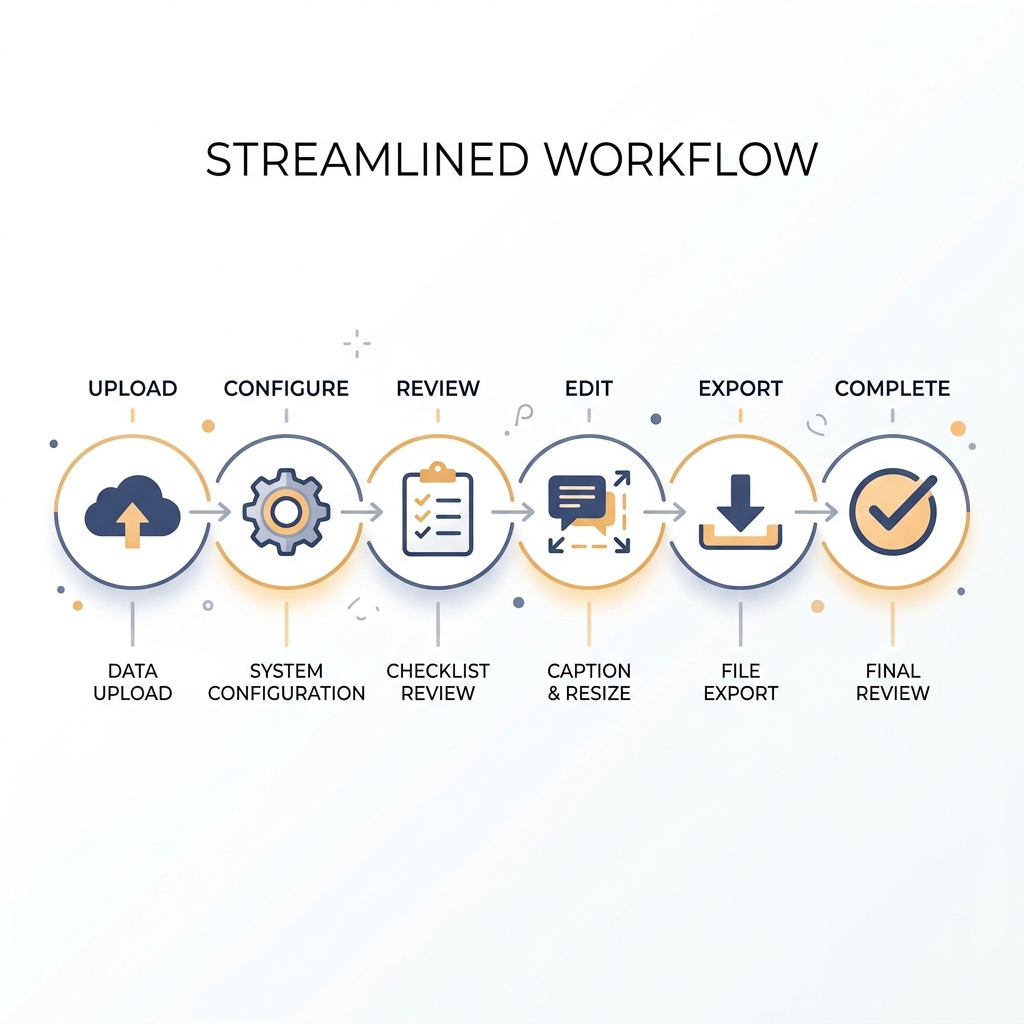
Tool landing pages typically describe three steps: upload, AI magic, download. The actual workflow is six steps, and two of them require your judgment regardless of which tool you use. Skipping the review steps is how you end up publishing clips that are contextually incomplete or cut off mid-sentence.
Here is what the complete workflow actually looks like:
-
Upload your source video -- Most tools accept common video file formats and some accept direct video link inputs. What's supported varies by tool, so check format compatibility before committing to a workflow. Higher-resolution source files generally produce cleaner exports.
-
Configure content type and language -- Select the content category (interview, webinar, educational, etc.) and your primary language. This improves AI accuracy significantly. Skipping this step often produces generic clip candidates that miss the actual high points of your content.
-
Review AI-selected clip candidates -- The AI surfaces a ranked list of clip candidates. This is where your editorial judgment starts. Review each candidate: does it make sense as a standalone clip? Is it cut at a natural point? Does it misrepresent the context of what was said? Reject or adjust clips that don't hold up. This step is not optional if you care about what gets published.
-
Edit: captions, aspect ratio, and brand elements -- Apply auto-captions and review them for accuracy. Resize the clip to the target platform's aspect ratio (more on platform specs below). Add brand elements like logos, intro frames, or lower-thirds if your tool supports it. This step is where clips go from AI drafts to publish-ready content.
-
Export and publish or schedule -- Export clips to your target platforms or schedule them directly from the tool if it supports multi-platform publishing. GotReach runs this entire step from one workflow, repurposing your video content and scheduling across platforms without requiring separate tools. For platforms not natively connected, export and upload manually.
-
Human review checkpoint -- Even after completing steps 1 through 5, do a final review pass before anything publishes. AI clip selection is a strong starting point, but pacing, context, and platform fit still require editorial judgment. Clean interview content may need minimal correction. Dense technical content may need significant trim adjustment.
To put the volume difference in concrete terms: a creator using GotReach can produce up to 300 clips from a single long session in approximately 30 minutes. Tools that process one video at a time at 5 to 10 minutes each make that same output a multi-hour, multi-session project. Processing one video at a time is not a content strategy if you're publishing at any meaningful cadence.
You can also schedule clips to social platforms directly from the workflow, which removes the separate scheduling step entirely.
Platform-Specific Clip Requirements: TikTok, YouTube Shorts, Reels, and LinkedIn
The same clip exported at generic settings will look wrong, get cropped, or underperform on at least two of the four major short-form platforms. Platform format differences are not minor adjustments. They are part of the clip creation workflow, not something to fix after posting.
Here are the key specs for each platform:
| Platform | Optimal Length | Aspect Ratio | Captions | Key Notes |
|---|---|---|---|---|
| TikTok | 15 to 60 seconds | 9:16 vertical | Critical | A significant share of TikTok viewing happens without sound. Captions are not optional. Hook must land in the first 2 to 3 seconds. See TikTok's video specifications for full technical requirements. |
| YouTube Shorts | Up to 60 seconds | 9:16 vertical | Recommended | Algorithm favors complete watch-throughs. Strong hook required within the first 3 seconds. Shorter clips (under 45 seconds) often see higher completion rates. Review YouTube Shorts creator documentation for current limits. |
| Instagram Reels | 15 to 90 seconds | 9:16 preferred | Recommended | Cover frame matters for grid appearance -- choose it intentionally. Trending audio can boost organic reach, but original audio performs well for educational and interview content. |
| Up to 3 minutes | 16:9, 1:1, or 9:16 | Recommended | Professional tone required. B2B content can support longer clips. Square and landscape formats are widely used alongside vertical. Native uploads outperform link shares. |
One practical note: AI clip tools vary significantly in how automatically they handle per-platform resizing. Some tools resize all exports automatically to each platform's spec. Others require you to manually export a separate version per platform. Check this before you commit to a tool, especially if you're publishing across three or four platforms consistently.
How to Choose an AI Clip Tool: The Criteria That Actually Matter
Most AI clip tools are evaluated by marketing copy, not by criteria that actually affect your output. The tool with the best landing page is not necessarily the tool that fits your content type, your posting volume, or your workflow.
Here is the framework that actually filters useful tools from the noise:
| Criteria | What to Look For | Why It Matters |
|---|---|---|
| Free tier monthly limit | Video count or minute cap per month on the free plan | Determines whether the free tier is a real working plan or just a trial |
| Watermark on free exports | Yes or no. Some tools add a watermark to every free export. | Watermarked clips look unprofessional and limit real-world usability. GotReach's free tier exports up to 30 videos per month with no watermarks. |
| Export quality on free tier | Full resolution or compressed/downgraded for free users | Low-quality exports on free plans force an upgrade before you can evaluate true output quality |
| Genre and content type compatibility | Is the tool optimized for interview/podcast formats, or does it handle a broader range of content types? | Some tools perform well only on structured speech content and struggle with everything else |
| Editing control after AI selection | Can you adjust trim points, reject clips, and re-cut after AI selects candidates? | Fully automated tools with no override controls produce inconsistent publishable output |
| Caption accuracy and language support | How accurate are auto-captions for your content type, accent, and language? | Captions require review before publishing regardless of tool. Know the baseline accuracy before committing. |
| Multi-platform publishing and scheduling | Does the tool publish natively to your target platforms, or does it export only? | Export-only tools require a separate scheduling tool, adding friction to the workflow |
| Team and agency workflow support | Does the tool support multiple accounts, brand consistency across clients, or centralized management? | Solo creators and agencies have different requirements. GotReach Enterprise supports agencies managing multiple client accounts from a centralized dashboard. |
GotReach's free tier is a useful benchmark here: 30 videos per month, one connected social account, no watermarks on exported clips. That's a specific, no-ambiguity starting point for evaluating whether a free plan is genuinely usable or just a conversion hook.
The best tool for creating clips is the one that matches your content type, your volume requirements, and your actual workflow, not the one with the most impressive feature list. Use these criteria to filter before you commit.
For a closer look at how GotReach handles content repurposing at scale, the platform page covers the full workflow from clip creation through multi-platform distribution.
When AI Clipping Works Well and When It Doesn't
Knowing where AI clip detection underperforms is as valuable as knowing where it excels. Creators who set accurate expectations consistently get more from these tools than those who trust the marketing copy.
Where AI Clipping Works
- Interviews and podcast episodes with clear speaker turns and distinct topic transitions
- Talking-head educational content with strong vocal energy and a clear structure
- Structured webinars with defined segment breaks, chapter-like transitions, and varied pacing
- Q and A sessions where question-and-answer pairs create natural clip units
- Content with clean audio, minimal background noise, and a single primary speaker
Where It Still Needs You
- Dense technical narration with minimal energy variation and few natural breaks
- Fast-cut gaming or sports footage where visual action, not speech, carries the content
- Content with heavy background music layered over speech, where audio signal analysis is degraded
- Non-English primary audio or heavily accented English, where language support varies significantly by tool and often drops in real-world accuracy
- Poor source audio or low-resolution footage, where AI output reflects source quality directly. No tool compensates for unclear speech or significant background noise.
- Complex or multi-topic content where clip candidates selected by AI may be contextually incomplete without additional manual trim correction
Post-AI editing time scales with content complexity. Clean interview content often needs minimal adjustment after AI selection. Dense or technically specialized content may require meaningful manual review of every clip candidate before anything is publishable.
Frequently Asked Questions About Creating Clips with AI
How many clips can you get from a one-hour video using AI?
It depends on the tool and how information-dense your content is. AI may surface 10 to 30 clip candidates from a one-hour session, though the range varies widely. Structured interview content with clear topic transitions typically yields more usable candidates than dense technical narration. Quality and relevance still require human review before publishing.
Do free AI clip tools add watermarks to exported clips?
Policies vary significantly between tools. Some free tiers add a visible watermark to every export, which limits real-world usability. Others do not. GotReach's free tier does not add watermarks to exported clips. Always check the watermark policy before committing to a free plan.
How accurate are AI-generated captions for clip creation?
Accuracy depends on audio quality, the speaker's accent, and the specific tool. Captions generated from clean, single-speaker audio with standard pronunciation tend to perform well. Technical vocabulary, heavy accents, and noisy audio all reduce accuracy. Review captions before publishing, especially for specialized or professional content.
Can AI create clips from non-English videos?
Most tools claim multilingual support, but real-world performance drops off significantly for accented English and non-English primary audio. Language support is one of the most overstated capabilities in AI clip tools. Check the specific language documentation for any tool you're evaluating before committing to a non-English workflow.
Do you still need to edit clips after AI selects them?
Yes, for most content types. AI selection is a strong starting point that surfaces the best candidates, but trim precision, context accuracy, and platform-specific formatting still require human review. The amount of editing varies by content type. Clean interview clips often need minimal adjustment. Complex or dense content may require significant manual correction.
Start Creating Clips at Scale
AI clip creation is more capable than most creators expect and less hands-off than most tool landing pages claim. The creators who get the most out of it are the ones who understand the real workflow, set accurate expectations about where human review is still required, and choose a tool that matches their content type and volume needs.
If you're publishing across multiple platforms and currently spending hours on manual editing or waiting on single-video processing, the workflow described here is the alternative. GotReach produces up to 300 clips in approximately 30 minutes, publishes to seven platforms from one workflow, and offers a free tier with 30 videos per month and no watermarks on exports.
For a look at how far a single recording can stretch, turning one recording into a full month of video content covers the content calendar side of this workflow.
Start your 30-day free trial today. Thirty videos per month, no watermarks, one connected social account. See what the workflow actually produces before you make any commitment.