AI Clip Makers: How They Work, Which Fits Your Content, and What to Know Before You Sign Up
An AI clip maker is software that analyzes a long video and automatically extracts short, shareable clips without requiring you to watch and cut the footage manually. It scans your recording for speech patterns, audio peaks, transcript keywords, and scene changes, then surfaces the moments most likely to perform as standalone short-form content.
If you have long videos sitting unclipped because manual editing doesn't scale, or you've tried a single-video tool and hit its limits, this guide is for you. Below is a plain-language breakdown of how these tools actually work, which one fits your content type, and what the free tiers realistically allow, before you sign up for anything. For a broader look at the process of turning long recordings into short clips, that workflow post is a useful starting point before diving into tool selection.
Key Takeaways
- AI clip makers analyze your video automatically, but accuracy depends heavily on your content type and audio quality.
- Not all tools are built the same: gaming-focused, transcript-first, and bulk-output tools serve different creator needs.
- Free tiers have real limits, and what gets withheld behind a paywall varies significantly by tool.
- Creator type is the most useful filter when choosing a tool, not marketing claims or user count.
- GotReach is built for creators who need volume, multi-platform publishing, and authentic output together, producing up to 300 videos in approximately 30 minutes from a single session.
What an AI Clip Maker Actually Does
Before evaluating any tool, it helps to understand what you're actually buying. AI clip makers are not magic selectors that always find your best moments. They are pattern-recognition systems trained to identify signals that correlate with engaging content. Independent tech journalists have reported on the growth of AI video editing tools as a distinct and expanding category worth understanding on its own terms.
The signals vary by tool, but most analyze some combination of:
- Audio volume and energy peaks (laughter, applause, raised voice)
- Speech density (how much talking is happening per unit of time)
- Transcript keywords (words or phrases associated with high-engagement topics)
- Scene changes and visual transitions
Many tools also apply what's called viral scoring, a probabilistic signal that estimates how likely a clip is to perform well based on patterns in historically high-engagement content. It is not a guarantee of virality. It is a ranking heuristic.
One architectural distinction worth understanding before you compare tools: some AI clip makers, like the ones covered in this article, detect and extract moments from your actual footage, preserving your real voice and face. Others, like HeyGen, generate entirely AI-produced video where the creator's human presence is replaced. That difference is not a minor feature gap. It determines whether your audience sees you or a synthetic version of you.
Accuracy also varies by content type. A structured podcast with clear topic transitions gives AI a lot of clean signal to work with. A three-hour gaming session with minimal commentary and sparse audio peaks gives the AI very little. That context matters when you choose a tool. For a deeper look at how AI identifies highlight moments in video, that explainer covers the detection approach in more detail.
How AI Clip Detection Works (Simplified)
- Upload or link your video. The tool ingests the source file or URL.
- AI analyzes the content. Audio, transcript, and visual signals are scanned for highlight candidates.
- Clips are ranked and surfaced. The system presents its top selections, often with a score or confidence indicator.
- You review, adjust, and export. Most tools allow you to trim, reorder, or regenerate clips before publishing.
Which AI Clip Maker Fits Your Content Type
The most common mistake creators make when choosing an AI clip tool is picking the most-marketed option rather than the one built for their content type. The architecture underneath matters.
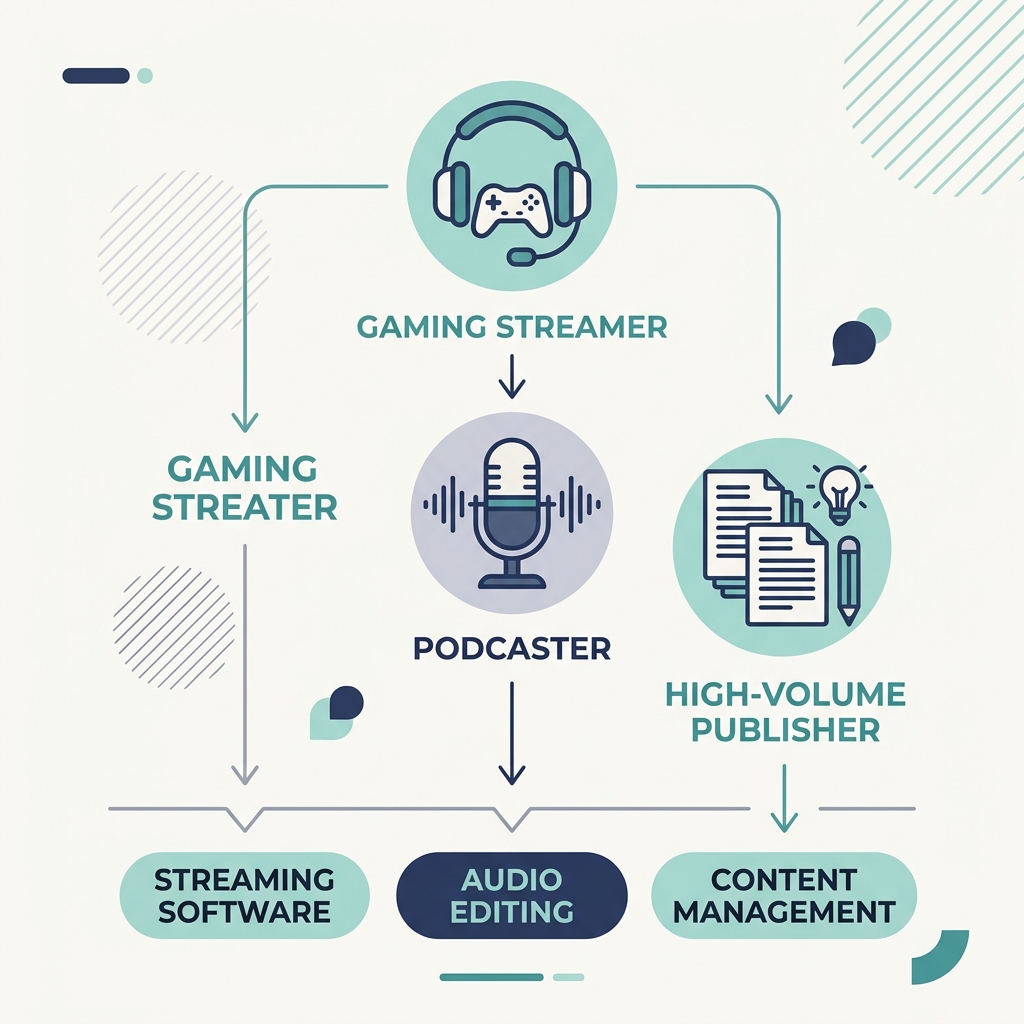
Gaming streamers need tools that understand VOD structure: long sessions, intermittent highlight moments, and game-title context. Eklipse is optimized specifically for stream VOD highlight detection, including recognition of common game titles and in-game event patterns. That specialization meaningfully improves clip accuracy for gaming content compared to a general-purpose tool.
Podcast and interview creators benefit most from transcript-first tools. OpusClip and WayinVideo both use transcript-based detection, which works well for structured spoken content with clear topic segments. The tradeoff: accuracy degrades noticeably with poor audio quality, heavily overlapping speakers, or rambling, unstructured delivery. A 60-minute podcast with chapter markers and a clean mic setup performs very differently than a loosely structured interview recorded over a video call.
High-volume creators and businesses face a different problem entirely. Single-video tools that process one clip at a time, like Captions, which requires 5 to 10 minutes per video and handles only one at a time, cannot meet modern content demands if you're trying to maintain a consistent publishing cadence across multiple platforms. For creators in this position, GotReach is built around that specific need: producing up to 300 videos in approximately 30 minutes from a single session, keeping the creator's authentic voice in the output rather than replacing it with AI-only generation.
Creator-Type Match Grid
| Content Type | Recommended Tool Category | Key Reason |
|---|---|---|
| Gaming streams and VODs | Eklipse or gaming-specialized tools | Game title recognition and VOD highlight detection improve clip relevance |
| Podcasts and structured interviews | Transcript-first tools (OpusClip, WayinVideo) | Clear speech segments give transcript analysis strong signal |
| High-volume creators and businesses | Bulk-output tools (GotReach) | Single-session bulk creation removes the one-at-a-time bottleneck |
| Multi-platform publishers | Tools with native scheduling integration | Export-only tools add manual steps; integrated publishing reduces friction |
How to Evaluate an AI Clip Maker Before You Sign Up
Tool pages are not going to tell you what matters most. Here is the framework that does.
Clip volume matters more than most free tiers suggest. Ask how many clips you can produce per upload and per month on the free plan, and what the per-clip or per-minute limit actually allows in practice. OpusClip's free tier offers 60 minutes of processing per month, which sounds generous until you try to upload a 90-minute podcast and realize it covers less than one full episode.
Reframing quality determines whether your vertical clips look professional or awkward. For TikTok, Instagram Reels, and YouTube Shorts, the standard output format is 9:16 vertical. A tool that crops your footage without tracking the subject will produce clips where faces drift out of frame mid-sentence. Look for tools that actively track and center subjects during reframing. YouTube's official Shorts format guidance is a useful reference for understanding what the platform expects from vertical content.
Watermark policy is often buried in the fine print. Many free tiers brand every export with the tool's watermark, which is a meaningful limitation if you're posting to client accounts or building a professional presence. GotReach's free plan does not add watermarks.
Post-limit pricing is the single biggest information gap across the category. What happens when you run out of free credits or hit your monthly cap? Some tools auto-charge; others lock you out. Knowing this before you sign up prevents surprises.
Batch versus one-at-a-time processing defines how well a tool scales. Single-video tools are fine for occasional repurposing. They break down when you need to publish consistently at volume across platforms.
Platform connection determines whether your workflow ends at export or continues into publishing. Tools that only export files require you to manually upload to each platform. Tools that connect to your publishing accounts, like GotReach's seven-platform distribution, close that gap as part of the same workflow. This is worth factoring in when you look at your broader content repurposing workflow.
Pre-Signup Evaluation Checklist
- Does the tool support my video genre (gaming, podcast, interview, vlog)?
- How many clips can I produce per month on the free plan?
- Does the free plan add watermarks to exports?
- What happens when free credits or free tier limits run out?
- How does the tool handle vertical reframing for TikTok and Reels?
- Can I connect my publishing accounts, or is it export-only?
- Does the tool require one-video-at-a-time processing, or can I batch?
Top AI Clip Makers Compared
No single tool is right for every creator. The table below reflects what each tool actually offers, without the marketing layer, so the choice follows from your content type and workflow needs. Where exact pricing or limits were not publicly verifiable at time of writing, qualitative descriptors are used.
| Tool | Free Tier | Paid Pricing (Starting) | Best For | Reframing Quality | Watermark on Free | Key Input Sources |
|---|---|---|---|---|---|---|
| GotReach | 30 videos/month, 1 connected account | See site for current plans | High-volume creators, multi-platform publishers | AI-assisted vertical formatting | No | See site for supported sources |
| OpusClip | 60 min processing/month | Paid tiers available | Podcasters, interview creators | Strong subject tracking | Yes (on free) | YouTube URL, local file upload |
| WayinVideo | Limited free credits | Paid tiers available | General creators, structured video | Good for transcript-rich content | Yes (on free) | YouTube URL, local file |
| Eklipse | Free highlights available | Paid tiers available | Gaming streamers, VOD creators | Optimized for gaming formats | Yes (on free) | Twitch VODs, YouTube gaming |
| Vidyo.ai | Limited free credits per month | Paid tiers available | General creators, social media repurposing | Reasonable for talking-head content | Yes (on free) | YouTube URL, local file |
A few things worth noting:
OpusClip works well for podcasts and interview content. If you need to publish at volume across seven platforms from one session, it hits limits quickly. The 60 minutes per month free tier is a meaningful constraint for creators with longer recordings.
Eklipse's gaming-specific detection is a genuine advantage if you stream. For non-gaming content, that specialization works against you: the tool is built around game events and may not find strong clips in interview or vlog footage.
WayinVideo applies transcript analysis that performs well on structured spoken content. Like OpusClip, it struggles when audio quality drops or delivery becomes unstructured.
Caption (the app) is worth mentioning as a contrast point: it processes one video at a time, taking 5 to 10 minutes per clip. For individual creators doing occasional repurposing, that's manageable. For anyone trying to scale output, it creates a bottleneck that compounds quickly.
HeyGen occupies a different category entirely. It generates AI-only video, replacing the creator's presence with a synthetic avatar. That may suit certain use cases, but it removes the creator's authentic voice, which is the opposite of what most creators building an audience actually want.
GotReach is built for the creator who needs all three things at once: speed, volume, and authentic output. If you need to go from a single session to 300 videos in approximately 30 minutes, distributed across seven platforms without switching tools, that is the use case GotReach is designed for. The free plan (30 videos per month, no watermarks, one connected account) is a real starting point, not a teaser. See how GotReach helps businesses and people create and publish more at gotreach.com/content-repurposing.
When AI Clipping Works Well and When It Doesn't
No tool page in this category will tell you when their product underperforms. That's the information gap this section fills.
AI Clipping Works Well When:
- The content has clear structure: defined topic segments, chapter markers, or obvious narrative transitions
- The audio is clean with a single primary speaker or minimal crosstalk
- There are identifiable energy peaks: laughter, applause, key argument moments, game event highlights
- The delivery is varied: changes in pace, tone, or volume give the AI useful signal
- The content type is interview or podcast-format with back-and-forth that creates natural clip boundaries
AI Clipping Struggles With:
- Monotone narration with low vocal variation and few energy shifts
- Long unedited gaming sessions with sparse commentary and minimal in-game highlight density
- Heavily overlapping speakers or crosstalk that confuses transcript-based detection
- Unstructured vlogs without clear topic transitions or narrative anchors
- Poor recording quality: low bitrate audio, background noise, or inconsistent volume levels
- Content that relies heavily on visual context that audio analysis cannot detect
The takeaway is not that AI clipping is unreliable. It is that the tool performs better when you give it better input. Cleaner audio, more structured delivery, and recordings with defined topic shifts all improve AI clip selection meaningfully. Creators who understand this get more usable output from any tool. Manual review before publishing is still good practice, especially for brand-sensitive content or accounts where caption errors would be visible.
Getting Your First AI Clip: A Practical Starting Point
Getting started with AI clipping is straightforward. The friction comes from choosing the wrong tool for your workflow, not from the upload process itself.
- Choose a tool matched to your content type. Use the creator-type grid above. Gaming creators, podcasters, and high-volume publishers need different architectures.
- Upload or link your source video. Most tools accept a direct URL (YouTube, for example) or a local file upload. Check what your chosen tool supports before uploading.
- Wait for processing. AI analysis is not instant. Depending on video length and platform load, expect a few minutes to over ten minutes for longer recordings.
- Review the AI-selected clips. Do not publish without checking. Scroll through the selections, spot-check caption accuracy, and confirm the AI found the moments you would have chosen manually.
- Adjust and correct before exporting. Most tools allow you to trim clip boundaries, fix captions, or swap in a different segment. Use that review window.
- Export or publish. If your tool connects to your social accounts, you can schedule and publish clips directly to your platforms. If it is export-only, download and upload manually to each platform.
For creators using GotReach, this process scales: one session, up to 300 videos in approximately 30 minutes, distributed across seven platforms from a single centralized workflow. That is the difference between a one-at-a-time tool and a publishing engine. The free plan includes 30 videos per month, no watermarks, and one connected social account. It is built to be a real starting point, not a commitment.
Start your 30-day free trial today and see what 300 videos from a single session looks like for your content.
Frequently Asked Questions
What is the best free AI clip maker for beginners?
It depends on your content type. GotReach offers 30 videos per month on its free plan with no watermarks and one connected social account, making it a strong starting point for creators who want volume without upfront cost. OpusClip is a reasonable option for podcasters on a limited free tier, though it adds watermarks to free exports.
How does AI decide which parts of a video to clip?
Most AI clip tools analyze a combination of audio energy peaks, speech density, transcript keywords, and scene changes to identify moments most likely to perform as standalone short-form content. Some tools apply a viral scoring signal that ranks clips by estimated engagement potential based on patterns in high-performing content. This is a probabilistic ranking, not a guarantee.
Can AI clip makers handle gaming streams and Twitch VODs?
Yes, but not all tools do it well. Eklipse is specifically optimized for gaming VODs, with game title recognition and in-game event detection that improve clip relevance. General-purpose tools like OpusClip and WayinVideo rely on transcript and audio analysis, which can struggle with long gaming sessions that have sparse commentary and low event density.
What happens when my free credits or free plan limit runs out?
This varies significantly by tool, and most product pages do not answer it clearly. Some tools auto-upgrade your plan or charge per additional clip. Others lock you out until the next billing cycle. Review the pricing page carefully before you hit the limit, and specifically look for what the per-clip or per-minute overage cost is if the tool uses a credit system.
Are AI-generated clips good enough to post without editing?
Sometimes, but a quick review is always worth it. AI clip selection is strong on structured content with clean audio. Caption accuracy and clip boundaries can still slip, especially on content with overlapping speakers, fast speech, or technical terminology. A fast manual review before publishing is good practice and takes only a few minutes.
Do AI clip makers add watermarks on the free plan?
Many do. OpusClip, WayinVideo, Eklipse, and Vidyo.ai all add watermarks to free tier exports. GotReach does not add watermarks on its free plan, which is a meaningful differentiator if you are posting to client accounts or building a professional presence.
Which AI clip maker is right for my specific content type?
Gamers: look at Eklipse for its stream VOD specialization. Podcasters and interview creators: OpusClip and WayinVideo use transcript-first detection that works well for structured spoken content. High-volume creators and businesses who need to publish across multiple platforms from a single session: GotReach is built for that workflow, with bulk creation, multi-platform distribution, and a free plan that does not require a credit card to start.