
AI Captions Apps: How to Choose the Right One for Your Use Case
Search for an AI captions app and you land on a wall of product homepages, each claiming the highest accuracy and the most generous free plan. None of them help you choose. That is because "AI captions app" covers three completely different product types, and picking the wrong one wastes real time and money before you realize the mismatch.
This guide categorizes the tools first, then compares them on criteria that actually drive the decision.
Key Takeaways
- "AI captions app" describes three distinct product categories: caption-only tools, AI video editors with captioning features, and all-in-one platforms. Matching category to use case matters more than brand name.
- Headline accuracy claims (99%, 97%) are self-reported and degrade with accents, background noise, fast speech, and non-English languages. Treat them as ceilings, not guarantees.
- Free plans have real limits: minute caps, video caps, watermarks, and processing throttling that product pages rarely advertise up front.
- Your monthly content volume is one of the most important selection filters. A tool that works for one quarterly webinar will bottleneck a creator publishing five videos a day.
- If you publish to multiple platforms at volume, captioning speed and distribution workflow matter as much as caption quality itself.
What "AI Captions App" Actually Means: Three Different Products, One Keyword
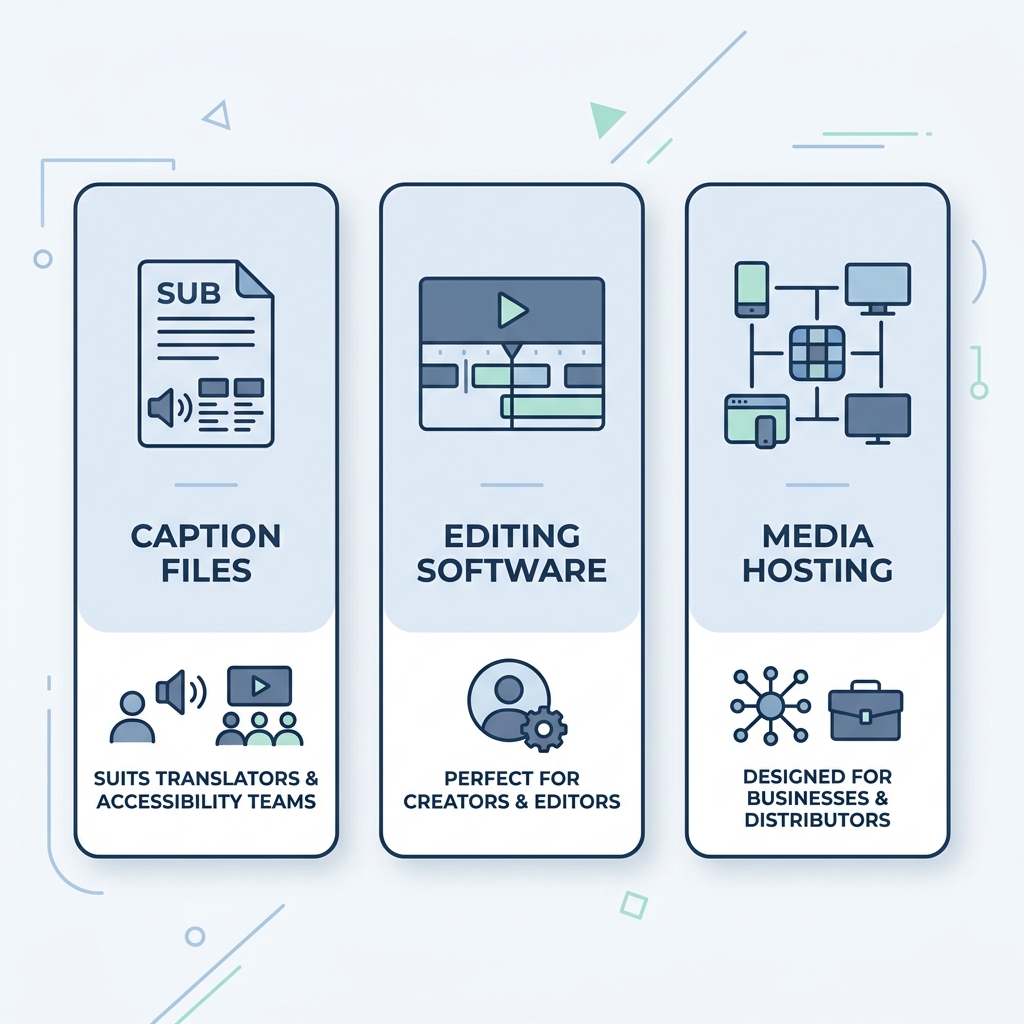
Before comparing specific apps, it helps to know which category of tool you are actually shopping for. Most searchers do not realize there are three distinct product types hiding under this keyword.
Caption-Only Tools These generate subtitles or captions from your audio and nothing else. You upload a video, the app returns a caption file or a version of your video with text burned in. No timeline editing, no publishing, no clipping. This is the right category if you need a clean caption file for a specific video without building a broader production workflow around the tool.
AI Video Editors with Captions Here, captioning is one feature inside a larger editing suite. You get a timeline, cut tools, maybe B-roll or clip generation, and captions as part of the package. These tools cost more because you are paying for the editor. If captions are 90% of what you need, you are buying features you will never use.
All-in-One Platforms These combine content creation, captioning, scheduling, and multi-platform publishing in a single workflow. They are built for creators and teams publishing at volume. The bottleneck these tools eliminate is real: a caption-only tool that processes one video at a time, taking 5 to 10 minutes per upload, simply cannot keep pace with a creator publishing daily across multiple platforms.
A business adding captions to one quarterly webinar has different requirements than a social media creator publishing five videos a day. Choosing the wrong category creates friction that no amount of feature comparison will fix.
For a deeper look at how tool type affects AI caption accuracy specifically, see how accuracy varies by tool type and AI model.
How to Evaluate an AI Captions App: Eight Criteria That Actually Matter
Most tool homepages lead with a bold accuracy claim and a free tier callout. Neither tells you whether the tool fits your actual situation. Here are the eight criteria worth evaluating before you download anything.
1. Caption Accuracy Percentage claims like 99% or 97% are self-reported by vendors and measured under ideal conditions: a clear English speaker, quiet room, moderate pace. Accuracy drops with accents, background noise, fast speech, and non-English content. The gap between a claimed percentage and your real-world result can be substantial. For a full breakdown of what those numbers mean in practice, this explainer on AI speech-to-text accuracy covers the variables in plain terms.
2. Language Support A long language list is not the same as reliable multilingual accuracy. Most AI captioning tools perform best in English and noticeably worse in other language groups, particularly those with complex tonal or morphological structures. Check whether the tool specifies accuracy by language, not just lists languages supported.
3. Platform and Device Availability Some tools are iOS-only. Others are Android-compatible. Others are browser-based and work on any device. An App Store listing does not help Android users or people working from a laptop. Confirm availability before investing time in an app.
4. Export Formats Burned-in captions are embedded directly in the video file and cannot be separated later. SRT and VTT files are separate caption files you can upload to YouTube, LinkedIn, or another editor. Not every app supports all three. If you need to repurpose caption files across platforms, this matters.
5. Pricing and Plan Limits Free plans have real caps: a maximum number of minutes per month, a maximum number of videos, watermarks on exported files, or processing throttling that slows output at higher volumes. These limits rarely appear prominently on product pages. Read the pricing page carefully before committing.
6. Customization Depth Animated captions, font control, color options, speaker labels, and manual timing adjustment are relevant mainly for social media creators who need captions to match their brand aesthetic. For business video or podcast transcription, basic static captions are usually sufficient.
7. Processing Speed and Simultaneous Handling A tool that handles one video at a time is a bottleneck for anyone publishing more than a few videos per week. Captioning one video at a time at 5 to 10 minutes per upload adds up fast. At 20 videos a week, that is hours of processing time before you have touched your content.
8. Multi-Platform Publishing Some tools export a file. Others publish directly to your social accounts on a schedule. If you are managing multiple platforms, the difference between exporting and publishing is the difference between one workflow step and several.
Before you download any app, run through these questions:
- What is my primary use case: social media, podcast, business video, or agency production?
- Do I need iOS, Android, or browser access?
- How many videos do I publish per month?
- Do I need multilingual captions?
- What is the free plan's real limit: minutes, videos, or watermark status?
- Do I need to export caption files (SRT or VTT) or just burned-in captions in the video?
- How important is caption customization: fonts, animated styles, speaker labels?
- Will I need to process multiple videos simultaneously, or one at a time?
AI Captions Apps Compared: Features, Pricing, and Real Plan Limits
The table below covers the leading AI captions apps on the criteria that drive the actual decision. Accuracy percentages where listed are self-reported by vendors and vary by language, accent, and audio conditions. Plan details were current at time of publication and may change.
| App | Tool Type | Free Plan Limit | Paid Starting Price | Platforms | Languages Supported | Export Formats |
|---|---|---|---|---|---|---|
| Captions.ai | Caption-only | Limited minutes, watermark on free | ~$9.99/mo | iOS only | English-primary | Burned-in, SRT |
| OpusClip | AI editor with captions | Limited clips/mo, watermark | ~$15/mo | Web | English-primary | Burned-in |
| CapCut | AI editor with captions | Watermark on some exports | Free tier available | iOS, Android, Web | Multiple | Burned-in |
| Submagic | Caption-only | Limited videos/mo, watermark | ~$20/mo | Web | Multiple | Burned-in, SRT |
| Kapwing | AI editor with captions | Watermark, limited exports | ~$16/mo | Web | Multiple | Burned-in, SRT, VTT |
| GotReach | All-in-one platform | 30 videos/mo, no watermark, 1 account | See pricing | Web | English | Burned-in (within workflow) |
Key limitations to know before choosing:
- Captions.ai processes one video at a time at 5 to 10 minutes per upload. At volume, that processing pace becomes the bottleneck, not the caption quality.
- OpusClip is web-based but clip-focused; captioning is secondary to its clipping workflow.
- CapCut is available cross-platform but is primarily a mobile editor; watermarking and export limits apply on the free tier.
- Submagic focuses on animated caption styles for short-form video; accuracy varies by language.
- Kapwing offers the broadest export format support (SRT, VTT, burned-in) but is priced as a full editor.
- GotReach is not a caption-only tool. Its differentiation is volume and distribution: up to 300 videos in approximately 30 minutes from a single idea, published across seven platforms in one workflow. It is not the right choice if you need standalone SRT export or multilingual subtitle files.
For a full breakdown of GotReach plan tiers and what each includes, see the GotReach pricing page.
Choosing the Right AI Captions App for Your Use Case
There is no single best AI captions app. There is only the right tool for your specific content volume, platform requirements, and workflow. The matrix below maps creator type to tool category and flags the key tradeoff to watch for.
| If You Are... | Your Priority | Best Tool Type | Watch Out For |
|---|---|---|---|
| Social media creator (TikTok, Reels, Shorts) publishing daily | Speed, caption style, multi-platform reach | All-in-one platform | Plan caps at high volume; single-video processing tools will not keep pace |
| Podcaster or long-form creator | Accuracy, transcript export, SRT files | Caption-only or transcription tool | Language and accent limits; accuracy variance in non-English content |
| Marketer or business needing scale or multi-platform publishing | Volume, workflow consolidation, distribution | All-in-one platform | Per-video processing bottlenecks; tools priced per video get expensive fast |
| Occasional user needing basic captions | Low cost or free | Free tier of a caption-only tool | Watermarks, minute caps, and the upsell wall when volume increases |
For social media creators and marketers publishing at volume, the bottleneck is rarely caption quality. It is throughput. GotReach creates up to 300 videos in approximately 30 minutes from a single idea and publishes across seven platforms without switching tools. The free plan includes up to 30 videos per month with no watermarks and one connected social account. A 30-day free trial is available for creators who want to test the full workflow before committing.
If you are publishing at scale and manually captioning one video at a time, start your 30-day free trial today and see what your output looks like when the bottleneck is removed.
Captions and Reach: The Benefit Creators Overlook
Every major social platform defaults to muted video autoplay. TikTok, Instagram Reels, YouTube Shorts, and LinkedIn all play video silently unless the viewer actively unmutes. Captions are not a convenience feature in that environment. They are what keeps a viewer watching when there is no audio.
Research on captioning consistently shows that captions improve viewer engagement and retention, particularly in environments where sound is off by default. Adding captions is not about accessibility as an afterthought. It is a reach decision.
For deaf and hard-of-hearing audiences, captions are not optional at all. They are the access point. Businesses publishing video content also have accessibility considerations under ADA guidelines. The WCAG caption compliance standards outline what is expected for prerecorded video content, and they are worth understanding before publishing business video at scale. This article is not legal advice, but the standard exists and applies broadly.
Finally, on searchable video platforms like YouTube, readable and accurate captions contribute to how content is indexed. Poor-quality auto-captions with frequent errors are less useful for both viewers and search.
For creators focused on getting caption quality right after AI generation, this guide to editing captions and improving output quality covers the review and correction workflow in practical terms.
Common Questions About AI Captions Apps
What is the most accurate AI captions app for non-English languages? No app guarantees uniform accuracy across all languages. Most AI captioning tools are trained primarily on English and show meaningful accuracy variance in other language groups, particularly tonal languages, languages with complex morphology, and regional dialects. Before choosing a tool for non-English content, look for language-specific accuracy data from the vendor, not just a list of supported languages. When none is provided, assume accuracy is lower than the headline claim.
Can I use an AI captions app for free without a watermark? Some free plans include watermarks on exported videos; others do not. GotReach's free plan includes up to 30 videos per month with no watermark and one connected social account. Most caption-only free tiers watermark exports or limit processing to a small number of minutes per month. Read the plan details before uploading your content.
What is the difference between burned-in captions and SRT or VTT file export? Burned-in captions are permanently embedded in the video file. They cannot be removed or edited after export, and they display the same way on every platform. An SRT file (SubRip Subtitle) and a VTT file (WebVTT) are separate text files containing the caption text and timing data. You upload them alongside the video on platforms like YouTube or LinkedIn, and the platform handles display. SRT and VTT files are editable, can be translated, and can be reused across platforms. If you need flexibility or platform-specific caption control, SRT or VTT export matters. If you just need captions on a finished social video, burned-in is simpler.
Do AI captions apps work on Android, or are most of them iOS only? Availability varies significantly. Captions.ai is iOS-only, which excludes Android users and anyone working from a desktop browser. CapCut and a few others offer Android apps. Web-based tools like Kapwing, OpusClip, and Submagic work in any browser regardless of device. GotReach is web-based. If cross-platform access matters to your workflow, web-based tools are the most reliable choice.
How accurate are AI-generated captions compared to human transcription? For a clear English speaker in a quiet room at moderate pace, AI captions are often accurate enough for social media and internal business video without manual review. The gap widens with accents, fast speech, background noise, technical vocabulary, and non-English languages. Human transcription is slower and more expensive but more reliable in those conditions. For accessibility-critical content or professional video where errors carry real consequences, AI captions should be treated as a first draft and reviewed before publishing.
Ready to Publish More, Without the Bottleneck?
Most AI captions apps are built for one video at a time. If your content volume has outgrown that pace, a caption-only tool is not the constraint. The workflow is.
GotReach automates creation, captioning, and publishing across seven platforms in a single workflow, handling up to 300 videos in approximately 30 minutes without removing your voice from the content. The free plan covers 30 videos per month with no watermarks. The full platform is available free for 30 days.
Start your 30-day free trial today and see how GotReach helps businesses and people create and publish more.